

Affiliate programs are supposed to find you new customers, not tax you on the ones you already have.
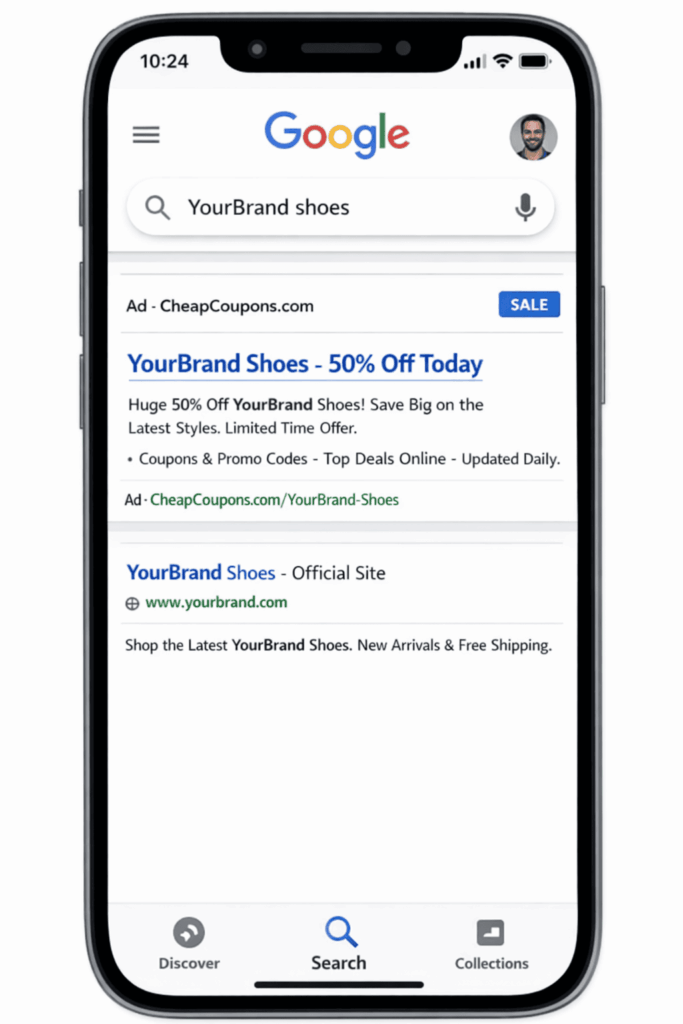
But if affiliates are bidding on your brand name in paid search, you are losing money. When someone searches Google for “[Your Brand] shoes,” they are already ready to buy. Brand bidding lets affiliates jump in front of that search, plant a tracking cookie, and steal a 10-15% commission on a sale that was already yours.
This guide breaks down how brand bidding works, the sneaky ways affiliates hide it, and how to stop it to protect your margins (while keeping your good affiliates happy).
What Is Brand Bidding in Affiliate Marketing?
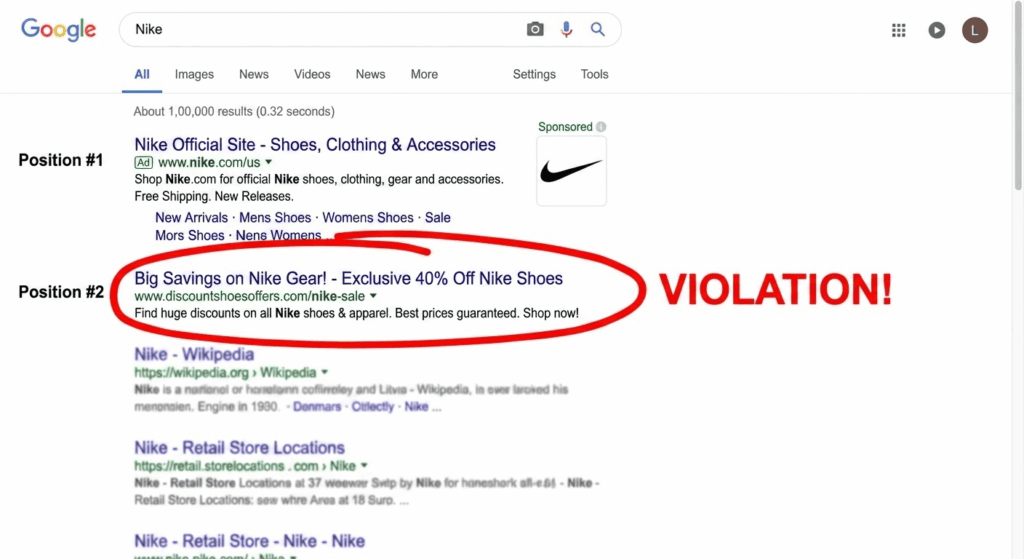
Brand bidding happens when an affiliate buys search ads using your company’s name or products. Because of this, when someone searches for your brand on Google, the affiliate’s ad shows up right above your actual website.
The problem is that a customer searching for “Buy [Your Brand] shoes” already knows who you are and is ready to buy. The affiliate didn’t introduce them to your business—they just stepped in front of a customer who was already walking through your door.
When the customer clicks that affiliate’s ad, you end up paying a commission for a sale you would have gotten anyway. Ultimately, it makes the affiliate look like they are driving sales, but you are really just paying an extra fee for customers you have already won.
Why Affiliate Brand Bidding is a Risk for Your Business?
When you work with affiliates, you expect them to bring you new customers. But when affiliates buy Google Ads using your brand’s name, it secretly drains your profits. Here are four reasons why “brand bidding” is so dangerous:
1. You Pay for Sales You Already Had
When an affiliate bids on your brand name, they intercept customers who were already looking for your store.
- The Cost: Imagine your store makes $5 million a year, and you pay a 10% affiliate commission. If 20% of your affiliate sales come from people just searching your brand name, you are throwing away $100,000 a year. You are paying a commission for a customer you would have gotten for free.
2. They Make Your Own Ads More Expensive
If you run your own Google Ads, affiliates bidding on your name forces you into a bidding war. They are competing directly against you in the same auction, which drives up the cost you have to pay for every click.
3. They Steal Your “Free” Search Traffic
Many store owners think, “I don’t run Google Ads, so this doesn’t affect me.” This is a major mistake. Even if you don’t run ads, affiliate ads hurt your free (organic) Google search results in two ways:
- They push your website off the screen: On mobile phones, Google shows a few ads before regular search results. An affiliate’s ad can push your official website completely out of view. The customer clicks the first thing they see—the affiliate ad—instead of your free link.
- They use clickbait to steal clicks: An affiliate can write a flashy ad headline like “YourBrand — 50% Off Today Only!” while your regular search result just shows your company name. Shoppers will naturally click the catchy ad.
- The Result: Suddenly, you owe the affiliate a 10% to 15% commission for a sale you were going to make anyway for zero cost.
4. They Ruin the Customer Experience
Affiliates don’t always send shoppers straight to your website. Often, they route them through messy coupon sites, confusing redirect links, or review pages. This creates a frustrating experience for the shopper, makes your brand look cheap, and can even distract the customer into buying from one of your competitors.
The Bottom Line: Don’t assume your brand is safe just because you aren’t paying for ads. Affiliate brand bidding targets your most loyal, ready-to-buy customers and tricks you into paying a commission for them.
Types of Brand Bidding
Not all brand bidding looks the same. Merchants need to understand the spectrum before writing policy.
| Bidding Type | Description | Risk Level |
| Direct brand keyword bidding | Affiliate bids on exact match “[YourBrand]” | High — zero incrementality |
| Brand + modifier bidding | “[YourBrand] coupon”, “[YourBrand] discount” | High — captures intent already in your funnel |
| Brand + competitor comparison | “[YourBrand] vs CompetitorX” | Medium — some discovery value possible |
| Trademark display in ad copy | Affiliate uses your brand name in ad headline | Medium-High — trademark violation risk |
| Misspelling / typosquatting | Bids on common misspellings of your brand | High — clear policy violation territory |
| Authorized brand bidding | Approved partner bidding under agreed terms | Manageable — requires defined rules |
The most damaging pattern merchants encounter is brand + coupon/discount modifier bidding, because it specifically targets customers who are already past the consideration stage and are actively looking for a reason to complete the purchase—a conversion that was essentially already won.
The merchant pays 10–15% commission on a customer who was already mid-funnel and searching for the brand by name. No discovery happened. No persuasion occurred. The affiliate simply inserted a toll booth between your brand search result and your checkout.
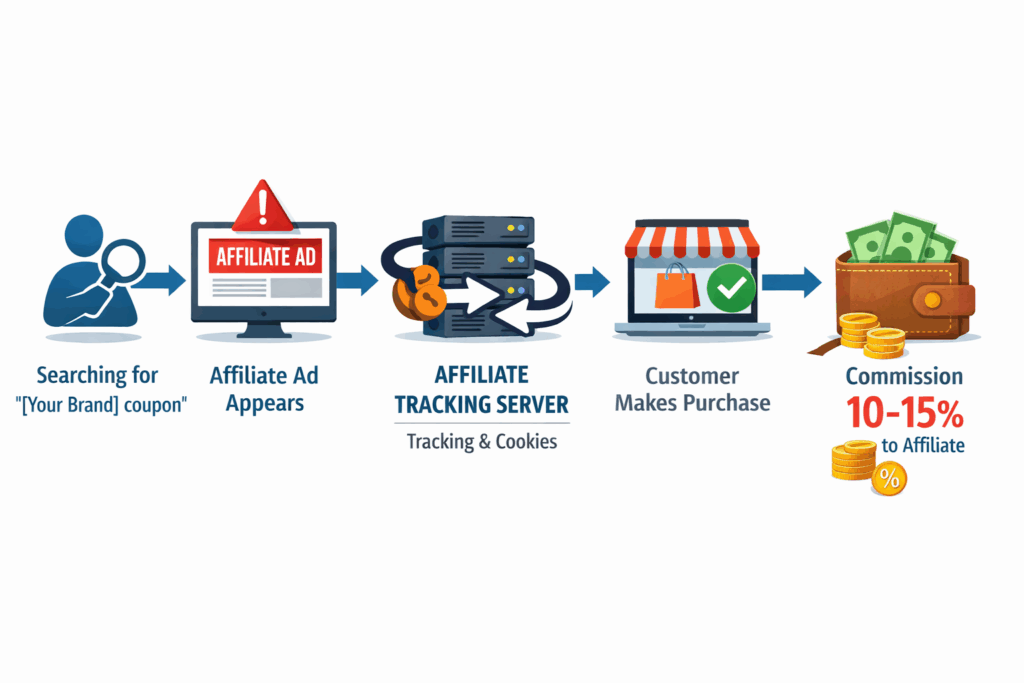
The takeaway: The customer’s intent never changed. Their destination never changed. Only the attribution did — and with it, 10–15% of your margin on every order that flows through that path.
Hidden Affiliate Bidding Tricks You Can’t Detect Manually
It’s not enough to just write a rule saying affiliates can’t bid on your brand name. Professional rule-breakers have developed clever ways to hide their ads from your in-house team.
If you don’t understand these three tactics, your brand policy won’t actually protect you.
1. Geo-Targeting
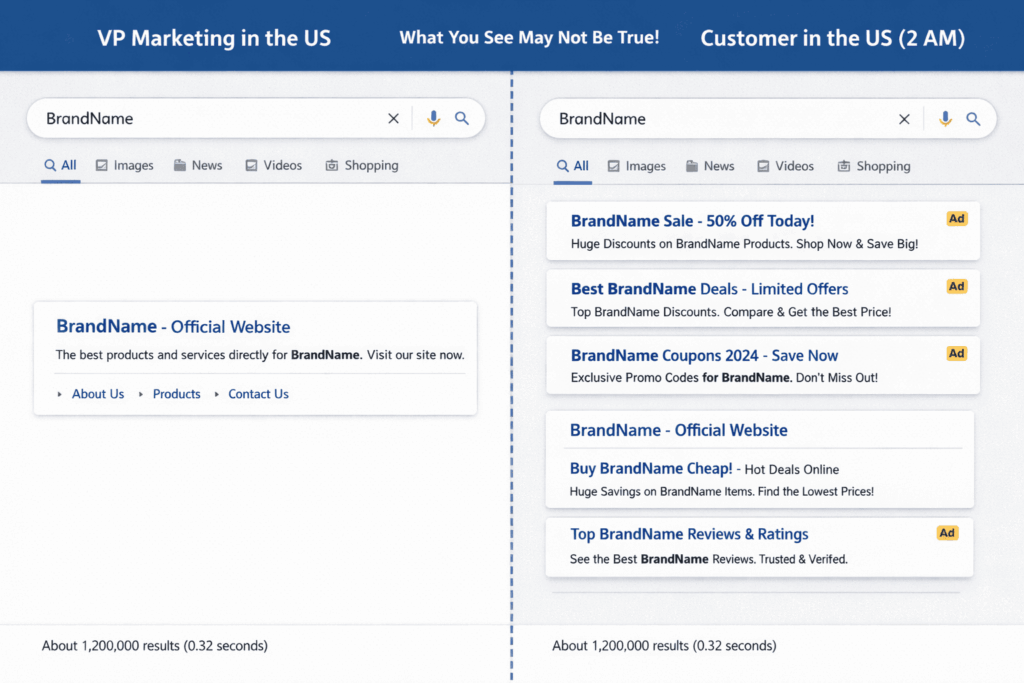
Affiliates know where your company is located, so they run their ads everywhere else.
- How it works: If your marketing team is in New York, they will search your brand name and see no affiliate ads. Meanwhile, the affiliate is running ads in rural Texas or overseas. They rake in commissions, and you suspect nothing.
- The fix: You need software that monitors searches across different cities and countries, not just from your office.
2. Day-Parting
Affiliates run their ads when your team is off the clock.
- How it works: Ads are scheduled to run late at night, early in the morning, or on weekends. When your paid search manager checks the search results on Monday morning, the ads are gone—but the affiliate has already stolen the weekend’s sales.
- The fix: You need 24/7 automated monitoring or random spot-checks outside of normal business hours.
3. URL Hijacking
This is the most advanced trick. The affiliate makes their ad look exactly like your official website, but hides their tracking link in the background.
- How it works: A user searching “[BrandName] shoes” sees an ad displaying yourbrand.com/shoes-sale. The URL looks authentic. They click. Under the hood, the click passes through three redirect hops — affiliate-link.com/click?pid=4821 → tracking-hub.net/track?ref=yourbrand → yourbrand.com — before landing on your site. The affiliate cookie is planted. The purchase is attributed. The commission is paid.
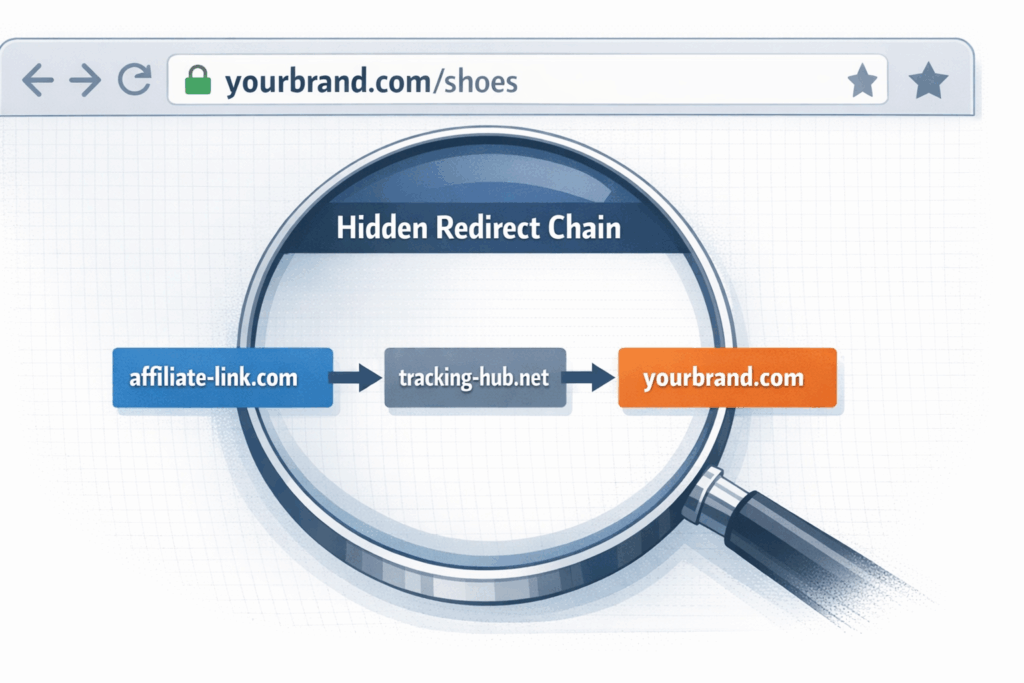
- The fix: Only deep, technical auditing of the links behind the ads will catch this.
The smartest cheaters use all three tricks at once. They run fake links, late at night, in cities where your team doesn’t live. Manual checking will never catch this; you need automated, third-party brand protection software to stop it.
Affiliate Brand Bidding Rules: Keywords You Can Allow, Restrict, or Block
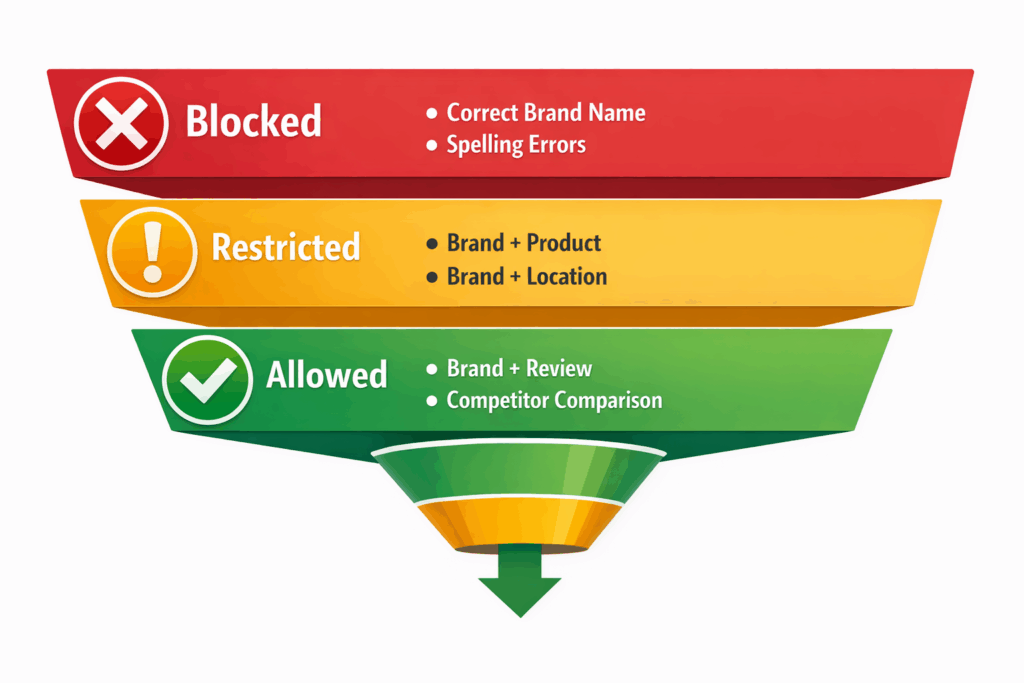
One of the most operationally valuable steps a merchant can take is publishing a keyword classification table in their affiliate agreement. Vague prohibitions like “no brand bidding” create ambiguity that affiliates exploit. A taxonomy removes interpretation.
Use this classification framework as a starting template:
| Keyword Type | Example | Recommended Policy |
| Broad brand (exact) | “Nike” | Block — Negative exact match required for all affiliates |
| Brand + product name | “Nike Air Max” | Restricted — Permitted for Tier 3 strategic partners only |
| Brand + review / informational | “Nike review”, “is Nike legit?” | Permitted — Genuine content value; low commission theft risk |
| Brand + coupon / discount | “Nike discount code”, “Nike coupon” | Strictly controlled — Highest commission-theft risk; Tier 3 only with conversion caps |
| Brand + competitor comparison | “Nike vs Adidas” | Encouraged — Legitimate competitive defense; confirm incrementality |
| Brand misspellings / typos | “Nikee shoes”, “Nkie” | Block — Typosquatting; immediate termination upon detection |
| Brand + location | “Nike store NYC” | Restricted — Evaluate based on affiliate type; retail affiliates may qualify |
Distributing this table with your affiliate agreement eliminates the “I didn’t know that was prohibited” defense and gives your enforcement team unambiguous criteria for action.
How to Create a Brand Bidding Policy in Affiliate Marketing
If you don’t control how affiliates bid on your brand name, you’ll end up competing against them and paying higher ad costs. Here is a step-by-step guide to setting up a bulletproof brand bidding policy.
Step 1: Set Your Rules Before You Launch
Decide your rules before your program grows. It is much harder to take privileges away from existing affiliates than it is to set clear rules from day one.
Your written policy must define:
- What is allowed: Can they bid on your brand? Are there exceptions?
- Off-limit keywords: Specify exactly what is banned (e.g., exact brand name, product names, trademark variations).
- Modifiers: Clearly define rules for “Brand + Modifier” terms (like “[Your Brand] coupon”).
- Penalties: Outline exactly what happens if they break the rules (e.g., 1st offense = warning; 2nd offense = kicked out + commissions reversed).
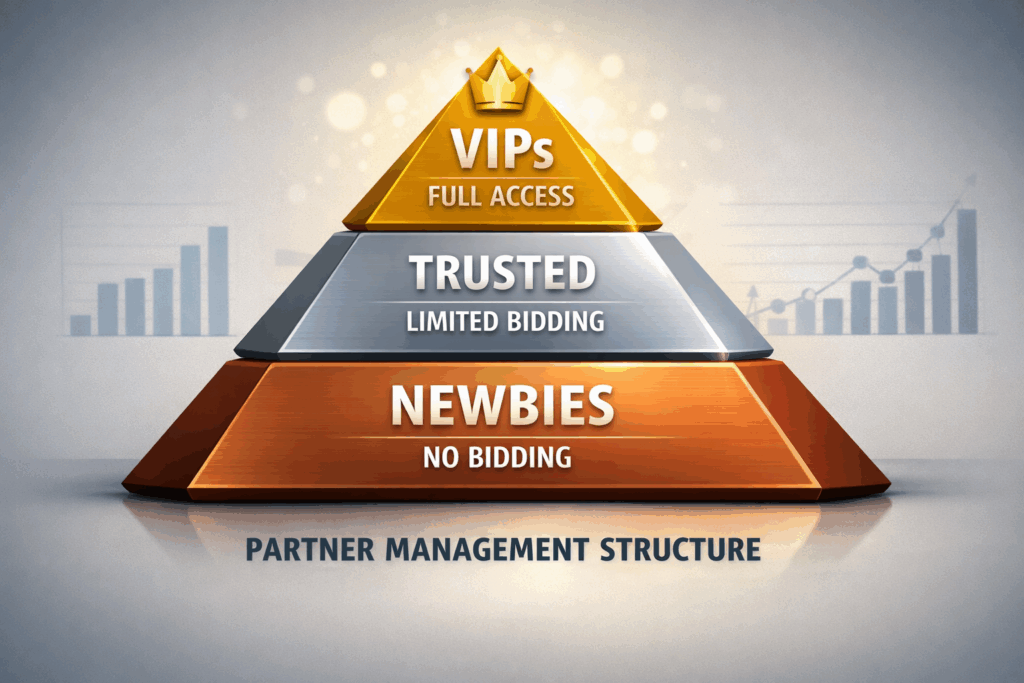
Step 2: Put Affiliates into “Permission Tiers”
Don’t give everyone the same access. Use tools like UpPromote to categorize affiliates into tiers:
- 🥉 Tier 1 (New Affiliates): Strictly prohibited. No brand bidding allowed. This should be your default.
- 🥈 Tier 2 (Trusted Partners): Conditional. Can bid on “Brand + Modifier” terms from a pre-approved list, with spending caps and strict ad copy rules.
- 🥇 Tier 3 (VIP Partners): Full Access. Can bid on brand terms, but must have agreed-upon limits, mandatory ad copy approval, and regular check-ins.
Step 3: Write a Strong Affiliate Agreement
Make sure your legal contract clearly bans unauthorized “brand bidding” (when affiliates buy ads using your brand name).
- List exactly which words are off-limits.
- Include a rule that lets you take back (clawback) commissions earned by breaking the rules.
- Tip: Work with a lawyer to ensure your trademarks are fully protected, especially if you sell internationally.
3.1 Technical Setup for Affiliate Google Ads
Having rules in your contract isn’t enough. If you allow affiliates to run paid search ads, you must force them to set up technical safeguards so they don’t accidentally (or purposely) steal your brand’s search traffic.
a. Require a Negative Keyword List
Give your affiliates a master list of words they cannot bid on. This should include your brand name, misspellings, product names, and phrases like “coupon.” Tell them to add these as Exact Match negative keywords (broad or phrase match won’t work).
Examples to give them:
- [yourbrand]
- [yourbrand coupon]
- [yourbrand promo code]
- [yourbrand review]
Rule to enforce: Make affiliates send a screenshot proving they added this list before you pay their first commission.
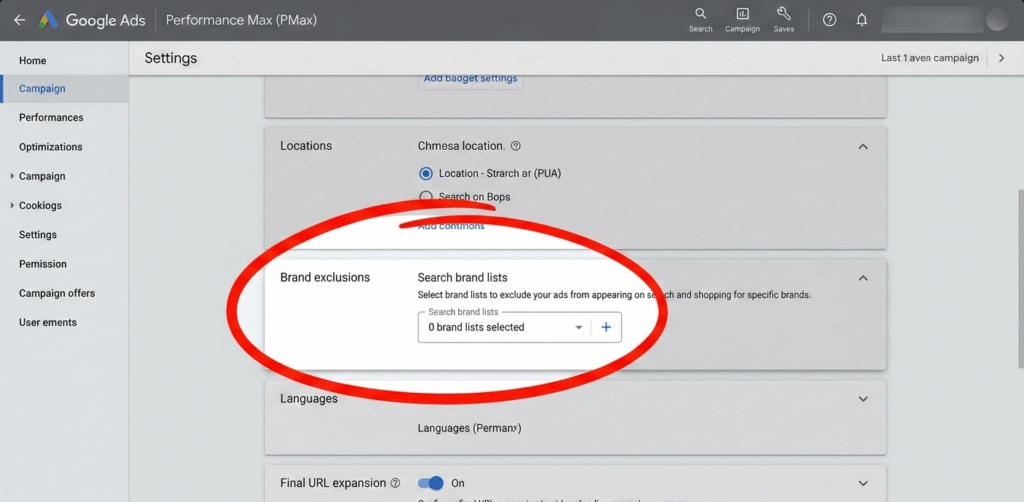
b. Require Performance Max (PMax) Brand Exclusions
If affiliates use Google’s Performance Max (PMax) campaigns, standard negative keywords aren’t enough. PMax will sneakily bid on your brand terms anyway. Require affiliates to:
- Go to their PMax campaign settings.
- Find Brand exclusions and add your brand.
- Apply this to the campaign level (not the ad group level).
- Send you a screenshot to prove they did it.
3.2 Protecting Your Own Google Ads Account
You also need to protect your own Google Ads account to stop your ads from competing against your affiliates. Take these three quick steps (they take less than 20 minutes!):
- Turn on Brand Restrictions: In your Search campaign settings, select your brand under “Brand restrictions.” This tells Google you are the real brand owner and gives you priority.
- Add Account-Level Negative Keywords: Go to Admin → Account Settings → Negative Keywords. Add terms like [yourbrand coupon] or [yourbrand promo code]. This stops your own ad budget from being wasted on cheap discount searches.
- Block Affiliate Domains: If you run Display or YouTube ads, block popular coupon sites (like Honey, Rakuten, or RetailMeNot) as placements. This stops your ads from showing up right next to your affiliates’ links.
Step 4: Monitor the Search Results
A rule is useless if you don’t check for rule-breakers. Set up a system to catch violations:
- Manual Checks: Search your brand name weekly on Google and Bing. Take screenshots of any affiliate ads you see.
- Use Tracking Tools: Software like BrandVerity, Adthena, or Semrush can automatically scan the web and alert you of rule-breakers.
- Check Ad Reports: Use Google’s Ad Transparency Center to track down repeat offenders.
- Do Quarterly Audits: Every three months, review your top affiliates to see if their traffic or sales look suspicious.
Step 5: Enforce the Rules Immediately
If you only give warnings and never punish rule-breakers, affiliates will ignore your policy. When someone breaks a rule, be consistent and take these steps:
- Gather proof: Save screenshots and timestamps.
- Send a notice: Email the affiliate explaining exactly which rule they broke.
- Hold their money: Pause their commission payouts while you investigate.
- Enforce the penalty: Follow through with a warning, an account pause, or a permanent ban.
- Make an example: If needed, let your other affiliates know about the ban so they understand you are serious.
How to Respond to Brand Bidding Violations from Affiliates
Speed matters in enforcement. A slow response signals low seriousness; a fast, precise response signals a professionally managed program. Keep this template in your affiliate management workflow for immediate deployment:
Subject: [URGENT] Brand Bidding Policy Violation — Action Required Within 24 Hours
Hello [Affiliate Name],
Our monitoring system has detected that your affiliate account is actively bidding on the branded keyword “[Brand Name]” via paid search on [Google / Bing] in the [Geographic Area] region.
This activity is a direct violation of Clause [X] of your Affiliate Program Agreement, which prohibits the use of our trademarked brand terms as paid search keywords without prior written authorization.
Required actions:
- Pause or remove all paid search campaigns targeting “[Brand Name]” and its variants within 24 hours of this notice.
- Send a screenshot of your updated negative keyword list confirming the addition of [yourbrand] as an Exact Match negative across all active campaigns.
- If running Performance Max campaigns, submit a screenshot confirming brand exclusions have been applied.
Commission impact: All conversions attributed to your account during the period of detected brand keyword activity are under review. Commissions from these orders will be suspended pending investigation and may be voided in accordance with our program terms.
Failure to comply within the required timeframe will result in immediate suspension of your affiliate account.
Please reply to this message with your compliance screenshots.
—
[Affiliate Program Management Team] [Brand Name] [Contact Email]A few operational notes on using this template effectively:
- Always include the specific keyword, geographic area, and detection date — vague notices are easier for affiliates to dispute or delay on.
- Send via the affiliate program’s internal messaging system and email to create a timestamped record in two places.
- Set a calendar reminder for 25 hours after sending. If no response, escalate to account suspension immediately. Consistency on the 24-hour window is what gives the policy teeth.
- If the affiliate complies and provides screenshots, restore commissions on orders after the compliance date. Retroactive voidance for the violation period is standard practice and should be stated clearly in your program terms.
How to Detect Brand Bidding in Affiliate Marketing
Behavioral signals in your data:
- Affiliates with suspiciously high conversion rates and low AOV on brand-adjacent traffic
- Sudden spikes in affiliate-attributed revenue when your own Google Ads CPCs rise
- Affiliates generating conversions with near-zero session time (indicating immediate redirect behavior)
- Traffic source data showing paid search as the origin for affiliates who claim to be content creators or email marketers
Search environment signals:
- Your brand ads losing impression share during periods of high affiliate activity
- CPCs on your own brand terms increasing without competitor activity to explain it
- New affiliates immediately generating high conversion volume without a content ramp-up period
How Uncontrolled Brand Bidding in Affiliate Marketing Hurts Your Profit
An online clothing brand making $3 million a year starts an affiliate program. They promise to pay a 12% commission to partners who bring in new sales. Six months later, affiliates are generating 25% of the brand’s total sales. On paper, it looks like a massive success.
The Catch
A closer look reveals a major problem: 40% of those affiliate sales are coming from partners who are simply buying Google Ads for the brand’s own name.
Instead of finding new customers, these affiliates are just intercepting people who were already searching for the brand and about to buy anyway.
The Hidden Costs
Because there were no rules preventing this, the brand is bleeding money in two ways:
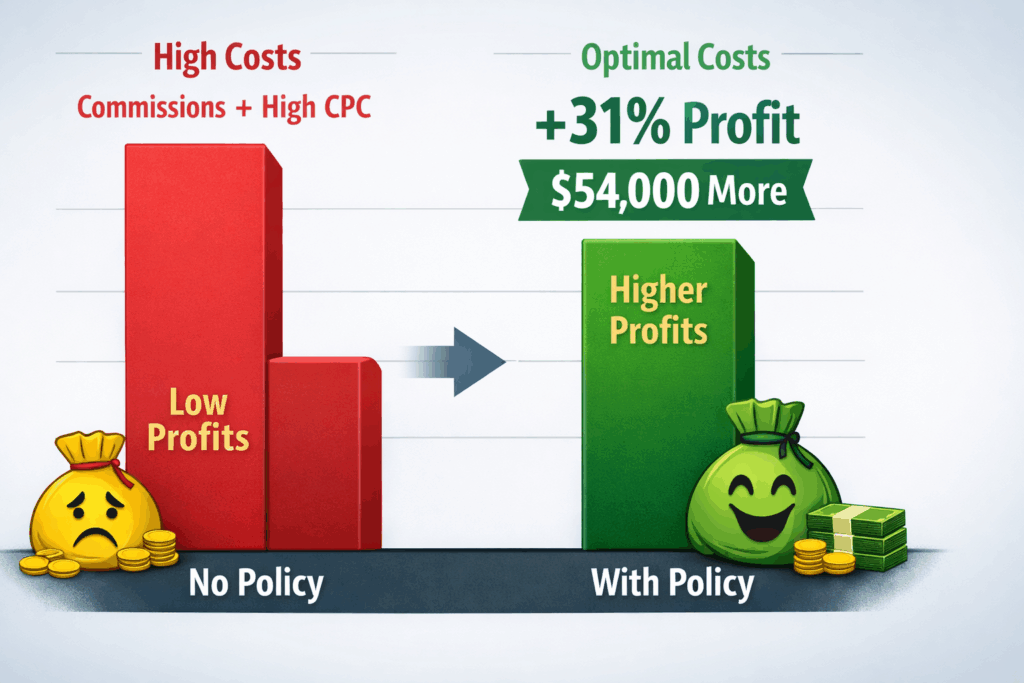
- Wasted Commissions: The brand pays $36,000 a year to affiliates for $300,000 in sales they would have gotten organically.
- Higher Ad Costs: Because affiliates are competing against the brand in Google Ad auctions, the brand’s own advertising costs shoot up by 22%. This wastes another $18,000 a year.
- Total Impact: The brand loses about $54,000 a year in profit.
The Fix & The Result
The brand takes action: they ban affiliates from bidding on their brand name, create new partner rules, and start checking their traffic every month.
- What happens next? Overall affiliate sales drop by 18% because the “fake” sales are cut off.
- The real win: The affiliate program’s actual profit jumps by 31%. Why? Because the brand is now only paying commissions for truly new customers, rather than paying affiliates to steal their existing traffic.x
Should You Allow Brand Bidding in Affiliate Marketing?
Use this framework to determine your program’s stance:
Allow brand bidding (under controlled conditions) if:
- You have established, trusted affiliate partners with proven incrementality track records
- You have gaps in paid search coverage in specific geographies or devices
- Your program is mature enough to support tiered partner management
- You have monitoring infrastructure in place before granting access
Prohibit brand bidding entirely if:
- Your program is new and you lack the infrastructure to enforce conditional access
- The majority of your affiliates are coupon, cashback, or loyalty sites (where brand bidding incrementality is lowest)
- Your own paid search team already saturates brand terms efficiently
- You lack legal resources to enforce trademark protections at scale
Enforce immediately if:
- Conversion rates from specific affiliates are anomalously high with no content explanation
- Your brand CPC costs are rising without clear external cause
- New affiliates are generating immediate high-volume conversions without a traffic ramp-up
5 Common Mistakes to Avoid
- Blaming affiliates instead of your rules: Brand bidding problems usually start with the merchant. Set clear policies from day one.
- Changing the rules too late: Don’t wait until 50+ affiliates rely on brand bidding to suddenly ban it. This causes drama and lost partnerships. Define the rules before they join.
- Trusting automated keyword blockers: Affiliate networks have keyword blockers, but they aren’t foolproof. Sneaky affiliates can bypass them using subdomains or redirect chains.
- Ignoring coupon and cashback sites: These affiliates are the most likely to intercept existing customers. Watch them with extra scrutiny.
- Taking their word for it: Never let an affiliate bid on your brand just because they say they are “protecting” your keywords. Make them prove it with the Hold-Out test first.
Conclusion
Brand bidding isn’t just an annoying compliance issue—it directly impacts your profit margins. If you ignore it, you will overpay for affiliate sales and drive up your own paid search costs.
The most profitable merchants don’t blindly block all brand bidding. Instead, they manage it smartly. They test for incrementality, write clear rules, and enforce them strictly.
By using a well-governed platform like UpPromote—which allows you to manage affiliate tiers, set custom rules, and enforce compliance—you can turn brand protection from a headache into a real competitive advantage.