TL;DR
An attribution model is the rule that decides which affiliate gets credit and gets paid when a customer interacts with multiple affiliates before purchasing.
- Default model: Last-click, used by the vast majority of Shopify affiliate apps
- When to switch: Only if 200+ affiliates and clear multi-touch journeys
- Bigger priority: Configure tracking method priority (link vs coupon) correctly
- Cookie risk: Safari caps cookies at 7 days; always give affiliates both a link and a coupon code
- Setup time: Five settings, ten minutes — configure once, track accurately ongoing
A customer clicks Affiliate Sarah’s Instagram link on Monday, browses the store, and leaves. On Wednesday, she reads Affiliate James’s blog review, clicks his link, adds a product to cart, and leaves again.
On Saturday, she Googles “[brand] discount code,” finds Affiliate Maria’s coupon on a deal site, applies it, and completes a $100 purchase.
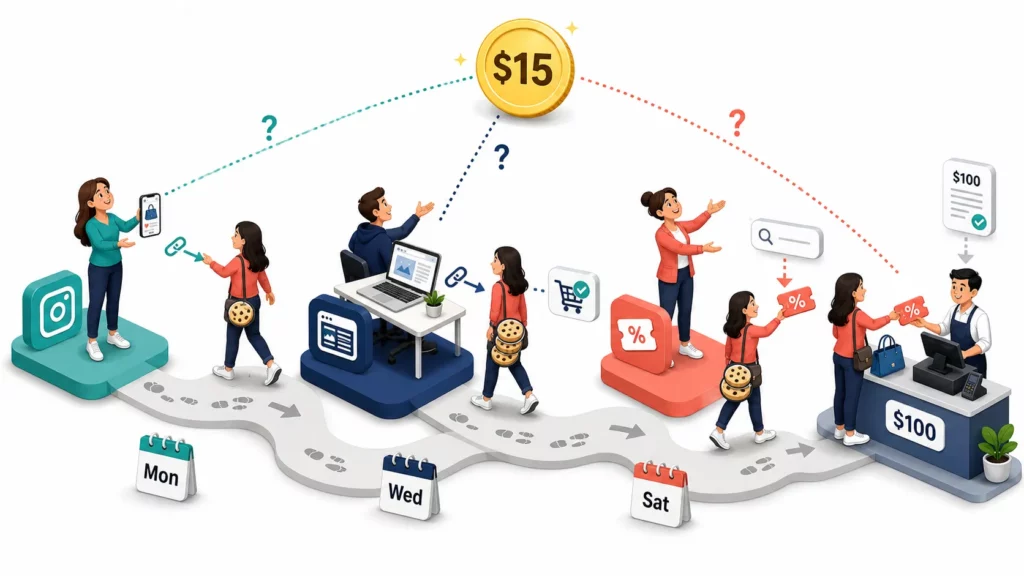
Three affiliates touched this sale. Who gets the $15 commission?
The answer depends on your attribution model. The rule that decides which affiliate receives credit when more than one was involved. Most Shopify stores never think about this until an affiliate emails asking why they didn’t get paid.
At the enterprise level, the picture is different. The IAB’s 2024 State of Data report found 76% of brands investing in multi-touch attribution. For most Shopify affiliate programs, though, last-click still works.
In this blog, we introduce five attribution models with real examples, the tracking conflicts that trip up most programs, and the settings that keep attribution accurate.
What Is Attribution in Affiliate Marketing? (Non-Technical Explanation)
Attribution is the rule that decides which affiliate gets credit when a customer makes a purchase. When only one affiliate is involved, the answer is obvious.
The question gets harder when a customer interacts with multiple affiliates before buying. One introduces the brand on Instagram, another writes a detailed blog review, and a third offers a coupon code at checkout.
Without a clear rule, every affiliate in that chain believes they earned the sale.
The same decision exists outside marketing. When you buy a house, a friend recommends the neighborhood, a real estate agent shows properties, and a banker approves the loan. The attribution model picks who earns the payout.
The same applies to your affiliate program. The right question isn’t “ which model is best? ” It’s “ which model matches how customers find and buy from my store? ”
5 Attribution Models Explained (With Real Customer Journey Examples)
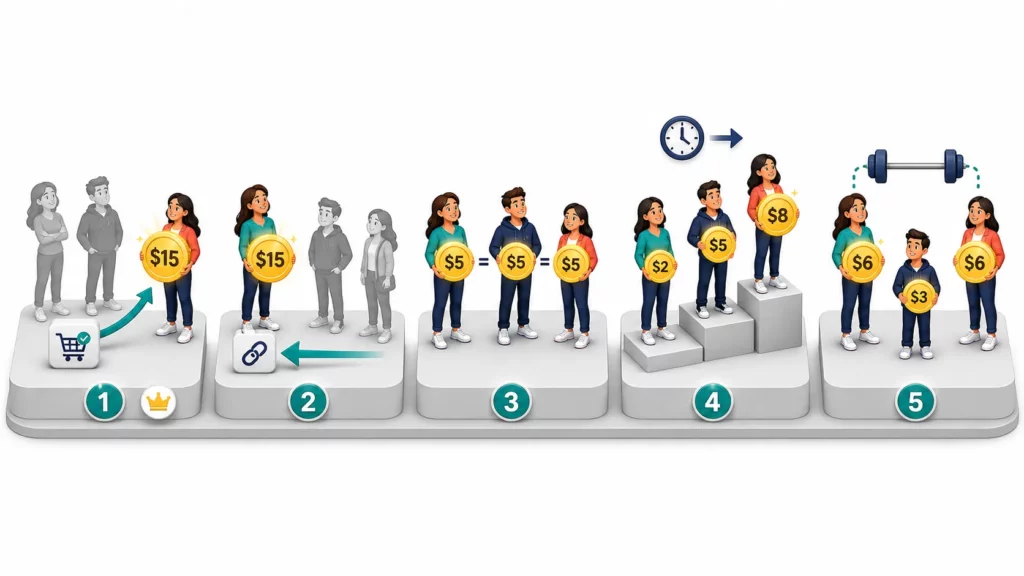
There are five attribution models for affiliate programs. Last-click is the industry default, and the other four cover situations most Shopify stores never encounter.
Each model assigns the same $15 commission, but the split changes. The scenario stays the same: Sarah (Instagram link, Monday), James (blog review, Wednesday), and Maria (coupon code, Saturday) on a $100 order.
| Model | Who Gets Credit | $15 Commission Split | Best For |
| Last-click (default) | Maria (last touch) | Maria $15 · Sarah $0 · James $0 | Most Shopify stores — simple, clear payouts |
| First-click | Sarah (first touch) | Sarah $15 · James $0 · Maria $0 | Long sales cycles, acquisition focus |
| Linear | All equally | Sarah $5 · James $5 · Maria $5 | Large programs, fair distribution |
| Time-decay | More to recent touches | Maria $8 · James $5 · Sarah $2 | Rewarding closing effort |
| Position-based | First + last weighted | Sarah $6 · James $3 · Maria $6 | Valuing both discovery and conversion |
Last-click (the default)
Last-click gives 100% credit to the final affiliate touchpoint before purchase. Maria entered her coupon code at checkout, so Maria earns the full $15. Sarah and James earn nothing.
This is the industry standard. CJ Affiliate and nearly every Shopify app (UpPromote, GoAffPro, Refersion, Social Snowball) defaults to last-click.
The trade-off: Sarah discovered the brand and James built trust, but neither gets paid. For most stores, one clear commission per sale outweighs that gap.
First-click
First-click reverses the logic. The first affiliate the customer interacted with gets 100% credit. Sarah introduced the brand on Instagram, so Sarah earns the full $15.
This model suits products with long sales cycles, 30 days or more, where the discovery touchpoint matters most. The weakness: it ignores everything that happens after the initial introduction.
Linear, time-decay, and position-based
The remaining three models all split credit across multiple affiliates. Linear divides it equally: $5 each. Time-decay gives more to recent touchpoints, so Maria gets $8, James $5, and Sarah $2.
Position-based weights the first and last touch at 40% each, with the middle affiliate splitting the remaining 20%. Sarah and Maria each earn $6, James earns $3.
All three require multi-touch tracking that most Shopify apps don’t support natively. They also introduce commission disputes that simpler programs avoid.
Key Takeaway: Start with last-click — the industry default, simplest to manage, and zero disputes. Consider alternatives only if you have 200+ affiliates and clear evidence that multiple affiliates touch the same customer journey regularly.
Link vs Coupon vs Email: How Each Tracking Method Affects Attribution
The attribution model is the rule. The tracking method is the data that feeds it. A model can only assign credit for touchpoints your tracking captures.
Three methods below handle most affiliate tracking on Shopify, and each one captures a different type of customer action.
| Method | How It Works | Strength | Blind Spot |
| Affiliate link | Cookie saved when customer clicks | Tracks browsing intent across sessions | Cookie blockers, expiration, cross-device |
| Coupon code | Code entered at checkout | Cookie-independent, works in DMs and dark social | Coupon leak sites, code sharing |
| Email match | Customer email tied to affiliate referral | Definitive 1:1 match | Requires login or email capture, limited reach |
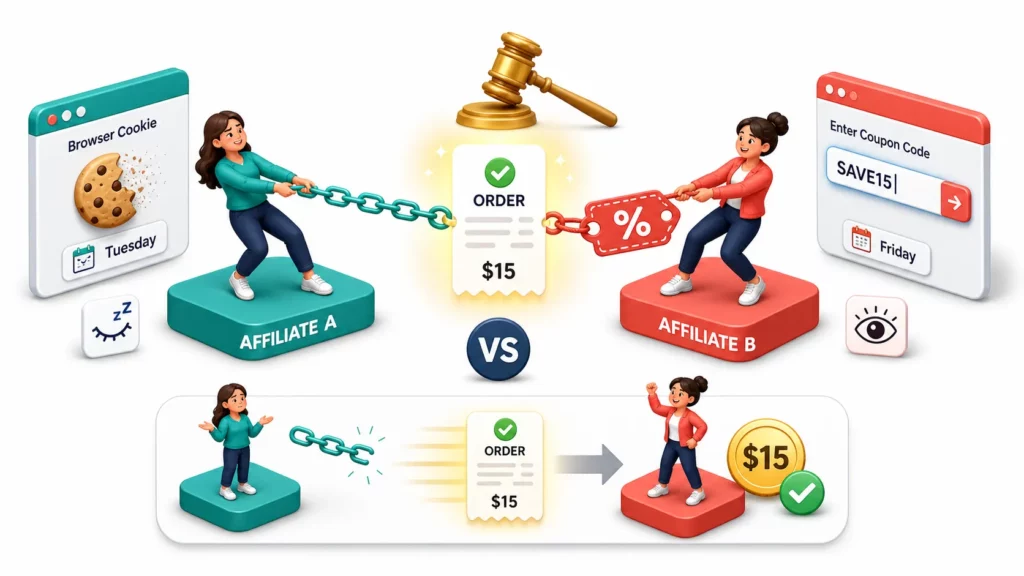
The real-world problem is what happens when two methods fire on the same order.
A customer clicks Affiliate A’s link on Tuesday, saving a cookie. On Friday, the same customer enters Affiliate B’s coupon code at checkout.
The link says Affiliate A. The coupon says Affiliate B. Which one wins?
The answer depends on your tracking priority setting . Affiliate apps like UpPromote let you choose which method wins when both a link cookie and a coupon code are present on the same order.
For most stores, coupon-over-link is the right call. A customer who types a code at checkout is taking a deliberate action. A link cookie, by contrast, may be days old.
That same logic explains why every affiliate should have both a tracking link and a coupon code. The link handles standard web traffic. The coupon serves as backup when cookies fail, and it reaches channels that links cannot.
Those channels are growing fast. When an affiliate shares your brand in a WhatsApp group or a podcast, no link exists to click. A coupon code still tracks the sale.
The Cookie Problem: Why Attribution Is Getting Harder in 2026
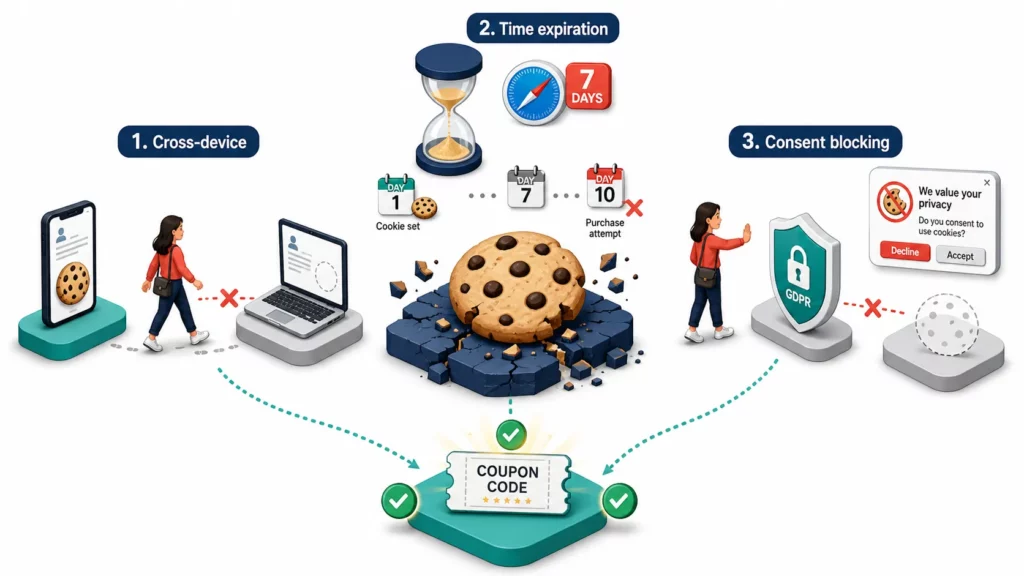
Cookie-based tracking is losing ground. Safari caps first-party cookies at seven days , Firefox blocks all third-party cookies, and over 40% of web traffic now flows through environments where traditional tracking fails.
The most common failure is cross-device. A customer clicks an affiliate link on their phone but completes the purchase on a laptop. The cookie stays on the phone, so the affiliate gets no credit.
Even on the same device, time works against you. Safari’s seven-day cap means a customer who clicks on Day 1 and buys on Day 10 falls outside the tracking window.
And when customers decline cookie consent under GDPR or CCPA, tracking never starts at all, regardless of device or timeframe.
But don’t worry, coupon codes sidestep all three problems. They do not depend on browsers, devices, or consent. A customer who remembers the code generates a tracked sale no matter how they reach checkout.
How to Set Up Attribution and Tracking for Your Affiliate Program
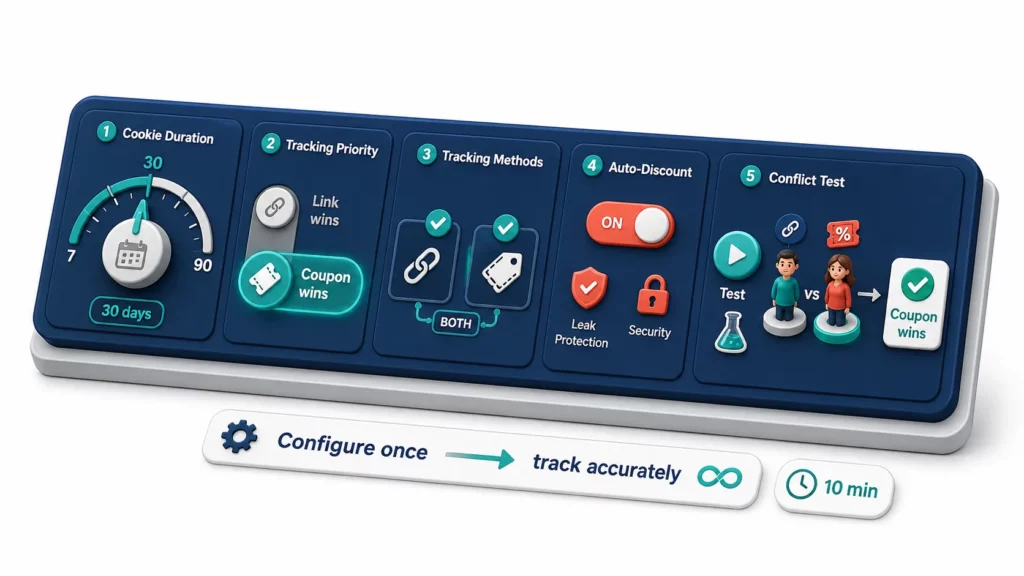
The model, the tracking method, and the cookie backup all come down to five settings in your affiliate app. Lock them in before your first affiliate shares a link, and attribution runs itself.
The defaults work for most programs. Knowing what each setting controls helps you spot the few cases where you would adjust one.
| Setting | Recommended Default | Why |
| Cookie duration | 30 days | Covers the buying window for most consumer products |
| Tracking priority | Coupon wins over link | Active intent (typing code) outweighs passive cookie |
| Tracking methods | Both link + coupon for every affiliate | Coupon = backup when cookies fail |
| Auto-discount | Enable if available | Removes coupon step, reduces leak risk |
| Conflict test | Run before launch | Confirms the right affiliate gets credit |
Cookie duration controls how long after a click a purchase still counts as a referral. 30 days is the industry standard and covers the buying window for most consumer products. Longer cycles (luxury, B2B) may justify 60 or 90 days.
The previous sections explained tracking priority and auto-discount. The last step — giving every affiliate both a link and a coupon — takes minutes.
Getting the defaults right matters less than verifying they work. Before launch, you’d better run a quick test: click one affiliate’s link, then enter a different affiliate’s coupon code on the same order.
If the credited affiliate doesn’t match your priority setting, fix it before real commissions are at stake.
When Should You Consider Multi-Touch Attribution? (And When to Stick with Last-Click)
Most Shopify stores should stick with last-click attribution and never look back. Multi-touch models solve a real problem, but that problem rarely shows up below 200 active affiliates.
Your program size and sales cycle determine whether the added complexity is worth it.
| Your Situation | Recommended Approach | Why |
| Fewer than 50 affiliates | Last-click | Simple, sufficient, zero disputes |
| 50–200 affiliates | Last-click + manual review | Default to last-click, adjust clear outliers manually |
| 200+ affiliates, complex journeys | Consider multi-touch | Multiple affiliates regularly touch same customers |
| Sales cycle over 30 days | First-click or position-based | Discovery deserves credit in long buying cycles |
| Heavy coupon-site traffic | Last-click + coupon leak protection | Coupon sites capture credit from content creators |
| Influencer + blog + coupon mix | Last-click + new-customer commission | Filter by customer type instead of splitting credit |
The honest reason most stores should stay on last-click has nothing to do with attribution theory. Most Shopify affiliate apps don’t support multi-touch natively, and commission splitting creates more disputes than it solves.
Those disputes look the same every time: affiliates argue credit percentages instead of sales, and the overhead rarely justifies itself under 200 partners.
A smarter path keeps last-click as the model and layers better commission rules on top. A new-customer commission pays a higher rate for first-time buyer orders, rewarding affiliates who drive acquisition without splitting credit.
Looking further ahead, AI may eventually automate these decisions entirely. Shopify notes that AI can recommend commission changes in real time, such as raising rates for high-value affiliates. For most stores today, that remains a trend to watch.
Frequently Asked Questions
What attribution model do most Shopify affiliate apps use by default?
Last-click. The last affiliate a customer interacts with before purchasing receives 100% of the commission. This is the standard across major affiliate networks, most Shopify apps, and the broader affiliate industry.
An affiliate says they brought the customer but a different affiliate got the commission. What should I do?
Under last-click, the affiliate whose touchpoint came last wins. If Affiliate A introduced the customer but Affiliate B’s coupon was used at checkout, B gets credit. Explain the model in your affiliate agreement and enable coupon leak protection to prevent credit theft.
Should tracking priority be set to coupon-over-link or link-over-coupon?
Coupon-over-link is the most common choice. A customer who types a code at checkout is taking an intentional action, while a link cookie may be days old. The exception: if you use auto-applied discounts with no coupon codes, link priority applies by default.
Does affiliate tracking work across devices?
Not reliably with cookies alone. A cookie saved on a phone does not transfer to a laptop. Coupon codes are the practical workaround — customers can enter a code on any device and the referral still tracks.
Do I need multi-touch attribution for my Shopify store?
Probably not. Last-click with correct priority settings and coupon leak protection covers the vast majority of programs. Consider multi-touch only if you run 200+ affiliates and consistently see multiple partners touching the same customer journey.
Can the attribution model affect affiliate retention?
Yes, indirectly. Affiliates who feel their effort goes unrecognized leave faster. Last-click with transparent rules is the fairest practical approach for most programs. Communicate the model during onboarding so affiliates understand how credit works before they start promoting.

Ellie Tran, a seasoned SEO content writer with three years of experience in the eCommerce world. Being a part of the UpPromote team, Ellie wants to assist Shopify merchants in achieving success through useful content & actionable insights.Ellie's commitment to learning never stops; she's always eager to gain more knowledge about SEO and content marketing to create valuable content for users. When she's not working on content, Ellie enjoys baking and exploring new places.

![How to Use Shopify Functions with Your Affiliate Program [2026 Guide]](https://static.uppromote.com/wp-content/uploads/2026/06/how-to-use-shopify-functions-with-affiliate-program-300x169.webp)

![How to Prevent Affiliate Fraud on Shopify: Self-Referral, Coupon Abuse & More [2026]](https://static.uppromote.com/wp-content/uploads/2026/06/how-to-prevent-affiliate-fraud-on-shopify-300x169.webp)