TL;DR
PayPal is the default payout method for most Shopify affiliate programs, but store credit is the most underused: your actual cost is COGS, not face value.
- Default method: PayPal auto-payout (2% fee, capped at $1)
- Smart supplement: Store credit: costs you less, affiliate gets more
- Setup time: Under 10 minutes for automatic payouts
- Safe schedule: Monthly, $25 minimum, 30-day holding period
- Tax rule: US affiliates earning $600+/year need W-9 + 1099-NEC
Ten affiliates, ten PayPal transfers, thirty minutes once a month. Manageable.
Fifty affiliates and the math changes. You’re cross-referencing a spreadsheet, calculating commissions after refunds, and sending individual PayPal transfers.
That eats two to three hours every month. Skip one cycle because you ran out of time, and the damage starts.
Late or inconsistent payouts are among the fastest ways to lose active affiliates. The partner who drove $2,000 in sales last month doesn’t care about your internal process — they care about getting paid on time.
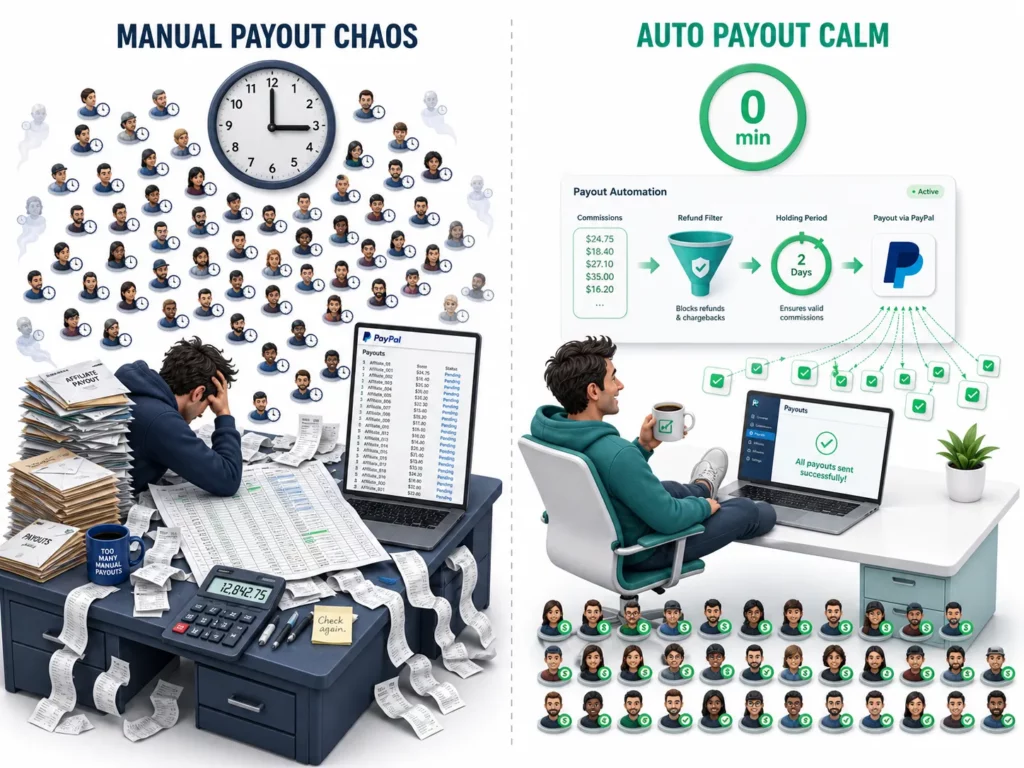
The fix is automatic payouts . Your affiliate app calculates commissions, deducts refunds, waits out a holding period, and sends payment on a set schedule.
After the initial setup, your manual work drops to zero.
The first decision is which payout method to set as your default.
What Are the Main Ways to Pay Affiliates on Shopify?
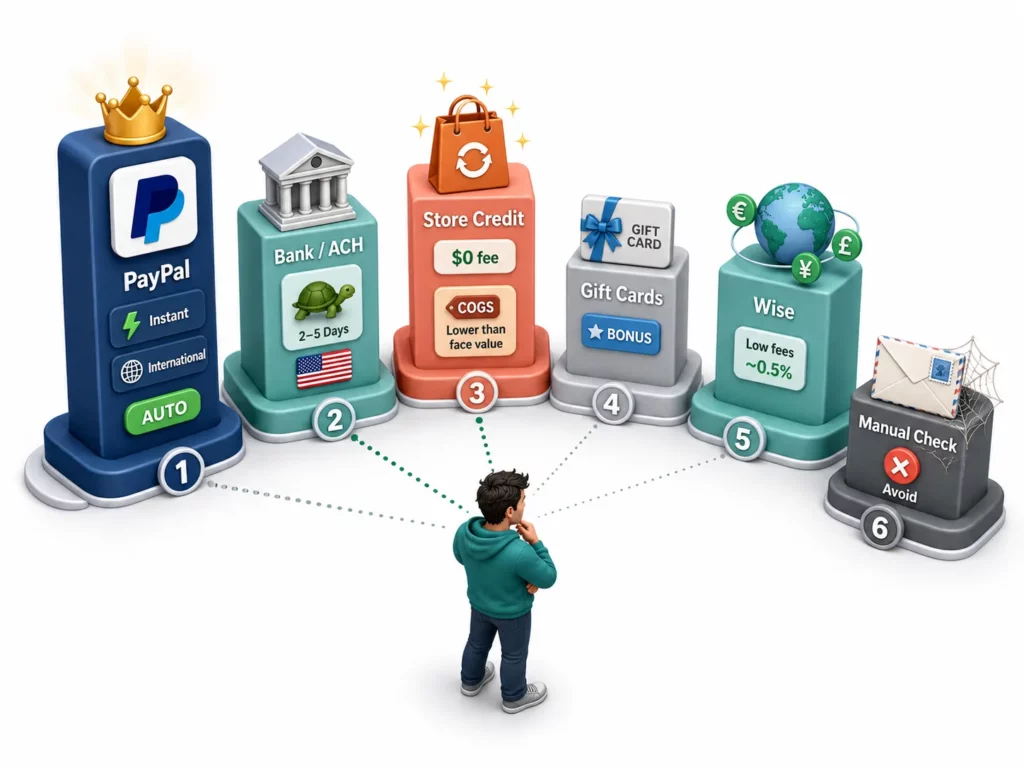
There are six popular payout methods for Shopify affiliate programs.
PayPal is the default for most stores because nearly every affiliate already has an account. Store credit is the least common but often the smartest option for repeat-purchase brands.
Each method makes a different tradeoff on cost, speed, and convenience. Take a quick look at the table below to pick the right default for your program.
| Method | Fee | Speed | Auto-Payout | International | Best For |
| PayPal | 2% (capped at $1) | Instant–24h | Yes | Yes (200+ countries) | Most programs (default) |
| Bank/ACH | $0–1 | 2–5 business days | Some apps | Limited (US focus) | High-volume US programs |
| Store Credit | $0 (cost = COGS) | Instant | Yes | Yes | Repeat-purchase brands |
| Gift Cards | $0 | Instant | Semi | Yes | Bonuses, not primary payout |
| Wise | ~0.5–2% | 1–3 days | Some apps | Yes | International affiliate base |
| Manual Check | Stamp cost | 7–14 days | No | Domestic only | Avoid if possible |
PayPal: Why Most Programs Start Here
PayPal sits at the top of the table for a reason: most affiliates already have an account, which makes onboarding frictionless. Payouts land within 24 hours, and the 2% fee is capped at $1 per domestic transaction .
You need a PayPal Business account to send mass payouts, but the account is free to open with no monthly fees . If your app connects through the PayPal API, the per-payout cost drops to a flat $0.25.
Store Credit: Lower Cost, Higher Lifetime Value
Store credit flips the payout equation. Instead of sending cash that leaves your business, you give the affiliate credit they spend at your store.
Your actual cost is COGS, not face value. On a product with 60% gross margin, $100 in store credit costs you roughly $40. The affiliate gets full retail value, and every payout becomes a new order.
Bank Transfer, Wise, and the Rest
Bank and ACH transfers suit high-volume US programs where the 2% PayPal fee starts to add up.
At $10,000 in monthly payouts, PayPal costs up to $200 in fees; ACH costs under $10. The tradeoff is slower settlement and limited international reach.
For international affiliates, Wise fills the gap with fees typically under 2% for most currency routes. Some affiliate apps, including UpPromote, integrate Wise directly so you can process international bank transfers from the same dashboard you use for PayPal.
Beyond those, gift cards work better as performance bonuses than primary payouts. Manual checks are best left behind.
How Do You Set Up Automatic Affiliate Payouts?
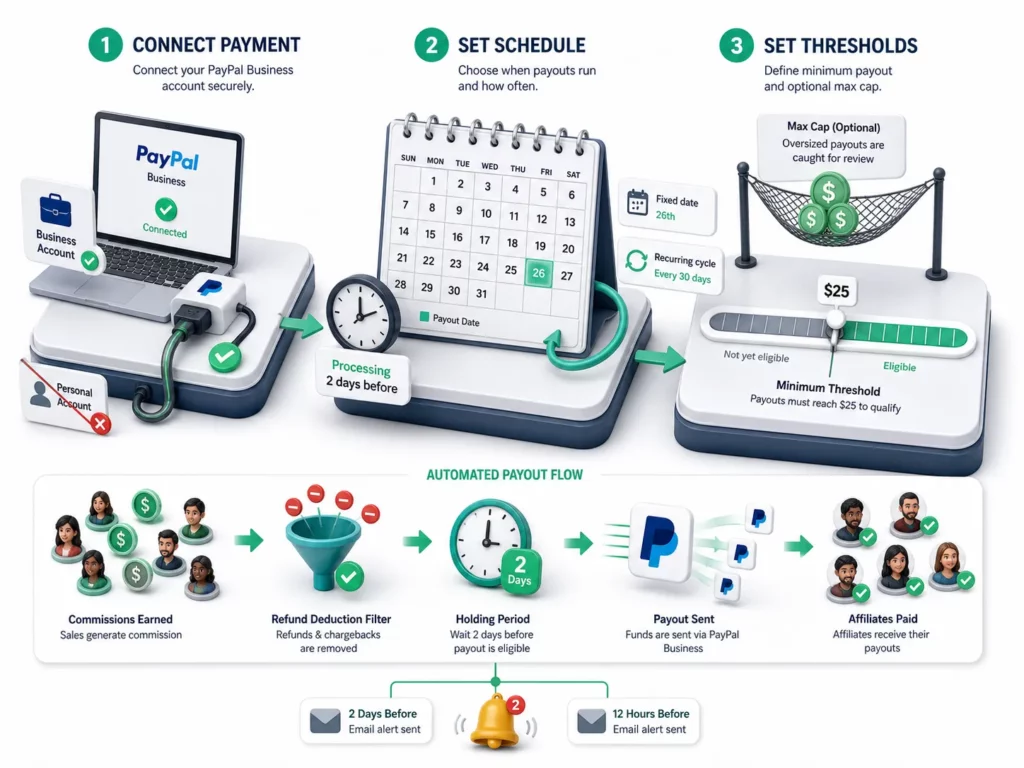
Any auto-payout process needs three things configured: a connected payment account, a schedule, and a minimum threshold.
Most Shopify affiliate apps follow the same pattern, so the concept transfers regardless of which tool you use.
In UpPromote, the setup takes about five minutes.
First, connect a PayPal Business account and enable PayPal as a payment method so affiliates can enter their PayPal email during signup. A personal PayPal account won’t work here — Business accounts unlock the mass payout feature, and upgrading is free.
Second, choose a payout schedule. UpPromote offers two options: a specific date (the 26th of every month, for example) or a recurring cycle (every 14 days, every 30 days, and so on). Either way, you pick a start date and the system repeats from there.
One detail worth noting: the schedule needs to be set at least two days before the first payout date so the system has time to process.
Third, set your thresholds. The minimum commission amount controls when affiliates become eligible for payout. A $25 minimum keeps micro-payouts from eating into fees while staying reachable within a month or two for most active partners.
There’s also an optional maximum payout limit. If your total payout for a cycle exceeds the cap you set, the system pauses and lets you review before sending. It’s a safety net, not a requirement.
Once activated, the app calculates commissions, deducts refunds, and sends PayPal payments on your schedule. You get email notifications two days and twelve hours before each payout, with the exact amount and affiliate count.
How Often Should You Pay Affiliates?
Monthly payouts on the 15th are the safest default for most Shopify programs. As your affiliate count grows past 20–30 active partners, bi-weekly keeps motivation high.
The right cadence depends on program size. You can consider our recommendations to match each stage to a recommended schedule.
| Program Size | Schedule | Holding Period | Minimum Payout |
| Small (under 20) | Monthly | 30 days | $25 |
| Medium (20–100) | Bi-weekly | 30 days | $25 |
| Large (100+) | Bi-weekly or weekly | 14–30 days | $50 |
| Enterprise (500+) | Weekly | 14 days | $100 |
Why the Holding Period Matters
The holding period is the gap between a confirmed sale and the moment that commission becomes eligible for payout. Its purpose is simple: give refunds and chargebacks time to surface before money leaves your account.
30 days is the standard because it matches most return policies. A shorter window pays affiliates faster but leaves you exposed if a customer returns the product after two weeks.
Setting the Right Minimum
With the holding period covering refund risk, the remaining threshold to configure is the minimum payout. A $25 minimum works for most programs.
Anything lower and transaction fees eat into every payout. Anything higher and smaller affiliates struggle to reach the threshold.
At a 15% commission on an $80 average order, an affiliate earns $12 per sale. Two or three sales clear the $25 mark, and most active partners hit it within their first month.
Why Is Store Credit the Payout Method Most Merchants Overlook?
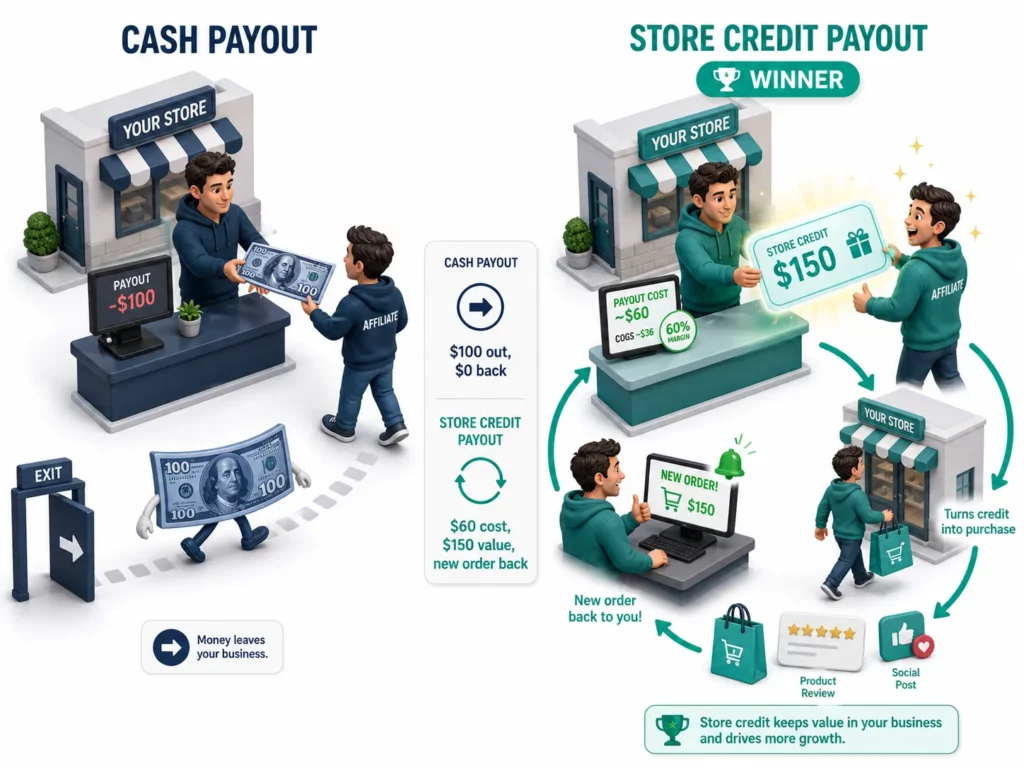
Store credit payouts cost you less, give the affiliate more value, and return every dollar as revenue instead of letting it leave your business.
For repeat-purchase brands, this is the most efficient payout method available.
The math explains why. Assume a product with 60% gross margin and a 50% store credit bonus.
| Scenario | Cash Payout | Store Credit Payout |
| Commission earned | $100 | $100 |
| Store credit bonus | — | +50% = $150 credit |
| Your actual cost | $100 cash | ~$60 (COGS of $150 retail) |
| Affiliate receives | $100 to spend anywhere | $150 at your store |
| Money stays in business? | No | Yes (returns as a new order) |
The affiliate gets 50% more value. You spend roughly 40% less. And every payout generates a new order, which means fresh content, new reviews, and deeper brand connection.
When Store Credit Works (and When It Doesn’t)
Those numbers only work if affiliates use the credit. Store credit performs best when your affiliates are also your customers.
Beauty, skincare, fashion, and food brands see the highest adoption because affiliates already use what they sell.
The method falls flat when affiliates are pure marketers with no personal interest in your catalog. High-ticket brands also struggle. Few affiliates want $2,000 in store credit for a single product.
The Hybrid Approach
The strongest setup offers both options. Let affiliates choose between cash via PayPal and store credit with a bonus (say 25–50% extra value on the credit option).
Affiliates who love your products pick store credit. Professional marketers pick cash. Both stay happy, and you reduce payout costs on every affiliate who opts for credit.
UpPromote, for example, can schedule store credit payouts on the same cycle as cash. The system generates a discount code for each affiliate’s owed amount and sends it on schedule.
What Do You Need to Know About Affiliate Taxes?
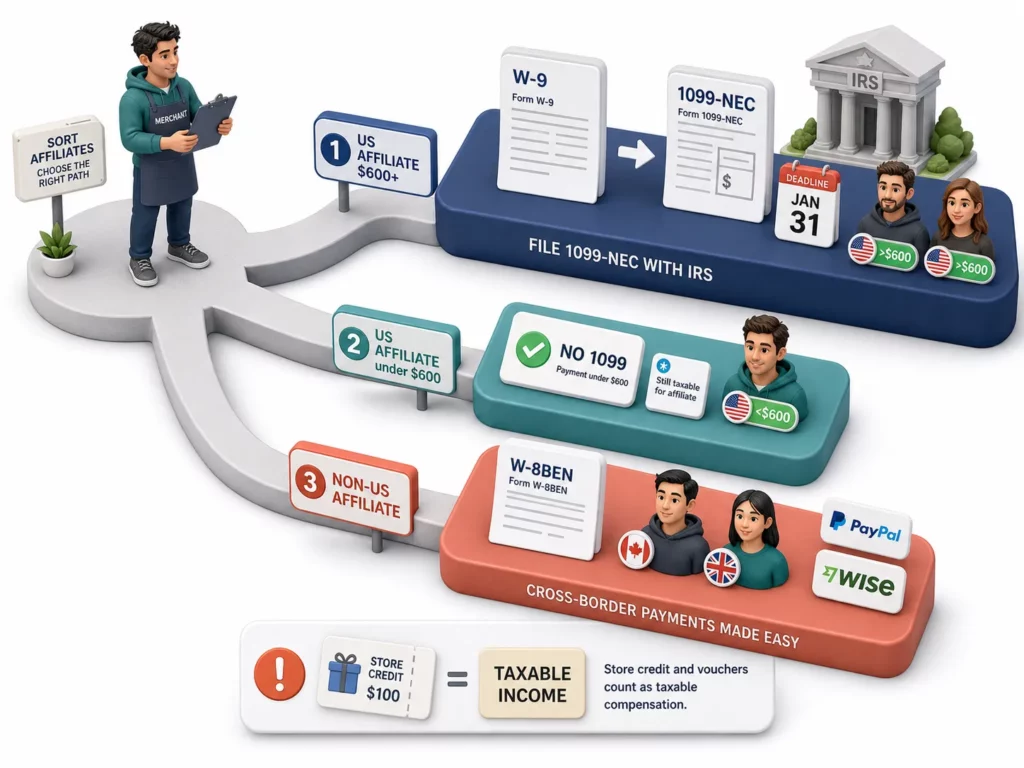
This section is general information, not tax advice. Consult a qualified accountant for your specific situation.
US-based affiliates who earn $600 or more per year from your program trigger a reporting requirement. You need to collect a W-9 form and issue a 1099-NEC by January 31 of the following year.
The requirements depend on where your affiliate is based and how much they earn.
| Situation | Requirement |
| US affiliate, $600+/year | Collect W-9, issue 1099-NEC |
| US affiliate, under $600/year | No 1099 required (still taxable for the affiliate) |
| Non-US affiliate, any amount | Collect W-8BEN (certifies foreign status) |
Store credit counts. The IRS treats any form of affiliate compensation as taxable income, including store credit and gift cards. Report the retail value of the credit on the 1099, not your COGS.
For international affiliates, PayPal and Wise handle currency conversion and cross-border transfers. Tax rules vary by country, so non-US affiliates should consult a local accountant.
Some affiliate apps, including UpPromote, can export invoices with tax details for both merchants and affiliates. That helps with record-keeping when 1099 season arrives.
Frequently Asked Questions
Does a PayPal Business account have a monthly fee?
No. PayPal Business accounts are free to open with no monthly fees. You pay only when you send a payout: 2% of each payment, capped at $1 for US domestic transfers. Upgrading from a personal account is also free.
How long should the holding period be for affiliate payouts?
Thirty days is the safest default because it matches most return policies. Shorten to 14 days if your return rate stays under 5%. Never set it to zero, because a refund after payout means you absorb the loss.
How do I pay international affiliates on Shopify?
PayPal supports payouts in over 200 countries and handles currency conversion. For lower fees, Wise is another option with rates under 2% for most routes. Ask international affiliates which method they prefer during onboarding.
Can I pay affiliates with both cash and store credit?
Yes. A hybrid approach lets affiliates choose between PayPal and store credit, often with a bonus on the credit option. Product fans lean toward store credit for the extra value, while professional marketers prefer cash.
Do I need to send a 1099 to every affiliate?
No. Only US-based affiliates who earn $600 or more during the calendar year require a 1099-NEC. Non-US affiliates need a W-8BEN form instead. Affiliates under the $600 threshold still owe taxes on their income, but you do not need to file on their behalf.
What happens if a customer gets a refund after the affiliate was already paid?
Most affiliate apps deduct the refunded commission from the next payout cycle. If you do not expect future payouts from that affiliate, you may need to request a manual reversal. A 30-day holding period prevents this scenario in most cases.

Ellie Tran, a seasoned SEO content writer with three years of experience in the eCommerce world. Being a part of the UpPromote team, Ellie wants to assist Shopify merchants in achieving success through useful content & actionable insights.Ellie's commitment to learning never stops; she's always eager to gain more knowledge about SEO and content marketing to create valuable content for users. When she's not working on content, Ellie enjoys baking and exploring new places.

![How to Use Shopify Functions with Your Affiliate Program [2026 Guide]](https://static.uppromote.com/wp-content/uploads/2026/06/how-to-use-shopify-functions-with-affiliate-program-300x169.webp)

![How to Prevent Affiliate Fraud on Shopify: Self-Referral, Coupon Abuse & More [2026]](https://static.uppromote.com/wp-content/uploads/2026/06/how-to-prevent-affiliate-fraud-on-shopify-300x169.webp)