TL;DR:
Most Shopify stores should run affiliate link tracking and coupon code tracking together. Neither method covers every channel or every customer on its own.
- Affiliate links: Cookie-based, track clicks to purchase, rich funnel data
- Coupon codes: Checkout-based, immune to ad blockers and browser privacy limits
- Best for links: Blogs, email, YouTube, SEO content (clickable placements)
- Best for coupons: TikTok, Instagram, podcasts, in-person (audio or visual-only)
- Priority rule: When both appear in one order, apps assign commission through a set hierarchy
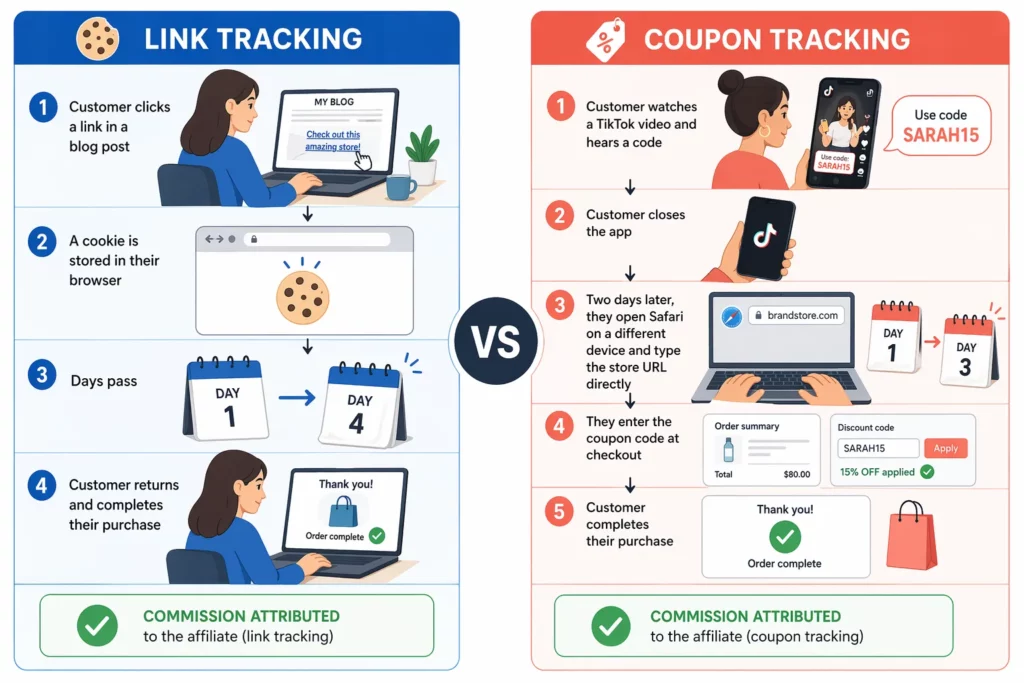
A customer sees your brand in a TikTok review, remembers the creator’s code, and closes the app.
Two days later they search your store on Safari, browse a bit, and buy the next morning using the code at checkout.
No click on an affiliate link ever happened. If your tracking leaned on cookies alone, that sale would look like organic traffic.
This is the gap every Shopify affiliate program runs into.
Link tracking sees clicks and full customer journeys. Coupon tracking sees checkouts — including ones where nobody ever clicked. Each method misses what the other catches.
Browser privacy changes are making the split sharper. Safari caps cookies set through JavaScript at seven days (WebKit, 2019) and blocks third-party cookies outright. That erodes pure link tracking every year.
The fix isn’t picking one method. It’s using both, and knowing which handles each channel, which wins in conflicts, and where each is breaking down in 2026.
How Does Affiliate Link Tracking Work?
Affiliate link tracking gives each affiliate a unique URL. A browser cookie then credits any purchase that follows a click within the tracking window.
Every click drops a small data file on the shopper’s browser. When that same shopper checks out later, the app reads the cookie and credits the sale to the affiliate who earned the click.
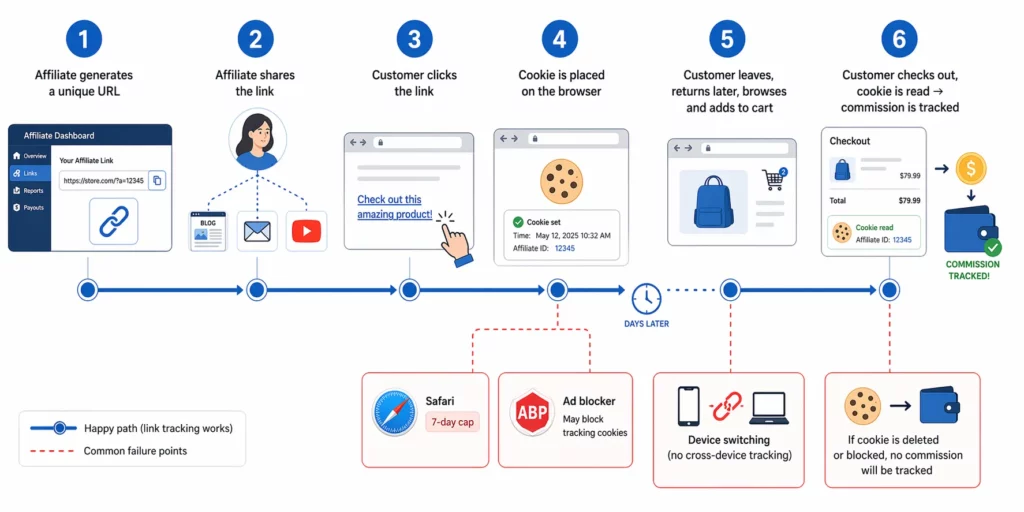
Here is what happens on a typical affiliate link purchase, from the moment the link goes live to the moment commission is recorded:
- The affiliate gets a unique URL from the merchant’s dashboard — something like yourstore.com/products/serum?ref=sarah123 .
- They share it on a blog, email, YouTube description, or Instagram bio.
- A shopper clicks and lands on the merchant’s store.
- A first-party cookie drops on the shopper’s browser, holding the affiliate ID and a timestamp.
- The shopper browses, adds to cart, sometimes leaves and comes back days later.
- They check out. The app reads the cookie, confirms it hasn’t expired, and records the sale under the affiliate’s account.
That flow captures more than the sale itself. Every step leaves a data trail that coupon tracking cannot access.
A click-based system shows you the full pre-purchase picture. You see how many people clicked and which pages they visited. You see how long they stayed, whether they abandoned cart, and how clicks converted by device or country.
This is the clearest view of customer journey any affiliate method offers.
If you want to know whether a blogger’s audience reads before buying, link tracking is the only source. Same for knowing which creator drives cart adds versus bounces.
The same browser cookie that powers all this data also sits at the center of where link tracking breaks.
Safari, which runs most iPhone traffic, deletes JavaScript-set cookies after seven days and blocks third-party cookies outright. Firefox enforces similar defaults.
That shrinks the window before it even starts.
Ad blockers add another layer. Any browser extension that blocks tracking scripts can stop the cookie from firing, and the loss never shows up in attribution reports.
Device switching compounds the problem. A shopper who clicks on mobile and buys on laptop looks like two different people to cookie-based tracking.
How Does Coupon Code Tracking Work?
Coupon code tracking skips the click entirely.
Each affiliate gets a unique discount code. The app credits the sale the moment that code hits checkout — no cookie, no browser dependency, no click required.
That one key difference is why coupon tracking works where link tracking cannot.
Audio channels, offline conversations, and any platform without a clickable link — coupons survive all of them.
The workflow is similar to link tracking at the edges, but the middle step disappears:
- The affiliate gets a unique code from the merchant’s dashboard — commonly a name-plus-discount format like SARAH15 .
- They share it on a podcast, in a TikTok video, across Instagram Stories, or on a physical flyer.
- A shopper sees or hears the code and remembers it — then navigates to the store through search, direct URL, or an ad.
- They enter the code at checkout.
- The app matches the code to the affiliate who owns it and records the sale under that account.
The data you get looks different too. Coupon tracking only sees what happens at checkout: which code was used, how many orders it drove , and how much revenue it produced.
Pre-purchase behavior is hidden. You cannot see how many people heard the code, how many searched for it, or how many abandoned before entering it.
The sale either arrives with a code attached, or it does not exist in the affiliate report at all.
Coupon tracking has one specific failure mode that link tracking does not share: the code itself is public by design.
Once an affiliate shares JANE15 in a video, that code exists as shareable text.
It ends up indexed on coupon aggregator sites, posted in deal subreddits, and autofilled by browser extensions. Often by shoppers who never saw the original video.
The sale still tracks to Jane, but Jane did not drive most of those sales. You pay commission on traffic you would have converted anyway.
One workaround is removing the code from the equation. UpPromote’s Anti-leak Discount applies the discount automatically when a shopper arrives through an affiliate link. No code to share, nothing to leak to aggregator sites.
The affiliate still gets tracked, and the shopper still gets the discount. What disappears is the public code.
How Does Link Tracking Compare to Coupon Tracking?
Neither method covers every sale on its own. The structural trade-offs show up side by side — each method wins in the exact places the other loses.
The table below groups the differences that change your commission math: what each method tracks, where each breaks, and which channels fit.
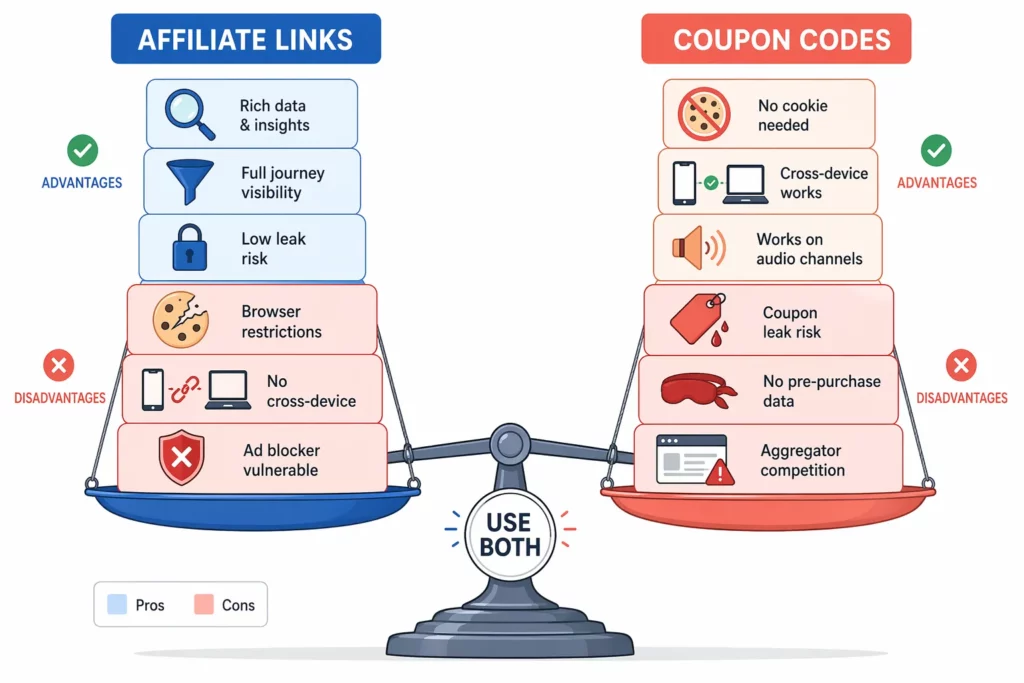
| Dimension | Affiliate Link Tracking | Coupon Code Tracking |
| Tracking mechanism | Browser cookie set on click | Code entered at checkout |
| Cookie required? | Yes | No |
| Ad blocker impact | Can block tracking scripts | Unaffected |
| Safari / iOS impact | Cookies capped at 7 days; third-party blocked | Unaffected |
| Cross-device attribution | No — cookies are per-browser | Yes — shopper remembers the code |
| Pre-purchase data | Clicks, page views, time on site, cart adds | None |
| Customer journey visible | Yes — full click-to-purchase path | No — checkout event only |
| Coupon leak risk | Low — links are harder to redistribute at scale | High — codes spread on aggregators and Reddit |
| Built-in conversion incentive | Optional (link alone offers nothing) | Yes — discount drives the checkout |
| Best channels | Blogs, email, YouTube descriptions, SEO | TikTok, Instagram, podcasts, in-person |
| Works without a click | No | Yes |
Source: WebKit Intelligent Tracking Prevention (Apple, 2019) for Safari cookie limits.
Three rows in that table shape most programs’ real results.
The Safari row matters more than it looks. Mobile traffic tilts toward iPhone, and Safari deletes JavaScript-set cookies after seven days.
A clicker who does not return within that window is lost credit on link tracking alone.
The cross-device row is a quiet leak. A shopper who clicks on their phone and buys on a laptop that evening looks like two visits to a cookie.
On the coupon side, the leak risk flips the direction of loss. Codes turn public the moment affiliates share them. Commission flows to whichever affiliate’s code was handy — not the one who drove the shopper there.
Which Tracking Method Should You Use for Each Marketing Channel?
The channel decides the method, not the other way around. Clickable formats suit link tracking; audio and visual-only formats suit coupon codes.
A simple test applies to every channel: can the audience click here? If yes, default to a link. If no, default to a code. Give the affiliate both so nothing falls through.
Each channel below shows where the primary tracking method fits the format, and which backup catches what the primary misses.
| Channel | Primary method | Why it fits | Backup |
| Blog posts | Link | Readers click inline links naturally | Code in post |
| Email newsletters | Link | CTA buttons give precise click tracking | Code in email body |
| YouTube descriptions | Link | Description box is the standard placement | Spoken code in video |
| Instagram Feed | Code | Feed captions do not support clickable links | Link in bio |
| Instagram Stories | Link sticker | Stories support clickable stickers | Code overlay |
| TikTok videos | Code | Viewers watch or listen — no direct click path | Link in bio |
| Podcasts | Code | Listeners hear the code; audio offers no click | Show-notes link |
| Facebook groups | Link | Group posts render clickable links | Code in post |
| In-person / Events | Code + QR | No digital click surface | QR code pointing to the affiliate link |
| WhatsApp / SMS | Link | Messages render links as tappable | Code as plain text |
The pattern underneath the table is binary.
If your audience reads or scrolls through a clickable interface, including blog posts, emails, YouTube descriptions, a link captures the richest data.
If your audience hears the code without a click path, such as podcasts, TikTok, in-person events, a code is the only way to track the sale.
The practical move is to equip every affiliate with both on day one.
A beauty influencer running Instagram Stories and TikTok will lean on the code for audio mentions and the link for profile-bio traffic.
A newsletter publisher will do the opposite. Neither setup is wrong; both channels need coverage.
What Happens When Both a Link and a Coupon Are Used in the Same Order?
A shopper clicks Affiliate A’s link on Monday, leaves, comes back Friday, and enters Affiliate B’s coupon code at checkout.
Two affiliates technically contributed. Only one gets commission. The tracking priority rule in your app decides which.
Most apps set a default hierarchy to resolve these conflicts without merchant input, and most merchants never realize it exists until a commission dispute surfaces.
UpPromote settles link–coupon overlaps through a four-level hierarchy set in its tracking docs. Anything higher on the list overrides everything below it:
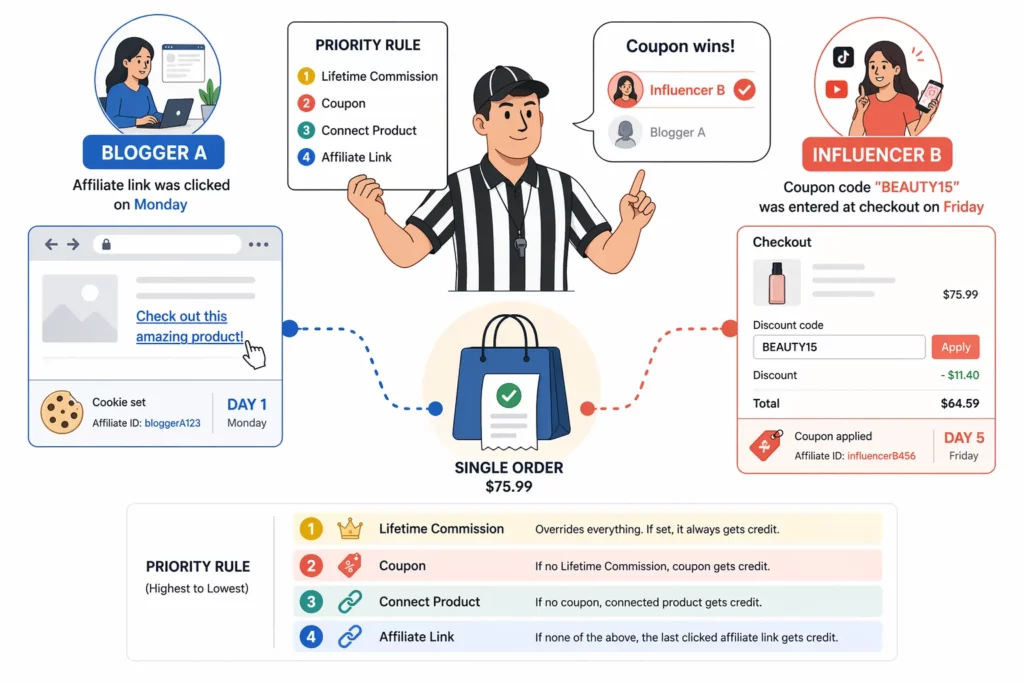
| Priority | Tracking type | When it applies |
| 1 (highest) | Lifetime Commission | A customer was permanently linked to an affiliate on a prior purchase |
| 2 | Coupon | The shopper entered an affiliate’s unique code at checkout |
| 3 | Connect Product | A specific product was permanently assigned to an affiliate |
| 4 (lowest) | Affiliate Link | The shopper arrived via a tracked affiliate URL and a valid cookie is present |
Source: UpPromote — Tracking types and priority.
The order reflects how committed each attribution type is.
Lifetime Commission means a customer was permanently linked to an affiliate on a past order. Nothing later overrides that.
Coupon redemption beats link clicks because a code entered at checkout is a concrete action the shopper took at the moment of purchase. A cookie set days earlier is weaker evidence.
Connect Product and Affiliate Link occupy the lower two tiers.
Connect Product applies only when a specific product is permanently assigned to an affiliate. Affiliate Link sits last because cookie-based attribution is the weakest of the four.
Knowing the order is only useful if you set it up before affiliates arrive. You may need to make two decisions to lock that in.
The first one is locking in the priority setting before you start inviting affiliates. Changing defaults mid-program creates commission fights on orders the app tagged under the old rule.
The second is setting separate commission rates for coupon-tracked sales, if you want to compensate link-driven referrals differently. Some merchants pay a lower rate on coupon orders because coupon codes leak and inflate tracking.
The Shopify fashion brand Jenni Bag uses UpPromote’s Coupon Code Commissioning feature for exactly that split.
They keep a standard commission rate for link-driven sales and a lower rate for orders tracked through coupon codes — the same setup runs across their 2,000+ affiliates.
How Is Tracking Changing in 2026 (and What Still Works)?
Both tracking methods face real pressure heading into 2026 — but from different directions.
Link tracking keeps eroding as browsers tighten cookie defaults. Coupon tracking keeps leaking as codes spread across aggregators and extensions.
The trade-offs are not going away. They are shifting.
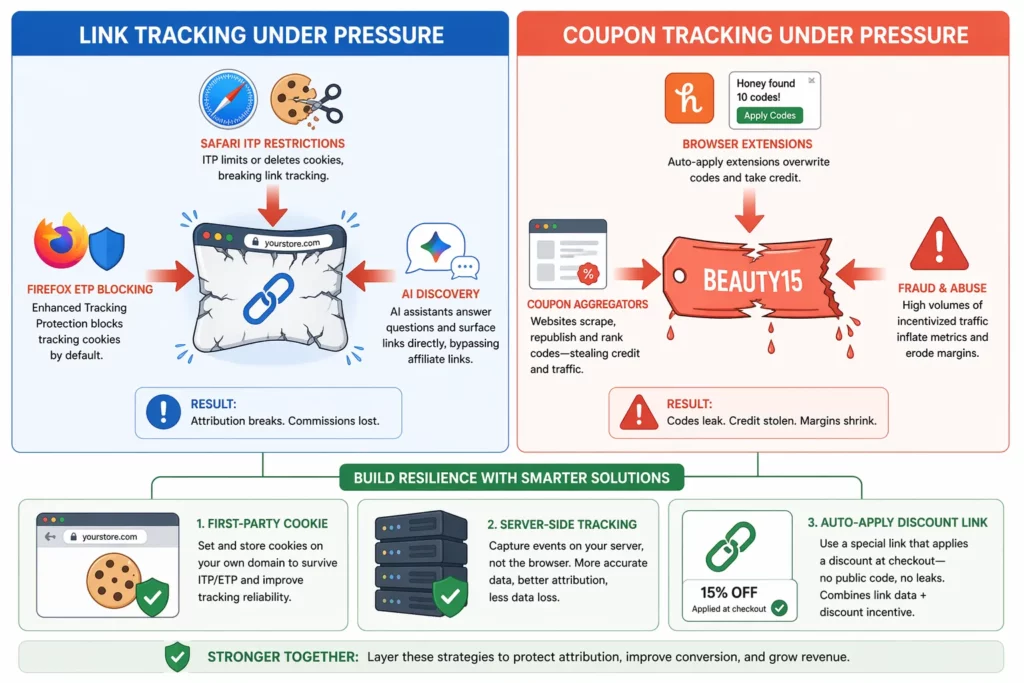
Where Link Tracking Is Breaking
Browser defaults and AI-driven discovery both hit link tracking hard.
Safari caps JavaScript-set cookies at seven days and blocks third-party cookies outright on iPhone traffic. Firefox blocks third-party tracking cookies by default through its Enhanced Tracking Protection setting (Mozilla, 2022).
AI-driven product discovery shortens the affiliate path. When shoppers ask an AI assistant to compare products, they often arrive at the brand through search or direct URL — the affiliate link that started the journey never loads.
Where Coupon Tracking Is Leaking
Coupon tracking faces a different mix of problems.
Browser extensions that auto-apply coupons at checkout have faced accusations of overwriting legitimate affiliate cookies.
A December 2024 investigation, reported by Fortune, triggered class-action lawsuits against PayPal’s Honey extension for affiliate commission theft.
Coupon aggregators index any code that appears online, and affiliate fraud runs at around 17% of traffic across the industry ( CHEQ, 2022 ).
Three Fixes Gaining Ground
These pressures are not going unanswered. The industry has converged on three fixes that close the gaps on both sides.
First-party cookie tracking sets cookies on the merchant’s own domain instead of a third-party tracker — browser defaults treat these more leniently.
Server-side tracking moves attribution off the browser, pushing click data to a dedicated server that records attribution regardless of browser rules.
Auto-apply discount links combine the incentive of a coupon with the data richness of a link.
Frequently Asked Questions
Can I use only one tracking method instead of both?
Technically yes, but most programs lose revenue that way. Link tracking alone misses every sale where the shopper could not click — podcasts, offline events, TikTok audio. Coupon tracking alone loses pre-purchase data and pays commission on leaked codes.
How is an auto-apply discount link different from a regular coupon code?
An auto-apply discount link embeds the discount into the affiliate link. When a shopper arrives, the discount applies at checkout — no code typed in, and no public code for aggregator sites to index. A regular coupon code lives publicly and anyone can enter it at checkout.
If a customer clears cookies, does the affiliate lose the sale?
With link tracking alone, yes — the cookie is the record. If the shopper clears cookies or uses a private window before buying, the attribution is lost. Coupon tracking does not depend on cookies, so a code entered at checkout still credits the affiliate.
Should I worry about Safari users on iPhone?
Yes — Safari is the default browser on every iPhone and iPad, and its privacy defaults cap tracking cookies at seven days. That gap hurts link-based attribution on mobile. Adding coupon codes and first-party tracking as backups is the standard workaround.
Which tracking method should each type of affiliate use?
Bloggers, email marketers, and YouTube creators use links as the primary method. TikTok and Instagram influencers lean on codes for mentions and reserve the link for their bio. Podcasters rely on codes, since audio has no click surface. Give every affiliate both anyway.
Is a 30-day cookie duration enough, or should I offer longer?
Thirty days is the industry default and covers the typical ecommerce decision cycle. Longer durations of 60 or 90 days make sense for higher-ticket products where shoppers take longer to decide. Shorter durations risk losing attribution on purchases that take more than a week.

Ellie Tran, a seasoned SEO content writer with three years of experience in the eCommerce world. Being a part of the UpPromote team, Ellie wants to assist Shopify merchants in achieving success through useful content & actionable insights.Ellie's commitment to learning never stops; she's always eager to gain more knowledge about SEO and content marketing to create valuable content for users. When she's not working on content, Ellie enjoys baking and exploring new places.

![How to Use Shopify Functions with Your Affiliate Program [2026 Guide]](https://static.uppromote.com/wp-content/uploads/2026/06/how-to-use-shopify-functions-with-affiliate-program-300x169.webp)

![How to Prevent Affiliate Fraud on Shopify: Self-Referral, Coupon Abuse & More [2026]](https://static.uppromote.com/wp-content/uploads/2026/06/how-to-prevent-affiliate-fraud-on-shopify-300x169.webp)