











TL;DR
Manual affiliate management can work at ten partners. Past thirty, it won’t scale.
Ten workflows cover the bulk of program admin: commission tracking, scheduled payouts, tier upgrades, welcome emails, application processing, leak detection, re-engagement, performance alerts, reporting, and post-purchase enrollment.
- Time saved: Double-digit weekly hours reduced to two or three
- Core stack: Affiliate app automation + Shopify Flow + email platform
- Setup: Two to three hours for the four highest-impact workflows
- Minimum cost: $0–60/month covers roughly 70% of automation needs
With five affiliates, the whole program can run on a spreadsheet. A few PayPal transfers, a handful of emails, maybe an hour a week.
Once you cross fifty, that equation starts to break. Fifty welcome emails, fifty commission calculations, fifty individual payouts. What used to take an hour could easily stretch past fifteen, and that’s before you factor in recruitment or strategy.
Shopify’s own affiliate software guide puts the scaling problem simply. A manual system may hold together at five or ten partners. Beyond that, it will start cracking well before you reach a hundred (Shopify, 2025).
The same guide also points to manual payouts as a common failure point. Hand-processed payments tend to create errors, delays, and frustrated partners.
In this blog, we’ll explore ten workflows worth automating and the tools behind each one. You’ll also find a setup order that should save you the most time with the least effort.
How Much Time Does Manual Affiliate Management Actually Cost?
At fifty active affiliates, manual program management can consume ten to fifteen hours every week. Automating the most repetitive workflows should cut that to two or three.
That gap matters less for the hours saved and more for what those hours could go toward. Strategy, top-performer relationships, and program growth rarely happen when you’re still processing PayPal transfers one by one.
Most of that time disappears into a handful of tasks that repeat for every affiliate, every week. Each one may only take a few minutes per partner.
But at fifty partners, those minutes will compound into a full workday or more.
| Task (at 50 affiliates) | Manual time/week | Automated time/week |
| Commission calculation | ~1.5 hrs | 0 (auto-calculated) |
| Payout processing | ~2 hrs | ~10 min (review + approve) |
| Application review | ~2 hrs | ~15 min (flagged cases only) |
| Welcome + onboarding emails | ~1.5 hrs | 0 (auto-sequence) |
| Tier upgrades | ~30 min | 0 (auto-tier) |
| Coupon leak monitoring | ~1 hr | ~15 min (review alerts) |
| Performance reporting | ~1.5 hrs | ~15 min (auto-report) |
| Inactive affiliate follow-up | ~1 hr | 0 (auto-trigger) |
| Post-purchase enrollment | ~30 min | 0 (one-time setup) |
| Ad-hoc communication | ~2 hrs | ~1 hr (templates + bulk) |
| Total | ~13.5 hrs | ~2 hrs |
Estimates for a program with fifty active affiliates. Actual hours will vary by program complexity and team size.
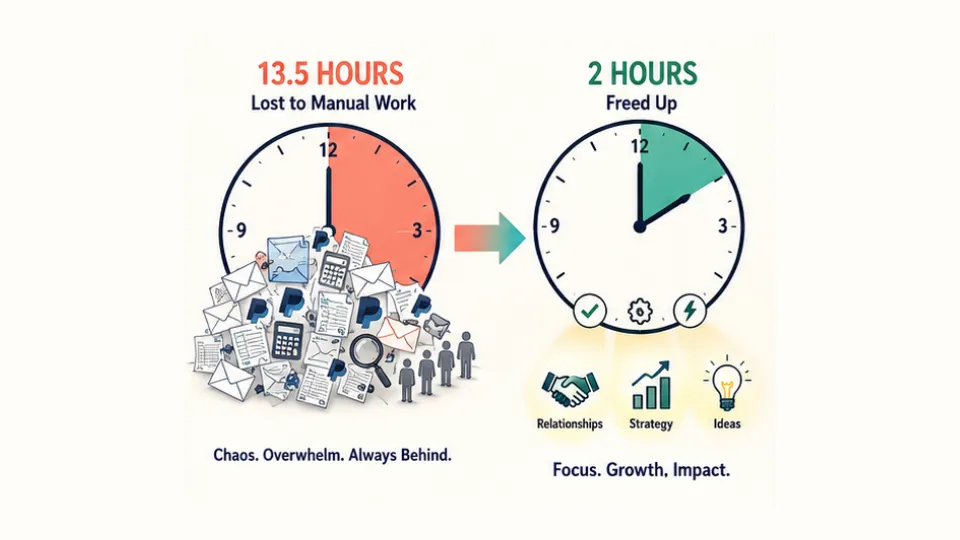
At fifty affiliates, the total gap sits around eleven hours per week. At a hundred, manual time roughly doubles while automated time barely changes. The return on automation only grows as your partner count scales.
The gap won’t appear overnight, though. It builds over time, and the right moment to start automating depends on where your program sits right now.
Under ten affiliates, every task can still fit inside an hour or two per week. Manual management works at this stage because the volume stays low enough to handle.
Once you move past fifteen or twenty, the first cracks tend to show up in payouts and onboarding emails. They’re the two tasks that scale most with headcount, which is why most merchants will automate them first.
By the time you reach thirty to fifty, missed payments, commission disputes, and inconsistent onboarding will start compounding. Your attention drifts from the work that grows the program.
At that stage, automation stops being a convenience and becomes what keeps the whole thing from stalling.
Which Affiliate Workflows Should You Automate First?
Not all ten workflows carry the same weight. The setup order will matter just as much as which ones you automate.
Four deliver the highest return with the least effort: commission tracking, scheduled payouts, application processing, and welcome emails. The rest can layer on once those four are running.
Here is what each workflow involves, the primary tool it needs, and the level of impact you can expect.
| # | Workflow | Primary tool | Setup effort | Impact |
| 1 | Commission tracking | Affiliate app (built-in) | None | Critical |
| 2 | Scheduled payouts | Affiliate app (built-in) | Easy | Critical |
| 3 | Application processing | Affiliate app | Easy | High |
| 4 | Welcome email sequence | Affiliate app or email platform | Medium | High |
| 5 | Tier upgrades | Affiliate app | Easy | High |
| 6 | Performance alerts | Shopify Flow | Medium | Medium |
| 7 | Coupon leak detection | Affiliate app | Easy | High |
| 8 | Inactive re-engagement | Email platform (Klaviyo/Omnisend) | Medium | Medium |
| 9 | Performance reporting | Affiliate app | Easy | Medium |
| 10 | Post-purchase enrollment | Affiliate app | Easy | High |
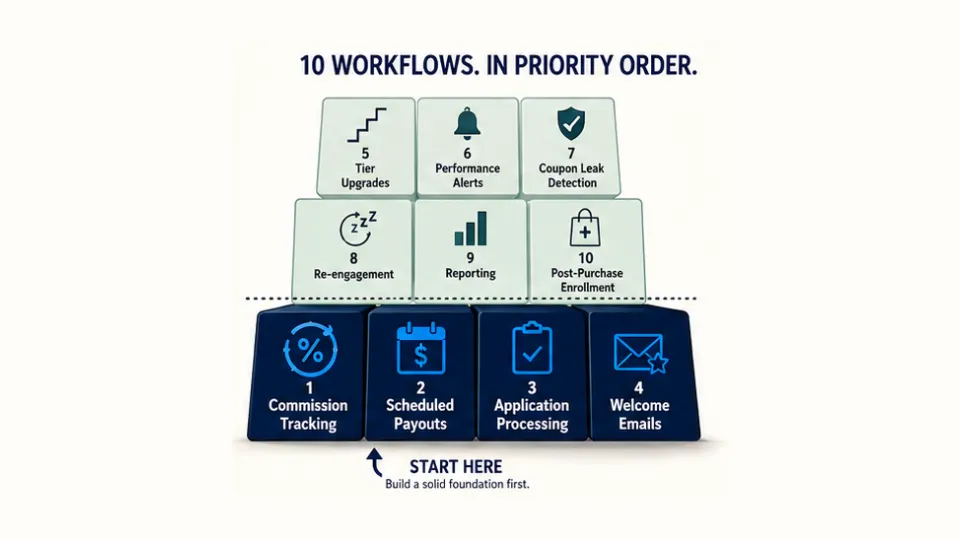
Commission tracking should come first because every other workflow depends on accurate referral data. Payouts are the natural next step, since late payments can erode affiliate trust faster than almost anything else.
Application processing and welcome emails round out the core four by cutting the manual work that comes with every new signup.
Most affiliate apps handle commission tracking and payout scheduling out of the box. UpPromote, for example, can auto-calculate commissions and process PayPal or store credit payouts on a set schedule, covering two of the four with no extra tools.
Once that foundation is in place, the remaining six workflows can layer on one at a time. Most will need Shopify Flow or an email platform like Klaviyo.
How Do Core Affiliate Automations Work?
These four workflows form a chain, and each one feeds into the next. That’s why they’ll work best when you set them up in order rather than all at once.
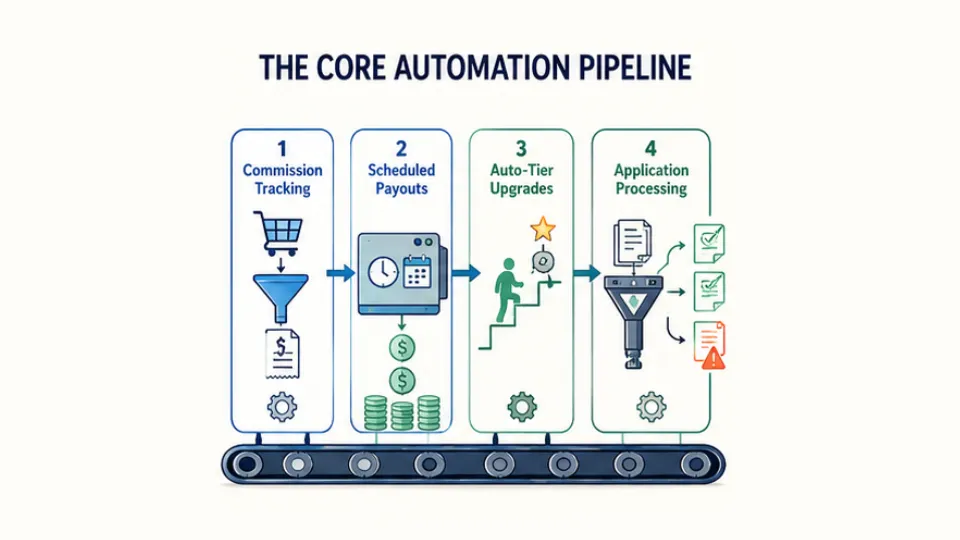
Commission tracking is where the chain begins. When a customer clicks an affiliate link or uses a coupon and makes a purchase, the app will record the referral and match the order to the right affiliate.
The commission then calculates on its own, whether you’ve set a flat rate, a percentage, or a per-product rate. Both you and the affiliate can see the result in real time.
That data, however, only matters if affiliates actually get paid. Scheduled payouts pick up where tracking leaves off by batching those commissions and sending them out on a set frequency.
You would typically choose a payment method, set a minimum threshold, and let the system take it from there. You configure the schedule and minimum amount once, and the cycle will continue on its own.
Once tracking and payouts are both running smoothly, auto-tier commission becomes a natural next step. This feature can move an affiliate into a higher-rate program whenever they reach a set milestone.
The trigger could be total referral sales, commission earned, or referral count. The affiliate sees a better rate, and you keep a motivated partner without having to send a single email.
At scale, these two layers tend to reinforce each other. The health brand Vetain paired auto-tier commission with scheduled PayPal payouts to manage over 8,000 referrals per month.
The fourth workflow, application processing, sits at the program’s entry point. Rather than reviewing every signup by hand, you can set criteria that filter applications on arrival.
For most consumer programs, this approach can work well. Stores with higher commissions or brand-sensitive products may still want to keep manual review for flagged applications, though.
How Do You Automate Affiliate Emails, Alerts, and Re-Engagement?
With the core four handling operations, the next layer of automation extends into communication and monitoring. These workflows will typically involve your affiliate app working alongside tools like Shopify Flow and Klaviyo.
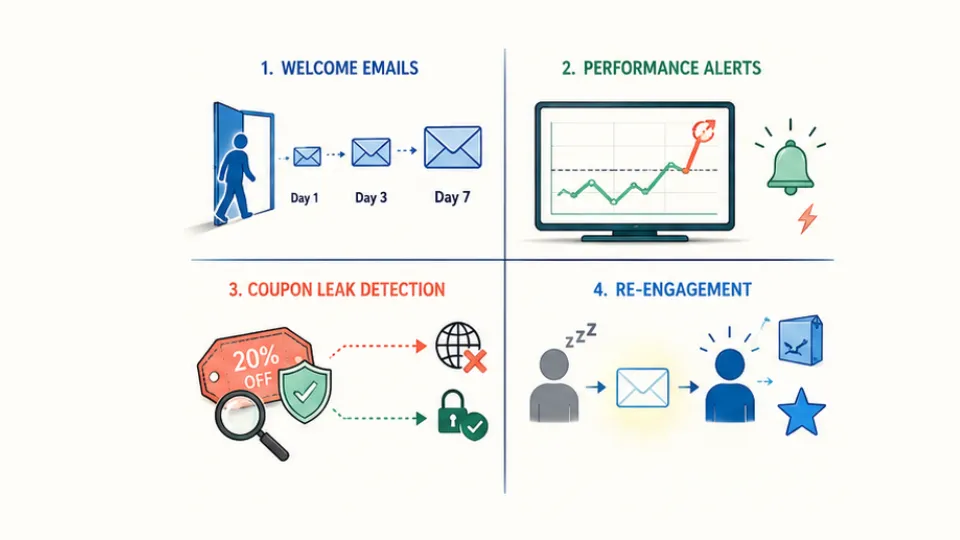
Welcome email sequences
Welcome email sequences are the natural starting point. When a new affiliate gets approved, a multi-step series can fire without any manual sending.
Day one might include an intro email with the affiliate’s dashboard link. A quick-start guide could follow a few days later, and a check-in would land after the first week.
Most affiliate apps will send a basic welcome note on approval. For a full multi-step drip, though, you’ll likely need a dedicated email platform.
UpPromote connects with both Klaviyo and Omnisend, so affiliate data can flow right into those tools. From there, a full welcome series can trigger on its own.
Performance alerts
Performance alerts through Shopify Flow cover the monitoring side. A 2025 update now lets you describe what you want in plain language. The AI assistant will then build the workflow in seconds.
What used to take thirty minutes to set up can now finish in under three (Shopify, 2025).
A typical Flow might notify you when an affiliate crosses a revenue milestone or when a high-value order comes through an affiliate code. Flagged signups can trigger review alerts as well.
Coupon leak detection
Coupon leak detection protects the revenue that your other workflows generate. When affiliate codes show up on coupon sites, sales can reach the wrong source or go uncredited.
The most effective fix tends to be structural. Some affiliate apps like UpPromote support applying the discount through the tracking link, which removes the need for a shareable coupon code altogether.
On top of that, fraud detection tools can flag unusual patterns like sudden traffic spikes or repeated use from a single IP.
Re-engagement
Re-engagement is the most proactive of the four. When an affiliate goes quiet for thirty days or more, an automated email sequence can pull them back in.
Fresh products to promote, updated creative assets, or a short-term commission boost would all work as hooks. This workflow runs best through your email platform, with a Shopify Flow tag serving as the trigger.
What’s the Right Automation Stack for Your Budget?
Your automation stack depends on two things: how many workflows you need and what you can spend each month. The good news is that the highest-impact automations sit at the bottom of the price range.
| Tool category | What it automates | Typical cost |
| Affiliate app (core) | Commission tracking, payouts, tiers, approvals, emails, enrollment | $0–200/mo + 1–2% perf. fee |
| Shopify Flow | Custom alerts, milestone triggers, tagging | Free with Shopify |
| Email platform (Klaviyo/Omnisend) | Welcome sequences, re-engagement, campaigns | $0–100/mo |
| Connector (Zapier, optional) | Bridge between tools (app → Slack, Sheets) | $0–30/mo |
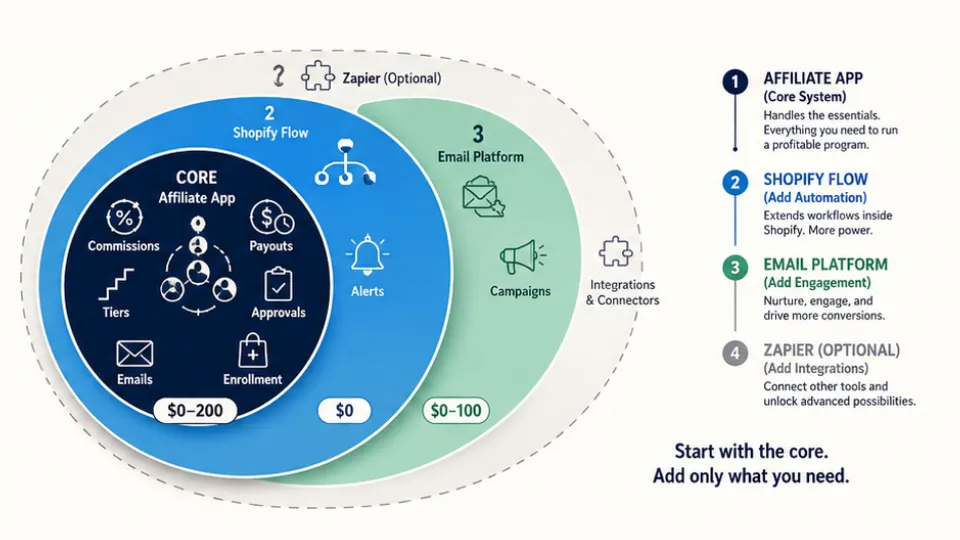
Most affiliate apps offer a free tier that covers tracking, fraud detection, and basic analytics. Paid plans typically range from twenty to two hundred dollars per month.
Many also charge a performance fee of one to three percent on affiliate revenue. That means your real cost will scale alongside your results, not just your subscription.
Two shifts in 2026 have made the lower tiers more capable. Shopify Flow now builds workflows from plain language, and most major apps have moved auto-payout features further down their pricing tiers.
Self-service affiliate portals have also become standard. Partners can pull up their own links, reports, and payment history without contacting you, which cuts routine support on its own.
Even with every workflow running, some work should stay human. Rate talks with top performers, content quality reviews, and dispute resolution all benefit from a personal touch. So do commission adjustments as your strategy evolves.
Frequently Asked Questions
Can automation fully replace manual affiliate management?
No. Automation covers the routine tasks: commission tracking, payouts, and welcome emails. Strategy calls, top-performer relationships, dispute handling, and content reviews still need a human. Automate operations, keep relationships personal.
How many affiliates should you have before automating?
Most merchants see the benefit starting at ten to fifteen active partners. By thirty, payouts and welcome emails get hard to manage by hand. By fifty, a manual program can take ten or more hours per week.
Is auto-approving affiliate applications safe?
For programs with standard rates and consumer products, yes. Programs with high commissions, brand-sensitive niches, or past fraud should keep manual review. A middle ground is to auto-approve by default and audit new signups each month.
How difficult is Shopify Flow to set up for affiliate workflows?
Much easier than it used to be. Shopify Flow’s AI assistant can build workflows from plain-language prompts, so setup now takes minutes instead of hours. Start with one trigger and one action, then build from there.
Will automated affiliate emails go to spam?
It depends on the sender. Emails sent through Klaviyo or Omnisend have strong delivery rates. Emails from a personal Gmail at high volume can hit spam filters. Use your affiliate app for system emails and a dedicated platform for marketing.
What is the minimum budget for affiliate program automation?
Zero. A free affiliate app plus Shopify Flow covers tracking, fraud detection, analytics, and custom alerts. Adding payouts and email tools starts around thirty dollars per month, enough to cover about seventy percent of program admin.

Ellie Tran, a seasoned SEO content writer with three years of experience in the eCommerce world. Being a part of the UpPromote team, Ellie wants to assist Shopify merchants in achieving success through useful content & actionable insights.Ellie's commitment to learning never stops; she's always eager to gain more knowledge about SEO and content marketing to create valuable content for users. When she's not working on content, Ellie enjoys baking and exploring new places.
![How to Use Shopify Functions with Your Affiliate Program [2026 Guide]](https://static.uppromote.com/wp-content/uploads/2026/06/how-to-use-shopify-functions-with-affiliate-program-300x169.webp)

![How to Prevent Affiliate Fraud on Shopify: Self-Referral, Coupon Abuse & More [2026]](https://static.uppromote.com/wp-content/uploads/2026/06/how-to-prevent-affiliate-fraud-on-shopify-300x169.webp)