TL;DR
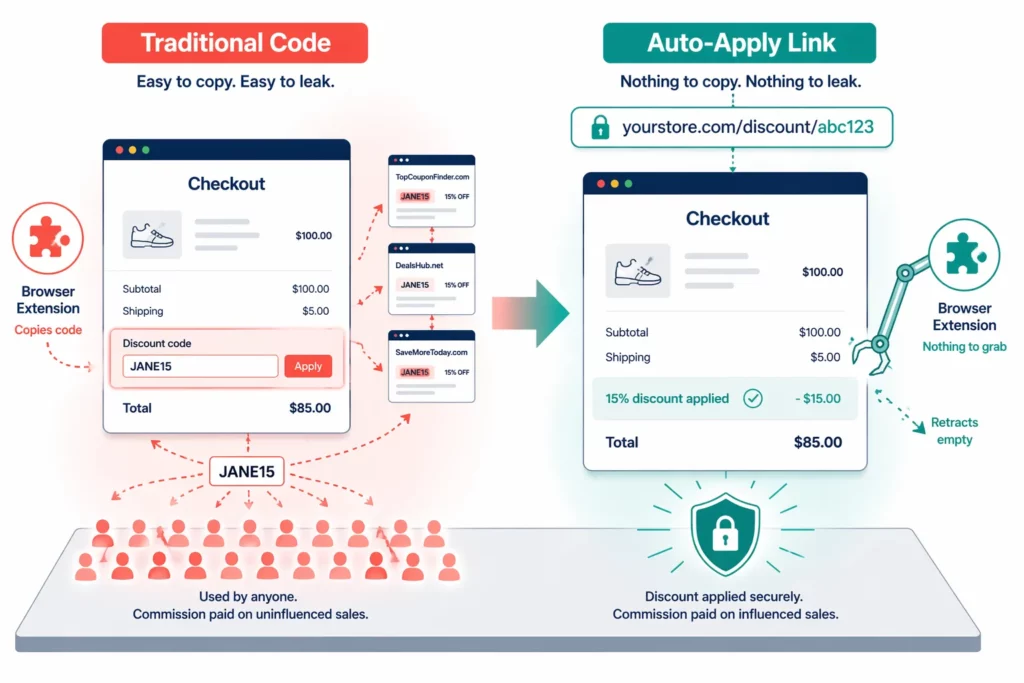
Auto-apply discount links embed the discount directly into the affiliate URL. Customers click, and the discount appears at checkout with no code to type, leak, or scrape.
- Leak protection: No visible code means nothing for browser extensions to capture
- Checkout friction: Zero extra steps vs. 3–4 steps with manual codes
- Conversion lift: Less friction at checkout leads to measurably higher completion rates
- Trade-off: Requires a clickable link — doesn’t work for audio-only channels like podcasts
- Solution: Hybrid approach — auto-apply for web channels, single-use codes for audio
Traditional affiliate coupon codes have a design flaw that no amount of blocking can fix: the code itself is public.
The moment a customer types “JANE15” at checkout, browser extensions detect it, save it, and broadcast it to their entire user base.
Honey, the most prominent of these extensions, had over 20 million Chrome users before a December 2024 expose changed everything.
The expose showed Honey was overriding affiliate links and hiding the best codes from users.
Honey has since lost millions of users, and Rakuten terminated its network access in January 2026. But dozens of similar tools still work the same way.
Meanwhile, 62% of online shoppers search for promo codes before completing a purchase (eMarketer, 2025). Every one of those searches is a chance for a leaked affiliate code to surface.
Auto-apply discount links solve this at the root.
Instead of sharing a code anyone can copy, affiliates share a link with the discount built in. No visible code means nothing to scrape, share, or leak.
In this article, let us compare both approaches across 12 criteria, explain how auto-apply works, and walk you through a migration plan.
How Do Traditional Coupon Codes Work — And Where Do They Fail?
Traditional affiliate coupon codes follow a simple model.
Each affiliate receives a unique code, like JANE15, and shares it with their audience. When a customer enters that code at checkout, the affiliate earns a commission.
The model is popular for good reasons: it works on every channel — including audio and video where links can’t be clicked. Setup takes minutes, and both merchants and affiliates understand it right away.
However, there are three structural weaknesses that undermine it.
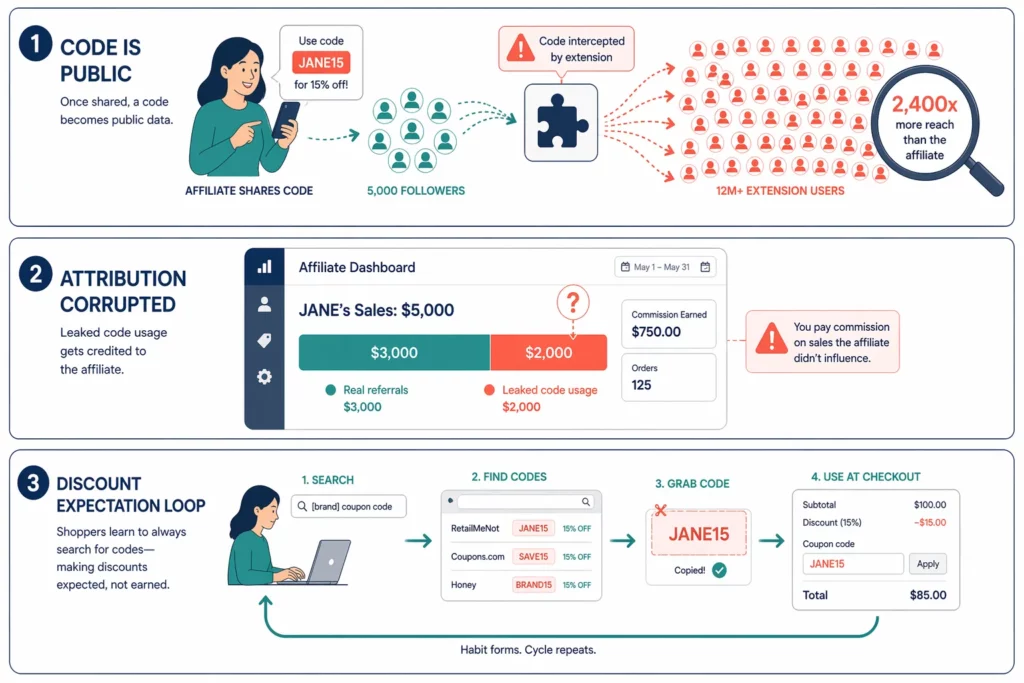
▶️ The code is public information. When one customer types JANE15 at checkout, extensions like Honey detect it, store it, and share it with millions of other shoppers.
A code designed for JANE’s 5,000 followers becomes available to anyone running a coupon browser extension.
▶️ Attribution data becomes unreliable. Your dashboard says JANE drove $5,000 in sales. But if $2,000 came from extension users who never saw her content, you don’t know her real value.
Every investment decision based on that data carries a built-in error.
▶️ Customers learn to search before buying. When shoppers discover they can always find a code, they start Googling “[brand] coupon code” before every purchase.
Traditional codes feed this habit instead of breaking it. Every one of those searches is a chance for leaked codes to show up.
How Do Auto-Apply Discount Links Work?
Auto-apply discount links change the core mechanic. Instead of you giving affiliates a code to share, the discount lives inside the affiliate’s tracking link itself.
Here’s the five-step flow:
- Merchant sets the rule: “Apply 15% off when a customer clicks any affiliate link.”
- App generates the link: Each affiliate gets a unique URL with the discount built in.
- Affiliate shares the link on their blog, email, or social media — no code needed.
- Customer clicks and shops. A banner confirms: “15% discount applied ✓.”
- Customer checks out. The discount is already there. The affiliate earns commission.
The core mechanic ties the discount to the link click, not to a typed code. UpPromote calls it Anti-leak Discount , meaning the discount shows at checkout only when a customer arrives through a tracked affiliate link.
Coupon extensions scan the checkout page for code input fields. With auto-apply, there is no code field to scan. The discount lives in the URL parameter, invisible to any tool that scrapes text codes.
A customer who visits your store directly — without clicking the affiliate link — pays full price. No code exists to share, Google, or paste from a coupon site.
The checkout experience changes too. With traditional codes, the customer has to remember the code, type it, fix any typos, and confirm it worked. That’s 3–4 extra steps.
With auto-apply, the discount is already waiting when they reach checkout. Zero extra steps.
Each added step in a checkout flow increases the chance a buyer drops off. Removing the code entry step means fewer abandoned carts and more completed orders.
Auto-Apply Links vs. Traditional Codes: Full Head-to-Head Comparison
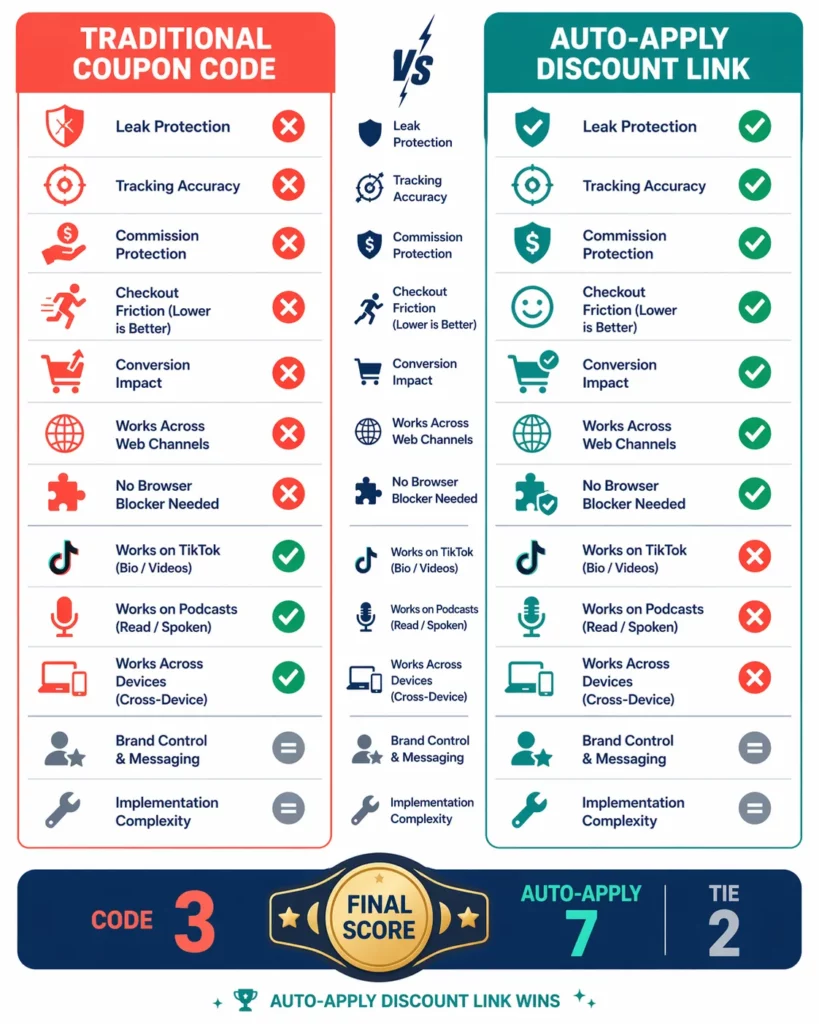
Auto-apply discount links win 7 out of 12 categories in a direct comparison and they sweep every category tied to revenue protection.
Traditional codes only win where the customer hears a code but cannot click a link.
The table below maps each approach across 12 criteria that matter most to merchants running affiliate programs.
| Criteria | Traditional Coupon Code | Auto-Apply Discount Link | Winner |
| Coupon leak risk | High — code is public, extensions scrape it | Near zero — no code to scrape | Auto-Apply |
| Tracking accuracy | Corrupted by leaked usage | Accurate — only genuine clicks count | Auto-Apply |
| Commission accuracy | Pays out on non-affiliate usage | Pays only for real referrals | Auto-Apply |
| Checkout friction | 3–4 extra steps (remember, type, retry) | Zero extra steps (pre-applied) | Auto-Apply |
| Conversion rate impact | Neutral to negative (added friction) | Positive (less friction) | Auto-Apply |
| Works on blogs, email, YouTube | Yes (type code) | Yes (click link — even better) | Auto-Apply |
| Works on TikTok video | Yes (say code aloud) | Limited (“link in bio” needed) | Code |
| Works on podcasts (audio) | Yes (say code aloud) | No (requires a click) | Code |
| Works cross-device | Yes (code stays in memory) | Limited (link lives on one device) | Code |
| Setup complexity | Very low | Low (one toggle in app) | Tie |
| Affiliate onboarding | Very easy (“share code JANE15”) | Easy (“share your personal link”) | Tie |
| Need a separate extension blocker app? | Yes ($8–$299/mo extra) | No — not needed | Auto-Apply |
Auto-apply wins every category tied to revenue: leak protection, tracking , and commission accuracy . It also wins on checkout experience and conversion rate.
Meanwhile, traditional codes only win on audio and verbal channels, podcasts, TikTok videos, and in-person events, where the customer listens but cannot click.
That split points to a clear setup. Use auto-apply as the default for every channel where a link works. Reserve codes only for affiliates whose audience listens instead of reads.
What Happens When Merchants Switch to Auto-Apply?
Three changes show up in the data when merchants move from traditional coupon codes to auto-apply discount links: commission waste drops, conversion rates climb , and attribution data becomes trustworthy .
Commission Waste Drops
When codes are public, a share of “affiliate” orders come from shoppers who found the code through an extension or a Google search — not through the affiliate’s content. You pay commission on those orders even though the affiliate didn’t drive them.
Auto-apply removes that leak path. No public code means extensions have nothing to capture, and coupon search sites have nothing to list.
Conversion Rates Climb
Every extra step in a checkout flow gives the buyer another chance to leave. Code-based discounts add 3–4 steps: recall the code, type it, fix typos, confirm it applied.
Auto-apply removes all of those steps. The discount is waiting at checkout the moment the customer arrives through the affiliate link.
Less friction means fewer abandoned carts. Merchants who remove the code entry step report higher completion rates on affiliate-referred orders.
Attribution Data Becomes Trustworthy
With traditional codes, your dashboard blends genuine affiliate sales with leaked-code sales. You can’t tell which affiliates are valuable and which ones look good only because extensions spread their code.
After switching, the numbers clean up. If Jane’s link generates $3,200 in sales, that’s $3,200 of genuine referral traffic. No inflation from leaked codes means every dollar in your dashboard reflects real affiliate performance.
For example, you can imagine what these shifts look like in practice for a mid-size store running $25,000/month in affiliate revenue.
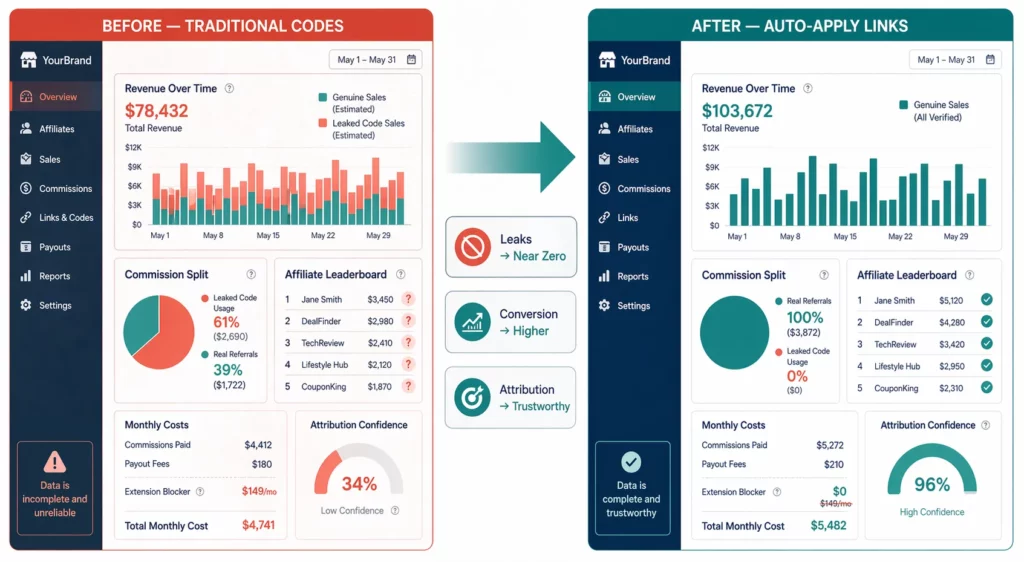
| Metric | Before (Traditional Codes) | After (Auto-Apply Links) |
| Leaked orders (estimated) | A significant share of affiliate orders | Near zero |
| Commission accuracy | Inflated by non-affiliate usage | Reflects genuine referrals only |
| Affiliate conversion rate | Baseline | Higher (fewer checkout steps) |
| Attribution reliability | Mixed — genuine + leaked blended | Clean — each sale traced to a real click |
| Extension blocker needed? | Yes ($8–$299/mo) | No |
| Affiliate satisfaction | Mixed (disputes over leaked orders) | Higher (accurate credit for their work) |
One cost also disappears. Merchants using traditional codes often add an extension blocker app that blocks Honey-style injection at checkout. Those apps run $8–$299/month.
How Do You Handle Channels Where Customers Can’t Click a Link?
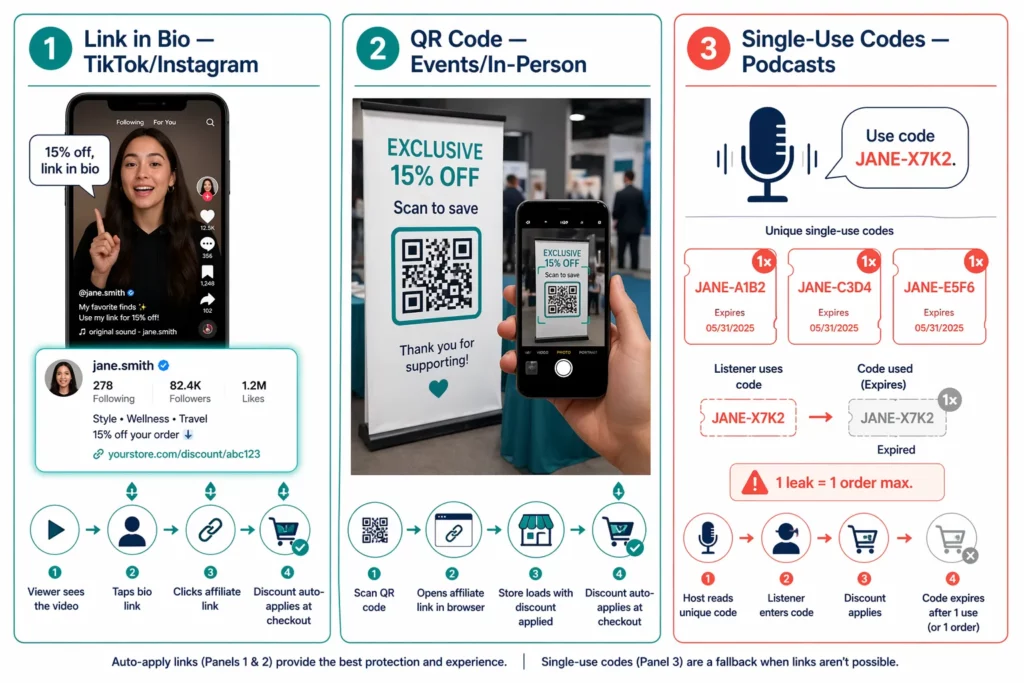
Auto-apply discount links need one thing traditional codes don’t: a click. That creates a gap on three channel types: TikTok videos, podcasts, and in-person events.
On all three, the audience watches, listens, or meets face-to-face, but never taps a link.
Don’t worry, a hybrid approach closes that gap without giving up leak protection.
📌Link in bio (TikTok and Instagram video). The affiliate mentions the discount in their video and directs viewers to the link in their bio.
The viewer taps the bio, clicks the affiliate link, and the discount auto-applies. One extra step compared to saying a code aloud — but zero leak risk and full click tracking.
📌 QR codes (in-person and events). The affiliate displays a QR code on a card, flyer, or booth banner. The customer scans it and lands on the store through the affiliate’s tracked link.
Most affiliate apps and free QR generators can create these in seconds.
📌 Single-use backup codes (podcasts). For podcast hosts who need to say a code on air, issue a batch of unique single-use codes. Each code works once and expires after use.
If one leaks, the damage is capped at a single order. A podcast host might receive 50 codes per month — one per episode mention.
In the table below, we suggest mapping each channel type to the right method.
| Channel | Primary Method | Backup |
| Blogs, email, YouTube | Auto-apply link | — |
| Instagram feed and stories | Auto-apply link (bio or sticker) | — |
| TikTok | Auto-apply link (bio) | Single-use code if needed |
| Podcasts | Single-use code | Link in show notes |
| In-person events | QR code (routes to affiliate link) | Single-use code |
Auto-apply covers roughly 80% of affiliate channels. Single-use codes and QR codes handle the rest.
The key constraint is: never issue a reusable public code when a link or single-use alternative exists.
How to Migrate from Traditional Codes to Auto-Apply Links
Switching from coupon codes to auto-apply links is not a one-click change.
It takes about two weeks, and the biggest hurdle is communication: telling your affiliates what’s changing and why it benefits them.
We recommend you five steps to cover the full transaction.
Five steps cover the full transition.
Step 1: Enable auto-apply discount in your affiliate app
If you use UpPromote, the Anti-leak discount setting is available on the Professional plan. Configure the discount percentage or fixed amount per program, then save.
Test it yourself before going further. Click an affiliate link, browse the store, and confirm the discount shows at checkout without entering a code.
Step 2: Notify your affiliates
Send one clear email that frames the change as an upgrade, not a restriction.
A subject line like “Your earnings just got more accurate” works well.
Then, explain the change in plain terms: their audience gets the same discount, but now it applies the moment someone clicks their link. No code typing needed.
Let them know where to find their new link in the dashboard.
Step 3: Phase the transition over two weeks
Week one, enable auto-apply for new affiliates only. Existing affiliates keep their codes while they update their content. Week two, migrate existing affiliates and deactivate old codes.
Step 4: Handle audio-channel affiliates separately
Podcast hosts and TikTok creators who mention codes on air need a backup. Issue them a batch of single-use codes — one per episode or video. Their web content still uses the auto-apply link.
Step 5: Monitor the first month
Google “[your brand] coupon code” and compare the results to what you saw before the switch. Check whether affiliate conversion rates are climbing and whether commission disputes are dropping.
All three signals should improve within the first few weeks.
Frequently Asked Questions
Does auto-apply reduce average order value?
No — the opposite tends to happen. When a discount appears pre-applied at checkout, customers feel like they’d lose a deal by leaving. That sense of commitment often leads to higher completion rates and, in many cases, slightly larger carts as shoppers add items to maximize the discount.
Which affiliates are most likely to push back on the switch?
Podcast hosts and TikTok creators who are used to saying a code on camera or on air. The fix is a hybrid setup: auto-apply links for all written content, single-use codes for verbal mentions. Frame the change as better credit — their genuine referrals now get full attribution instead of sharing it with coupon extensions.
Do customers notice any difference?
Customers see a banner or notification at checkout confirming the discount — for example, “15% discount applied.” The experience is smoother than typing a code, and most shoppers prefer it. No negative feedback from the customer side has been a consistent pattern in merchant reports.
If a customer shares the auto-apply link with a friend, is that a leak?
Not in the way that matters. The friend clicks the same affiliate link, so the original affiliate still gets credit for the sale. Extensions can’t scrape the discount because no code text exists. Organic link sharing is word-of-mouth — a positive signal, not a leak.
Does auto-apply affect Google Shopping or paid ad traffic?
No. The discount only triggers when a customer arrives through a tracked affiliate link with specific parameters. Visitors from Google Shopping, Facebook ads, or organic search land on the same product page but see full price. The parameters control who gets the discount.
My affiliate app doesn’t support auto-apply. What are my options?
Three paths: switch to an affiliate app that offers link-based discount protection, add a separate extension blocker to reduce code scraping, or replace reusable codes with single-use codes that expire after one use. The first option gives the most complete protection.
How long before leaked codes disappear after switching?
Most merchants see results within the first week. Once you deactivate old codes, they stop working at checkout. Coupon sites may still list them for a while, but customers who try them will see “invalid code” — and extensions will stop surfacing codes that no longer work.
What does migration cost?
The technical switch is free in most affiliate apps that support auto-apply — the setup takes 15–30 minutes. The ongoing cost depends on your app’s pricing tier for the auto-discount feature. The return typically outweighs the cost within the first month through reduced commission waste and eliminated blocker app fees.

Ellie Tran, a seasoned SEO content writer with three years of experience in the eCommerce world. Being a part of the UpPromote team, Ellie wants to assist Shopify merchants in achieving success through useful content & actionable insights.Ellie's commitment to learning never stops; she's always eager to gain more knowledge about SEO and content marketing to create valuable content for users. When she's not working on content, Ellie enjoys baking and exploring new places.

![How to Use Shopify Functions with Your Affiliate Program [2026 Guide]](https://static.uppromote.com/wp-content/uploads/2026/06/how-to-use-shopify-functions-with-affiliate-program-300x169.webp)

![How to Prevent Affiliate Fraud on Shopify: Self-Referral, Coupon Abuse & More [2026]](https://static.uppromote.com/wp-content/uploads/2026/06/how-to-prevent-affiliate-fraud-on-shopify-300x169.webp)