TL;DR
Affiliate tracking on Shopify runs on three methods — affiliate links for web channels, coupon codes for social and audio, and server-side tracking as a cookieless backup. And most stores should use links and coupons together.
- Attribution default: Last-click — the final touchpoint gets 100% credit
- Cookie duration: 30 days covers most product types
- Anti-leak: Auto-discount links replace public coupon codes
- Before launch: Test link tracking, coupon tracking, and priority conflicts
- Biggest risk: Skipping the test — tracking errors surface as affiliate disputes
Accurate tracking is the foundation of every affiliate program. When tracking breaks, two things happen: affiliates lose credit for sales they drove, or you pay commission on sales no affiliate influenced.
Both outcomes cost money, but the first one costs affiliates, and frustrated affiliates leave.
The harder problem is that most tracking guides stop at “ install an app and generate links .” They skip the part where tracking fails: ad blockers, device switching, Safari cookie restrictions, coupon code leaks.
That gap is where most programs lose money.
This guide covers what to do when tracking breaks — the full tracking stack:
- Three tracking methods compared
- Attribution models explained
- Cookie duration settings by product type
- A 10-step test checklist
- Eight common tracking issues with fixes
How Does Affiliate Tracking Work on Shopify? (The Mechanics)
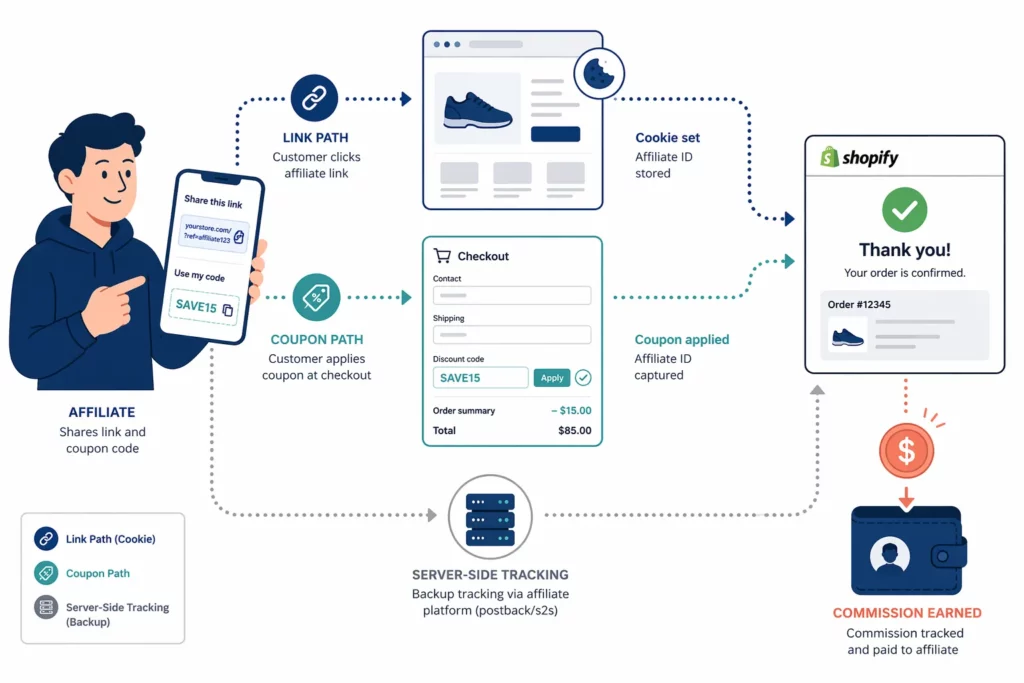
Affiliate tracking on Shopify follows four steps.
The affiliate receives a unique identifier, the customer interacts with it, the affiliate app records the event, and a completed purchase triggers commission.
A third-party app handles the entire loop. Shopify supplies order data through webhooks, but the app owns the tracking logic — who gets credit, how much, and when.
The most common identifier is a unique URL. Each affiliate receives a link — like yourstore.com/?sca_ref=789.sarah — and shares it on blogs, in emails, or in YouTube descriptions.
When a customer clicks that link, the app drops a first-party cookie on their browser. That cookie holds the affiliate’s ID and a timestamp. A customer who returns weeks later and buys still earns the affiliate credit.
Coupon tracking skips the cookie entirely.
Instead of a URL, each affiliate gets a unique discount code like SARAH15. They share it on channels where clicking isn’t an option — TikTok videos, podcast mentions, or Instagram captions.
When a customer enters that code at checkout, the app matches it to the affiliate. No click needed, no cookie involved, just a code and a completed order.
Both paths lead to the same result — a matched commission — but they differ at every step before it.
| Step | Affiliate Link Flow | Coupon Code Flow |
| 1 | Affiliate shares unique URL | Affiliate shares unique discount code |
| 2 | Customer clicks link | Customer enters code at checkout |
| 3 | App sets first-party cookie on browser | App matches code to affiliate |
| 4 | Customer browses, adds to cart | Customer browses, adds to cart |
| 5 | Checkout → app detects cookie | Checkout → app detects code |
| 6 | Commission attributed ✅ | Commission attributed ✅ |
The critical difference is what happens between click and checkout.
Link tracking depends on a browser cookie, which can expire or fail when browsers block it. Coupon codes bypass that; the customer carries the code, not the browser.
Shopify doesn’t handle affiliate tracking directly — its role is infrastructure. Webhooks notify the app when orders complete or when customers refund them, the checkout passes discount code data, and order details feed commission calculations.
The affiliate app sits on top of that system. It generates links and codes, records clicks, sets cookies, and matches every order to the right affiliate.
Once the app confirms a match, the commission enters a pending state. Most programs hold commissions for 30–60 days before payout, long enough to catch refunds and chargebacks.
3 Tracking Methods Compared: Links vs Coupons vs Direct
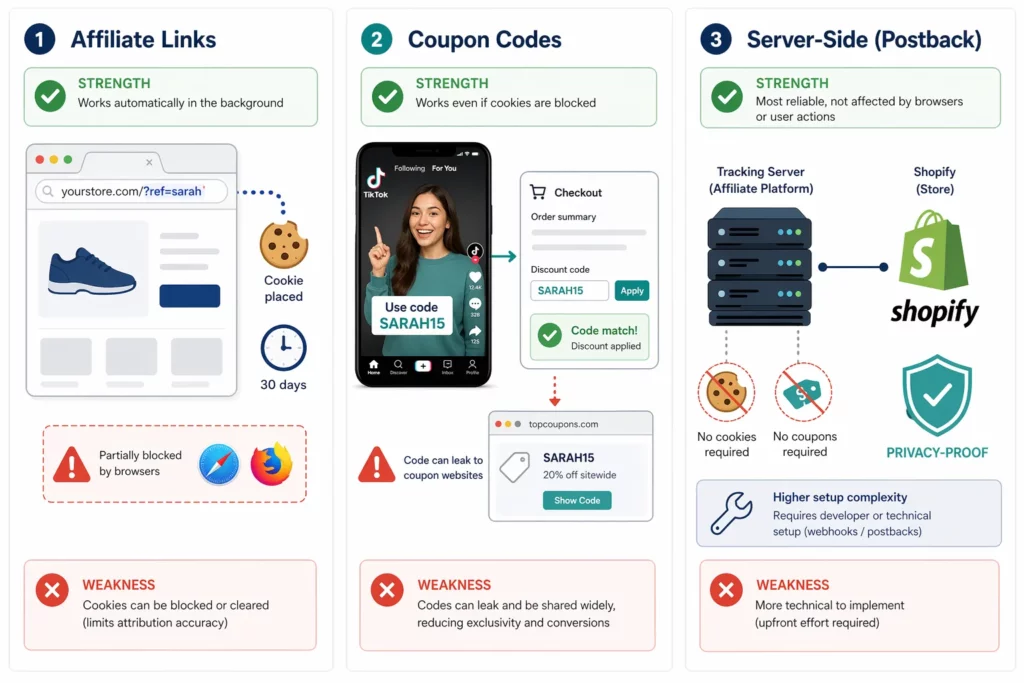
Affiliate tracking on Shopify runs on three methods. Link tracking sets a browser cookie on click, coupon tracking matches a code at checkout , and server-side tracking works without cookies.
Most stores need links and coupons together. Server-side adds a backup layer when browsers block or restrict cookies.
Each method handles browser privacy, cross-device behavior, and coupon leak risk in its own way.
| Feature | Affiliate Links | Coupon Codes | Server-Side Tracking |
| How it works | Unique URL per affiliate → cookie set on click | Unique discount code per affiliate → match at checkout | First-party data → server-level match |
| Cookie required? | Yes | No | No |
| Blocked by ad blockers? | Possible (script-dependent) | No | No |
| Affected by Safari ITP? | Yes (7-day cap on some cookies) | No | No |
| Works across devices? | No (cookie stays on one browser) | Yes (customer remembers the code) | Yes (server-side) |
| Coupon leak risk? | Low | High (codes spread to aggregator sites) | Low |
| Best channels | Blog, email, YouTube, website | TikTok, Instagram, podcasts, events | All (requires advanced setup) |
| Setup complexity | Low (auto-generated) | Low (auto-generated) | Medium to high |
Affiliate Links (URL Tracking)
The “cookie required” row in the table is the defining tradeoff of link tracking.
A cookie lets the app follow a customer for days after the first click. But tracking then lives or dies with the browser.
Each affiliate gets a unique URL. When a customer clicks, the app sets a first-party cookie holding the affiliate’s ID and a timestamp. Any purchase within the cookie window (typically 30 days) credits that affiliate.
The limitation is browser-dependent. Safari’s Intelligent Tracking Prevention (ITP) caps first-party cookies at seven days, and ad blockers can interfere with tracking scripts.
Cross-device gaps are another weak spot. A customer who clicks on mobile but completes the purchase on desktop loses the cookie, and the affiliate loses credit.
Coupon Codes (Discount Code Tracking)
Where link tracking depends on a browser, coupon tracking depends on the customer remembering a code. That tradeoff makes it immune to every browser restriction in the table above.
Each affiliate gets a unique discount code like SARAH15 or FITCLUB20. Customers enter it at checkout, and the app matches the code to the affiliate.
Codes work where links can’t, such as TikTok videos, podcast mentions, Instagram captions, and in-person events. The customer remembers the code and enters it at checkout on any device.
The risk is leaks. Codes can land on coupon aggregator sites like Honey or RetailMeNot. When they do, you pay commission on sales the affiliate didn’t drive.
The most reliable fix is removing the code from public view entirely. Some apps handle this by applying the discount through the affiliate link rather than a typed code.
Server-Side Tracking (Cookieless)
Both links and coupons carry a dependency. One on the browser, the other on human memory. Server-side tracking removes both by matching purchases to affiliates at the server level using first-party Shopify order data.
No cookie, no code — just a direct match between the order and the affiliate ID on the server.
The approach is still maturing. Most Shopify affiliate apps offer partial support, and full setup requires more technical work than links or coupons.
But as browsers keep tightening cookie restrictions, server-side tracking is becoming the long-term fallback for accurate attribution.
Key Takeaway: Use links and coupons together — links for web channels where customers click, codes for social and audio channels where they don’t. If your affiliate app supports server-side tracking, enable it as a privacy-proof backup.
How to Choose the Right Tracking Method for Each Channel
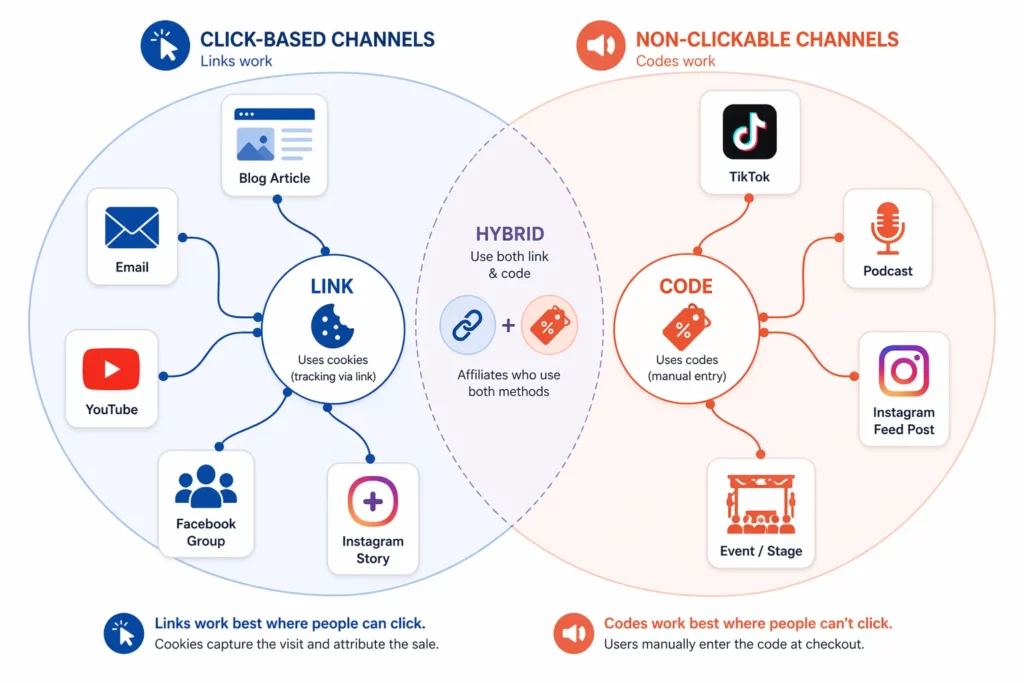
The right tracking method depends on how the audience interacts with content.
Blog, email, and YouTube audiences click links. TikTok, podcast, and Instagram audiences hear or see a code.
Choosing one method for the entire program is a common mistake. Most affiliates promote on multiple channels at once, links in blog posts, codes on TikTok, QR codes at events.
The match comes down to one question: can the customer click, or do they need to remember something?
The following table maps ten common channels to the right answer.
| Channel | Best Method | Why | Setup Tip |
| Blog posts | Link (embedded) | Readers click inline links → cookie tracks purchase | Use deep links to product pages, not the homepage |
| Email newsletters | Link (CTA button) | Click tracking is precise in email | Add unique UTM parameters per affiliate per campaign |
| YouTube | Link (description box) | Viewers click the link in the video description | Place the link in the first line of the description (above the fold) |
| Instagram Feed | Code (caption) + Link (bio) | Feed posts don’t support clickable links in captions | “Link in bio” + code in caption = dual tracking |
| Instagram Stories | Link (sticker) | Stories support clickable link stickers | Link sticker preferred over verbal code |
| TikTok videos | Code (verbal / text overlay) | Viewers hear the code — they don’t click | Keep codes short and memorable: “SARAH15” |
| Podcasts | Code (verbal mention) | Listeners hear the code — no screen to click | Easy to pronounce, mentioned at least twice per episode |
| Facebook groups | Link (post) | Groups allow clickable links in posts | Use full-length links — groups trust transparent URLs |
| In-person / Events | Code or QR code | No digital click point available | QR code redirects through the affiliate link → best of both |
| TikTok Shop | Platform native + Code | TikTok Shop has built-in affiliate tracking | Integrate native tracking + backup coupon code |
The pattern in the table is consistent.
Links dominate every web-based channel. Codes dominate every channel where the audience listens, watches, or meets in person.
Instagram is the one exception. Feed posts don’t allow clickable links in captions, so affiliates need a code there. However, stories support link stickers — link tracking is the better choice for that format.
Those two realities are why the hybrid approach works best. Give every affiliate both a link and a code, and let them pick the method that fits each promotion.
The only open question is what happens when both methods appear in the same order, one affiliate’s link and another’s code at checkout. That conflict depends on tracking priority, which the section on tracking priority covers.
Attribution Models: Who Gets Credit When Multiple Affiliates Contribute?
When multiple affiliates touch a customer before purchase, the attribution model decides which one earns commission.
There are three models.
Last-Click gives credit to the final touchpoint, First-Click rewards the affiliate who introduced the customer, and Linear splits credit across every affiliate involved.
The question of credit only matters when journeys involve more than one affiliate, but for active programs, that’s most journeys.
The three models split credit along one axis: timing.
| Model | Who Gets Credit | Strength | Weakness | Best For |
| Last-Click (default) | The final affiliate the customer interacted with before purchase | Simple, clear, easy to explain | Doesn’t reward affiliates who introduced the customer first | Most stores |
| First-Click | The affiliate who introduced the customer | Rewards discovery and top-of-funnel reach | The closing affiliate gets nothing | Stores prioritizing new-customer acquisition |
| Linear / Multi-Touch | Split evenly across every affiliate touchpoint | Fair to every contributor | Complex; commission per affiliate gets diluted | Enterprise programs with long decision cycles |
Picture this scenario.
A customer reads a blog review on Day 1 and watches a YouTube unboxing on Day 5. On Day 12, they see an Instagram Story with code “CHRIS10” — and buy.
Each model lands on a different affiliate.
Last-Click sends 100% to the Instagram creator. First-Click sends 100% to the blogger who started the journey. Linear splits the commission three ways, blogger, YouTuber, Instagram creator, at roughly 33% each.
Last-Click is the standard for one practical reason : it ends disputes before they start. The affiliate who closes the sale earns the commission, and there’s no debate about whose contribution mattered most.
First-Click flips that incentive. It’s worth considering when the program’s job is acquiring new customers rather than converting existing ones. Bloggers and YouTubers who introduce your brand earn the credit; coupon-site closers don’t.
Pairing First-Click with a higher commission rate for new customers is a common play. UpPromote’s New customer commission feature handles the second half: it detects whether the buyer has ordered before and applies a different rate.
Linear sits at the complex end . Most Shopify affiliate apps don’t support it natively. Even when they do, splitting commission across three affiliates leaves each with a fraction too small to motivate.
How to Set Cookie Duration (And Why It Matters More Than You Think)
Cookie duration controls how long after a click an affiliate still earns commission.
Most stores default to 30 days. This covers the typical purchase decision window, but high-ticket products need longer, and impulse buys need shorter.
The right window depends on how long your customers take to decide. Setting it too short loses affiliates credit on legitimate sales; setting it too long pays commission on purchases the affiliate didn’t drive.
Here’s s simple rule mapping cookie length to product price and decision cycle.
| Product Type | Recommended Cookie | Decision Cycle |
| Impulse (under $30) | 7–14 days | Minutes to hours |
| Standard ($30–$100) | 30 days | Days to one week |
| Considered ($100–$300) | 45–60 days | One to three weeks |
| High-ticket ($300–$1,000) | 60–90 days | Two to six weeks |
| Very high-ticket ($1,000+) | 90 days | One to three months |
The decision cycle in the right column drives the recommendation in the middle.
An impulse buyer converts in hours, so a 7-day cookie captures almost every sale. A high-ticket buyer researches for weeks, so a 30-day cookie would miss the purchase entirely.
Cookie length also has a recruitment effect, independent of the math.
Affiliates read “60-day cookie” as a sign of a generous program, which makes it easier to recruit them, especially for high-ticket niches where they know decisions take time.
Cookie length is one variable you control. The browser is the other, and it often overrides what the app sets.
| Browser | Cookie Policy | Impact on Tracking |
| Safari (ITP) | Third-party cookies blocked. First-party cookies capped at 7 days. | Affiliate apps using third-party cookies lose tracking after 7 days |
| Firefox (ETP) | Third-party cookies blocked by default | Similar to Safari for cookie-dependent tracking |
| Chrome | Third-party cookie deprecation in progress | Long-term shift toward first-party tracking |
| Edge | Follows Chrome’s policy | Similar Chrome behavior |
The first three rows tell the same story: third-party cookies are dying, and first-party tracking is the only durable option.
Affiliate apps that already use first-party cookies survive these restrictions. Apps that don’t lose tracking accuracy on every Safari and Firefox session.
How to Set Up Tracking Priority (When Link and Coupon Conflict)
A customer can click one affiliate’s link AND use a different affiliate’s code in the same order. Only one of them earns the commission. Tracking priority is the setting that decides which one.
The conflict happens more often than expected.
Affiliates promote in overlapping channels and customers compare deals before buying. A single order can carry both a cookie from Day 1 and a code entered at checkout on Day 5.
Each setting changes who wins that overlap.
| Priority Setting | Who Gets Credit | Best For | Trade-off |
| Last interaction wins (default) | The affiliate at the final touchpoint — usually the coupon code at checkout | Most stores — simplest to explain | First-touch affiliates feel under-rewarded |
| First interaction wins | The affiliate the customer interacted with first — usually the link click | Stores prioritizing discovery and acquisition | Closing affiliates feel under-rewarded |
| Link wins over Coupon | The affiliate whose link set the cookie, regardless of which code is used | Stores with coupon leak problems | Coupon-driven affiliates lose credit on real referrals |
| Coupon wins over Link | The affiliate whose code is entered at checkout, regardless of which link was clicked | Stores using strict coupon-per-affiliate tracking | Link-driven affiliates lose credit when codes overlap |
To see the conflict in motion: a customer clicks Blogger A’s link on Day 1, browses, and leaves. On Day 5, they return and enter Influencer B’s code “BEAUTY15” at checkout.
The same facts produce different winners. Last interaction or “Coupon wins” sends commission to Influencer B; First interaction or “Link wins” sends it to Blogger A.
Most stores get this right by default. Last interaction wins rewards whichever affiliate closed the sale and minimizes disputes — the closing touchpoint is easy to identify.
The case for switching is specific.
Coupon leaks are the most common trigger. When codes spread to aggregator sites, “Link wins over Coupon ” protects the bloggers and email marketers whose tracked clicks brought the customer in.
First interaction wins fits a different goal: rewarding affiliates who introduce new customers rather than those who close existing ones.
Whatever you choose, configure it once and leave it alone. If you use UpPromote, this setting lives under Tracking Settings — the tracking types priority docs cover the setup steps.
How to Prevent Coupon Leaks from Destroying Your Tracking
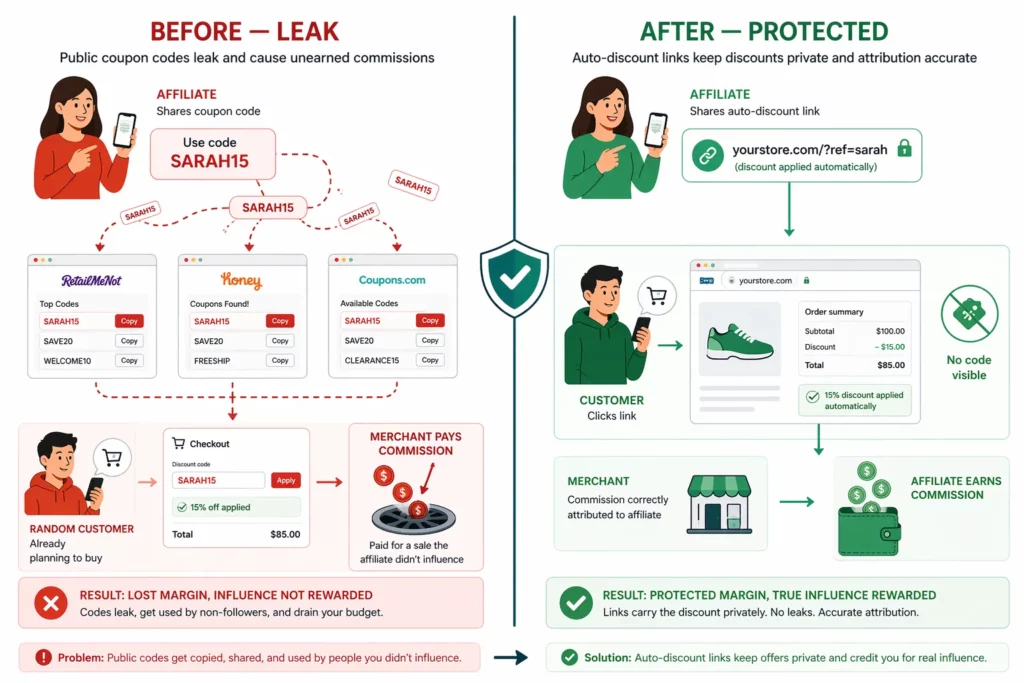
Coupon leaks happen when affiliate discount codes spread to coupon aggregator sites like Honey, RetailMeNot, or Reddit threads.
Once a code lands there, customers who would have paid full price use it instead. You pay commission on a sale the affiliate never influenced.
The mechanic is simple. A customer searches “[your store] coupon code,” finds an affiliate’s discount on an aggregator site, and applies it at checkout. The affiliate gets credit for a sale they had nothing to do with.
Three approaches narrow the leak surface, each removing a different point of failure.
| Solution | How It Works | Effectiveness |
| Auto-apply discount via link | The affiliate shares a link that triggers the discount automatically at checkout. No public code exists. | Highest |
| Single-use codes | Each code works for one order only. A leaked code costs at most one wrong commission. | High |
| Coupon abuse detection | The app flags suspicious code usage patterns — same IP, repeat customers, unusual volume spikes. | Medium |
The first row in the table is the only approach that removes the code. If your affiliate app can apply discounts through the link itself — UpPromote calls this Anti-leak discount — the leak vector doesn’t exist.
The link carries the discount as a tracked parameter. The customer clicks the URL, the discount triggers at checkout, and no code exists to copy.
Even with leak-resistant setup, suspicious patterns still surface — repeat use from the same IP, sudden code-volume spikes, or signups that look automated.
UpPromote’s Fraud detection flags these patterns. You can review and deny flagged orders before any commission goes out.
Or, the simplest sanity check costs nothing and catches most leaks early: search “[your store name] coupon code” in Google once a month.
If your affiliates’ codes show up on Honey, RetailMeNot, or coupon-listing sites, the leak is already live. The fix is switching that affiliate to an auto-discount link.
The Tracking Test Checklist (Do This Before Going Live)
A full tracking test takes 10 to 15 minutes and catches the setup errors that would otherwise surface as affiliate disputes weeks later. Skipping it is the most common mistake new programs make.
The cost of skipping the test is asymmetric. Catching a tracking issue before launch costs nothing. Catching it after means refunding commissions, explaining the error to affiliates, and rebuilding trust with partners who already lost faith in your tracking.
The full test takes 10 to 15 minutes and walks through every tracking path before any real affiliate sees the program.
Pre-test:
☐ Create a test affiliate account (yourself or a team member)
Link tracking tests:
☐ Generate a test affiliate link
☐ Open the link in a fresh browser window (incognito mode)
☐ Add a product to cart and complete checkout
☐ Confirm the order appears in the affiliate dashboard
☐ Confirm the commission amount calculates correctly
Coupon code tests:
☐ Generate a test coupon code
☐ Open the store in a fresh browser, add a product, enter the code at checkout
☐ Complete the purchase and confirm the code-tracked order appears in the dashboard
Edge case tests:
☐ Click an affiliate link, leave without buying, return 24 hours later, then purchase — confirm the cookie still tracks the order
☐ Click Affiliate A’s link, then enter Affiliate B’s coupon at checkout — confirm the correct affiliate gets credit based on your priority setting
Post-test:
☐ Refund the test order and confirm the commission reverses in the dashboard
☐ If everything passes, the program is ready for real affiliates
Most failures fall into one of four categories — and each has a fix that takes minutes once you know what to look for.
| Test Failed | Likely Cause | Fix |
| Order doesn’t appear in dashboard | App not synced with Shopify | Reinstall the app or check Shopify permissions |
| Commission amount is wrong | Commission rate or product exclusions misconfigured | Recheck rate setting and excluded-product list |
| Cookie doesn’t persist | Browser blocking cookies or app using third-party cookies | Confirm the app uses first-party tracking; retest in Chrome |
| Wrong affiliate credited | Tracking priority not configured | Set priority before retesting (see priority section above) |
8 Common Tracking Issues and How to Fix Them
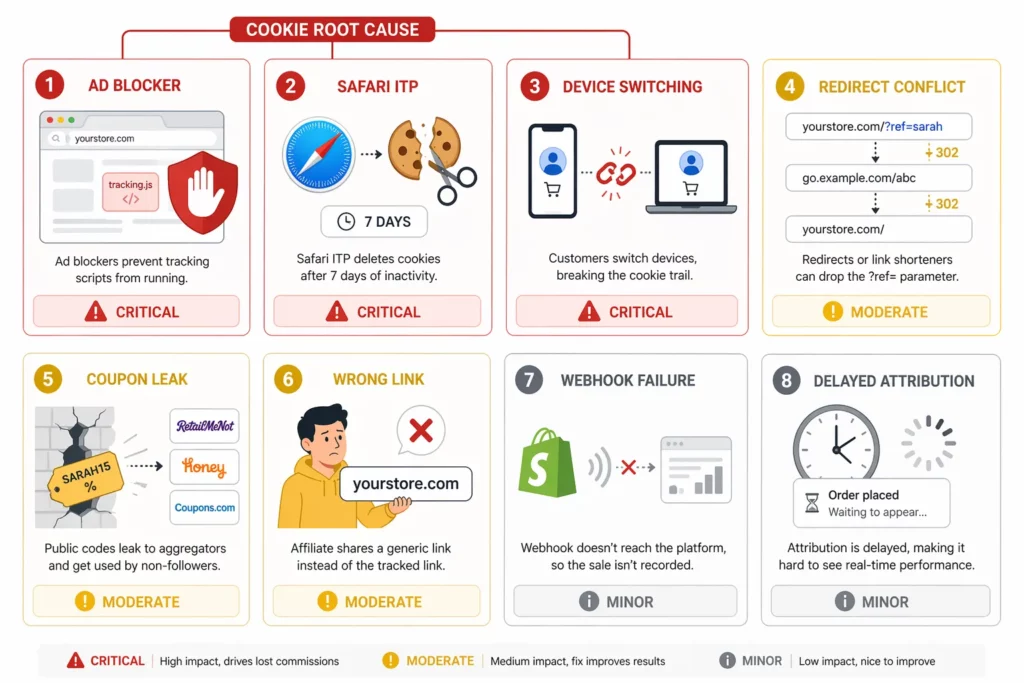
Eight tracking issues cause most of the disputes new affiliate programs face. Browser restrictions and ad blockers cause the largest share.
Device switching, redirect conflicts, and webhook failures show up often enough to plan for too.
According to a 2026 industry survey by NewMedia , 42% of affiliate managers report difficulties with accurate attribution and tracking.
Most tracking failures trace back to three causes:
- Privacy mechanisms (blocked cookies, active ad blockers)
- Setup mistakes (wrong link, priority unset)
- Delivery gaps (missed webhooks, delayed sync)
The patterns below appear in most programs at some point — knowing the symptom shortens the diagnosis from hours to minutes.
| Issue | Symptom | Cause | Fix |
| Ad blockers | Clicks track but orders don’t attribute | Blocker stops the tracking script | Use an app with server-side tracking. Always provide a backup coupon code. |
| Safari ITP | Affiliates lose credit on sales after 7+ days | Safari caps third-party cookies at 7 days | Use an app with first-party cookie tracking. |
| Device switching | Customer clicks on mobile, buys on desktop | Cookie lives on the original browser only | Provide a coupon code backup — codes work across devices. |
| Redirect conflicts | Click registers but tracking parameters disappear | URL redirect strips query parameters | Test every affiliate link end-to-end. Confirm redirects preserve ?ref= parameters. |
| Coupon leak | Commission spike doesn’t match affiliate activity | Code spread to coupon aggregator sites | Switch to auto-discount links or single-use codes. |
| Wrong link shared | Affiliate generates traffic but no commissions | Affiliate copied a generic store URL, not the tracked link | Resend the correct link. Add a “How to share your link” step to the welcome email. |
| Checkout webhook failure | Order completes in Shopify but never reaches the dashboard | Custom checkout or another app blocks the webhook | Check Shopify Settings → Notifications → Webhooks. Reinstall the affiliate app. |
| Delayed attribution | Orders show in Shopify but not yet in the dashboard | Normal sync delay (5–30 minutes) | Wait one hour. If the order still doesn’t appear, contact app support. |
The first three issues in the table share a single root cause: third-party cookies. Browser-blocking issues mostly disappear when the affiliate app uses first-party cookies.
UpPromote , for example, sets tracking cookies on your store’s own domain rather than on a third-party domain. The cookie survives Safari ITP and Firefox ETP that would otherwise block it.
There are four habits prevent most of the remaining issues:
- Provide both a link and a coupon code per affiliate so one method backs up the other when the other fails.
- Pick an app with first-party tracking so browser restrictions don’t degrade attribution.
- Run a monthly audit on five to ten random affiliate orders to verify correct attribution.
- Send affiliates a one-page guide on how to share links correctly so the wrong-link issue never reaches the dashboard.
What Changed in 2026?
Tracking systems for affiliate programs have shifted toward privacy-resistant setups in 2026. The apps that adapted early are the only ones that still work across all browsers.
Four shifts define the landscape, and together they push every program toward first-party tracking and code-free discounts.
Trend 1: First-party tracking is the baseline
First-party tracking is no longer a differentiator; it’s the bare minimum for accurate attribution.
Programs running on third-party cookies lose attribution on every Safari and Firefox session. Most major affiliate platforms migrated to first-party server-side data within the last 12 months.
Trend 2: Browser policy keeps tightening
Apple’s Intelligent Tracking Prevention tightened again in iOS 18. Chrome’s third-party cookie deprecation timeline is treated as inevitable rather than hypothetical.
Any affiliate program built on cookie-only tracking is on a clear expiration clock.
Trend 3: TikTok Shop adds a dual tracking layer
Native TikTok Shop attribution now coexists with third-party affiliate app tracking. Merchants selling on TikTok Shop need to configure both systems and reconcile results across them.
The dual layer isn’t optional for that channel — skip one side and the other captures an incomplete picture.
Trend 4: Auto-discount links become the recommended default
Auto-discount links have moved from nice-to-have to default recommendation across the industry.
Programs that swapped public coupon codes for link-applied discounts saw the biggest drop in coupon-aggregator leakage. The format is now standard advice for new program setups.
Frequently Asked Questions
The same questions surface across most affiliate program setups. The answers below cover the eight that come up most often during launch and the first few months of operation.
Does affiliate tracking slow down my Shopify store?
The performance impact is minimal. Most affiliate apps add a small JavaScript snippet that loads in the background. Modern apps that use server-side tracking add even less weight to the page. The slowdown is too small for shoppers to notice and too small to affect SEO scores.
Do customers know they’re being tracked by affiliate links?
Most don’t notice. The affiliate identifier sits in the URL as a parameter (like ?ref=sarah123 ) — shoppers ignore URL strings. Coupon codes show at checkout, but customers see a discount, not a tracker. GDPR and CCPA require disclosing cookie usage, so add affiliate tracking cookies to your privacy policy.
What happens if a customer uses an ad blocker?
It depends on the affiliate app. Apps using third-party cookies can lose attribution when a blocker stops the tracking script. Apps with first-party tracking and server-side fallbacks survive most blockers. The reliable workaround: give every affiliate both a link and a code — codes are immune to ad blockers.
Do affiliate links expire?
The link itself doesn’t expire — the cookie does. Clicking an affiliate link sets a tracking cookie that lasts for the duration you configure (usually 30 days). After the cookie expires, the link still works, but a new click sets a fresh cookie. The affiliate only loses credit if the original cookie expired before the customer purchased.
If two affiliates promote to the same customer, who gets the commission?
The attribution model decides. Last-Click — the default in most affiliate apps — gives 100% to the affiliate the customer saw last. First-Click gives 100% to the affiliate who introduced the customer. Linear splits commission across every affiliate, but most Shopify apps don’t support it natively.
Does affiliate tracking work with Shopify POS for in-store sales?
Limited support. Most affiliate apps track online orders through the Shopify checkout. POS orders only register if the customer enters an affiliate coupon code at the in-store terminal. The app then matches the code to the affiliate like any online order. Not every affiliate app supports POS integration.
How often should I test affiliate tracking?
Run the full test on first setup, after any tracking-setting change, after an app update, and after a Shopify checkout change. Between full tests, audit five to ten random affiliate orders each month to confirm attribution is correct. A quarterly retest of the full checklist catches drift before it becomes a dispute.
What tracking accuracy is realistic to expect?
No tracking is 100% accurate. Device switching, cookie clearing, and ad blockers always cause some loss — even with first-party tracking. Most well-run programs land in the high-90s on accuracy. Anything below 90% signals a setup problem worth a fix. Treat the lost few percent as a normal cost of digital tracking.

Ellie Tran, a seasoned SEO content writer with three years of experience in the eCommerce world. Being a part of the UpPromote team, Ellie wants to assist Shopify merchants in achieving success through useful content & actionable insights.Ellie's commitment to learning never stops; she's always eager to gain more knowledge about SEO and content marketing to create valuable content for users. When she's not working on content, Ellie enjoys baking and exploring new places.

![How to Use Shopify Functions with Your Affiliate Program [2026 Guide]](https://static.uppromote.com/wp-content/uploads/2026/06/how-to-use-shopify-functions-with-affiliate-program-300x169.webp)

![How to Prevent Affiliate Fraud on Shopify: Self-Referral, Coupon Abuse & More [2026]](https://static.uppromote.com/wp-content/uploads/2026/06/how-to-prevent-affiliate-fraud-on-shopify-300x169.webp)