TL;DR
The most effective way to stop coupon leaks on Shopify is replacing traditional codes with auto-apply discount links. No code means nothing for Honey or RetailMeNot to scrape.
- Biggest threat: Browser extensions that auto-inject scraped codes at checkout
- Best prevention: Auto-apply discount links (eliminates the root cause)
- Second layer: Unique single-use codes for audio-only channels
- Quick win: Extension blocker apps for immediate protection
- Time to fix: Under one week for most Shopify stores
Last month, you paid $2,000 in affiliate commissions. But how many of those sales did your affiliates actually influence?
If your coupon codes show up on Honey, RetailMeNot, or Reddit, the answer might be fewer than you think.
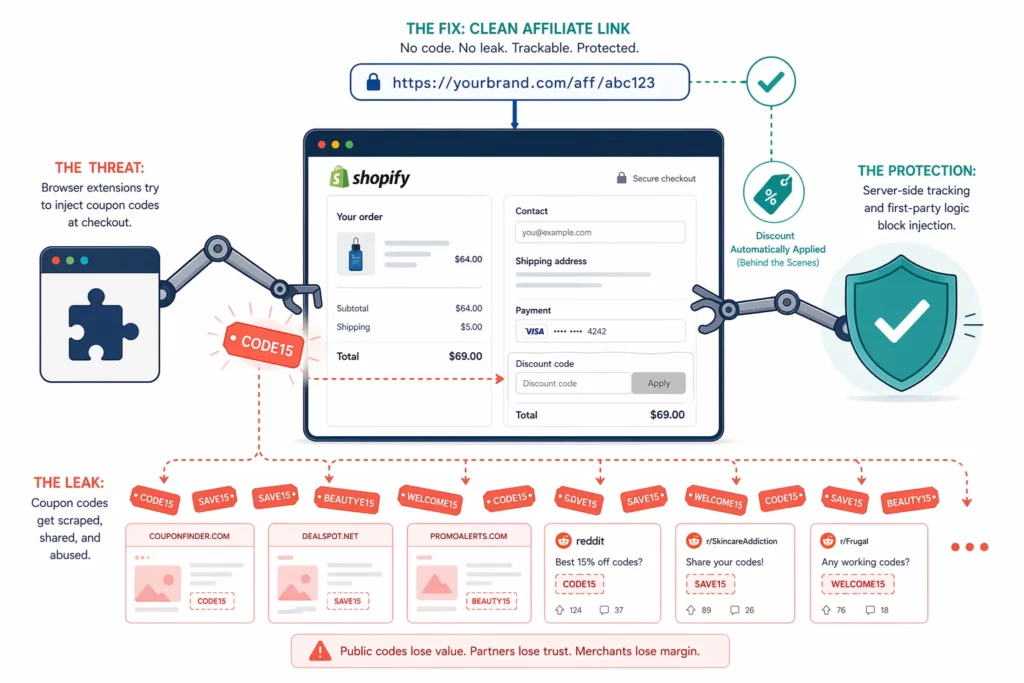
Browser extensions scrape working codes the moment any customer enters one at checkout. Honey alone had 20 million Chrome users before its 2024 controversy and still has roughly 12 million today. Every code that works once gets broadcast to all of them.
The problem extends well beyond a single extension. A CHEQ study found that 17% of all affiliate traffic was fraudulent in 2022, costing the industry an estimated $3.4 billion.
Coupon leaks are one slice of that fraud. And for Shopify merchants running code-based affiliate programs, often the most expensive one.
This guide will break down why leaks happen, ranks five prevention methods by effectiveness, and walk through a setup you can finish in under a week.
What Are Coupon Leaks and Why Should You Care?
A coupon leak happens when an affiliate-exclusive discount code ends up on coupon sites, browser extensions, or public forums.
The result: you pay commissions on sales your affiliates never drove.
The damage runs deeper than lost revenue.
First, your margin takes a direct hit. A customer ready to pay full price gets a leaked code auto-applied by Honey, and you absorb both the discount and the commission.
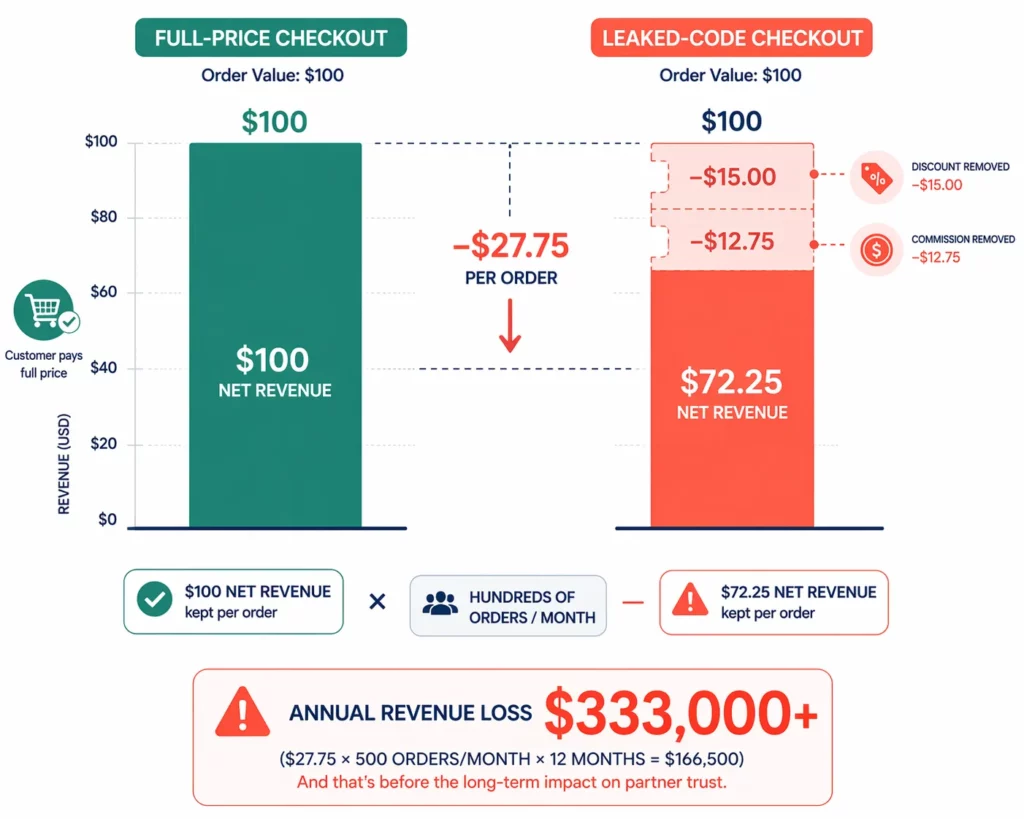
Here is what that looks like on a single $100 order:
| Full-price checkout | Leaked-code checkout | |
| Order value | $100 | $100 |
| Discount applied | $0 | −$15 (15% off) |
| Revenue collected | $100 | $85 |
| Commission owed | $0 | −$12.75 (15% of $85) |
| Net revenue | $100 | $72.25 |
That gap, $27.75 per order, adds up across hundreds of leaked-code orders per month.
Second, your attribution data stops being useful. Leaked codes credit the wrong affiliate for sales they never influenced.
A partner who looks like a top performer may owe most of their numbers to extension users. That makes it impossible to tell which affiliates deserve more investment.
Third, customers learn to expect a discount every time. Once shoppers discover that searching for your brand plus “coupon code” returns a working result, they stop paying full price — permanently.
How Do Coupon Leaks Actually Happen?
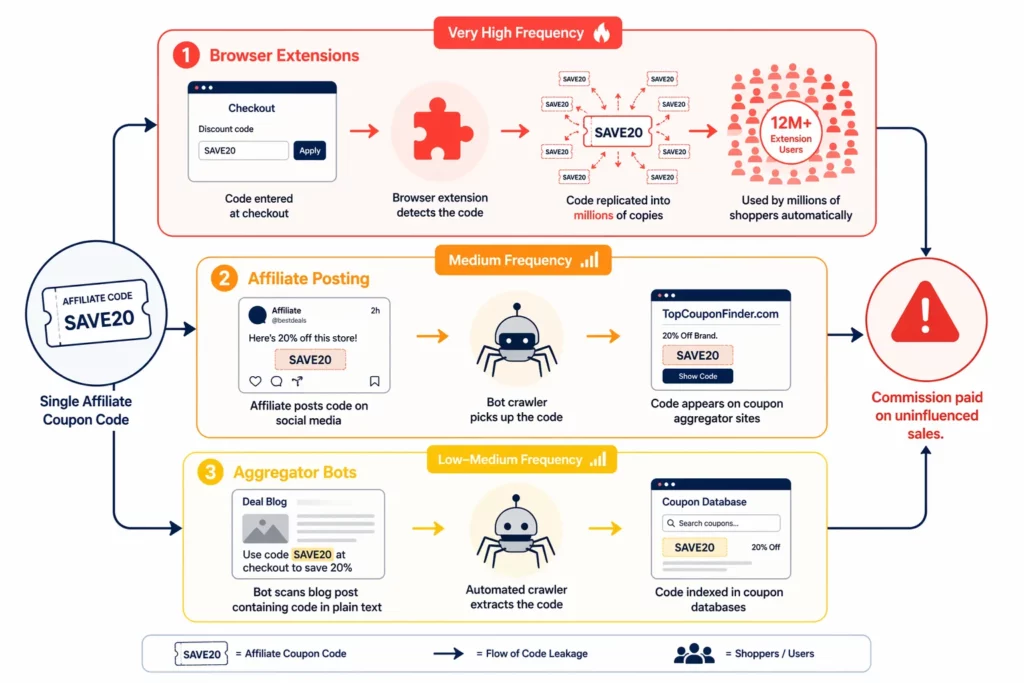
Coupon codes leak through three vectors: browser extensions that scrape codes at checkout, affiliates who share codes publicly, and bots that crawl for discount patterns.
Extensions cause the most damage, and are the hardest to stop.
Browser extensions are the biggest threat
The mechanism is simple.
One customer enters your affiliate’s code “ROBERT15” at checkout, and an extension like Honey detects that the code works.
From that point on, every extension user who visits your store sees a popup offering “ROBERT15” whether Sarah referred them or not.
MegaLag revealed that Honey went further than passive scraping. The extension replaced existing affiliate codes with its own and hid better coupons from shoppers.
Honey has since lost roughly 8 million of its 20 million Chrome users . But extensions like Capital One Shopping and Coupert still operate at scale with millions of active users.
The core problem remains: extensions run on the customer’s browser, outside your control. One successful code entry feeds millions of users.
Affiliates sometimes cause leaks directly
Some affiliates post codes on coupon aggregator sites to inflate their order volume — a form of fraud.
Others leak codes unintentionally by sharing them in public social media posts where bots can crawl and index them.
Aggregator bots handle the rest
Automated crawlers scan the web for text matching common coupon patterns — uppercase letters plus numbers, like ROBERT15 or SAVE20. Even codes in a blog post or email can get indexed if the page is publicly accessible.
Each vector requires a different defense, and they differ sharply in frequency and difficulty:
| Vector | Frequency | Difficulty to block | Best countermeasure |
| Browser extensions | Very high (~12M+ Honey users alone) | Very hard (client-side) | Auto-apply discount links |
| Affiliate posting | Medium | Medium | Terms enforcement + monitoring |
| Aggregator bots | Low–medium | Low | Single-use codes + link-only sharing |
How Much Are Coupon Leaks Costing Your Store?
The exact cost depends on your store size, discount depth, and commission rate.
But even conservative assumptions show that most stores running coupon-based affiliate programs lose thousands per year to leaked codes.
Every leaked order costs you twice: the discount you gave and the commission you owe.
The calculation starts with your monthly orders using affiliate codes. Multiply that by your estimated leak rate, then by the sum of your average discount and commission per order. The result is your monthly leak cost.
Here is a worked example for a mid-size store:
| Input | Value |
| Monthly orders using affiliate codes | 200 |
| Estimated leak rate | 15% |
| Average discount per order (15% off $80 AOV) | $12 |
| Average commission per order (15% of $80) | $12 |
| Leaked orders | 30 |
| Cost per leaked order | $24 |
| Monthly leak cost | $720 |
| Annual leak cost | $8,640 |
At just 15% leak exposure, this store loses $720 per month, or $8,640 per year, on orders that had nothing to do with its affiliates.
That number scales with revenue. The table below applies the same formula across five store sizes, using a 10–20% leak range as a working assumption.
| Monthly revenue | Affiliate orders/mo | Leak rate (est.) | Monthly leak cost | Annual leak cost |
| $5,000 | 50 | 10–20% | $120–$240 | $1,440–$2,880 |
| $10,000 | 100 | 10–20% | $240–$480 | $2,880–$5,760 |
| $25,000 | 250 | 10–20% | $600–$1,200 | $7,200–$14,400 |
| $50,000 | 500 | 10–20% | $1,200–$2,400 | $14,400–$28,800 |
| $100,000 | 1,000 | 10–20% | $2,400–$4,800 | $28,800–$57,600 |
Assumptions: $80 AOV, 15% discount, 15% commission. Leak rate is a working estimate based on coupon extension penetration — not a verified industry benchmark.
These estimates assume an $80 average order, 15% discount, and 15% commission. Your actual numbers will vary, but the pattern holds: even a modest leak rate turns into a meaningful annual cost.
Prevention, by comparison, is inexpensive. Auto-apply discount links are built into most affiliate apps at no extra charge. Dedicated extension blocker apps range from $8 to $299 per month depending on features and store size.
For a store losing $600 or more per month to leaks, almost any prevention tool pays for itself within the first billing cycle.
5 Methods to Prevent Coupon Leaks (Ranked by Effectiveness)
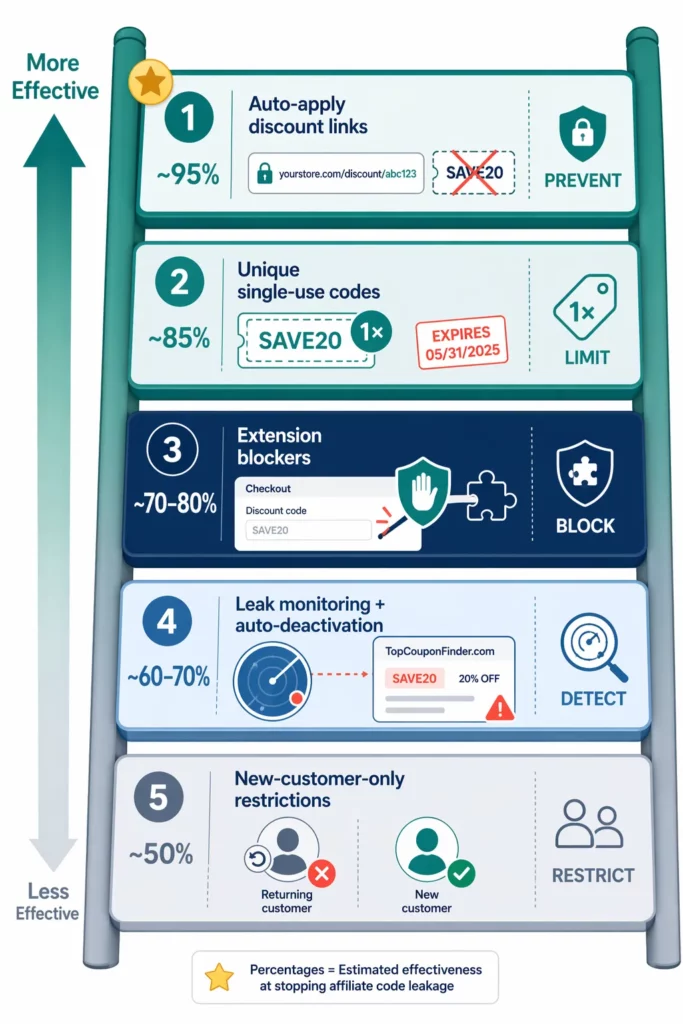
Not all prevention methods are equal.
The five approaches below are ranked by how much they reduce leaks with a clear hierarchy: preventing codes from going public beats detecting leaks after the fact , which beats blocking extensions at checkout.
The ranking reflects that hierarchy, from the method that eliminates the root cause down to the one that only limits damage partially:
| Rank | Method | Est. effectiveness | Approach | Cost |
| 1 | Auto-apply discount links | Very high (~95%) | Prevent — no code exists publicly | Included in affiliate app |
| 2 | Unique single-use codes | High (~85%) | Limit — 1 code = 1 order max | Included in affiliate app |
| 3 | Extension blockers | Medium-high (~70–80%) | Block — stop extensions injecting | $8–299/mo (separate app) |
| 4 | Leak monitoring + auto-deactivation | Medium (~60–70%) | Detect — find leaks, kill codes | $0–99/mo (varies) |
| 5 | New-customer-only restrictions | Moderate (~50%) | Restrict — block repeat customers only | Built-in (Shopify setting) |
Effectiveness estimates reflect each method’s mechanics, not verified benchmarks. Actual results depend on your store’s leak exposure and traffic profile.
The top-ranked method — auto-apply discount links — works differently from the rest. .
Instead of fighting leaked codes, it removes the code from checkout entirely. No code means nothing to scrape, share, or index.
Method #1: Auto-Apply Discount Links (Best — Eliminates Leaks)
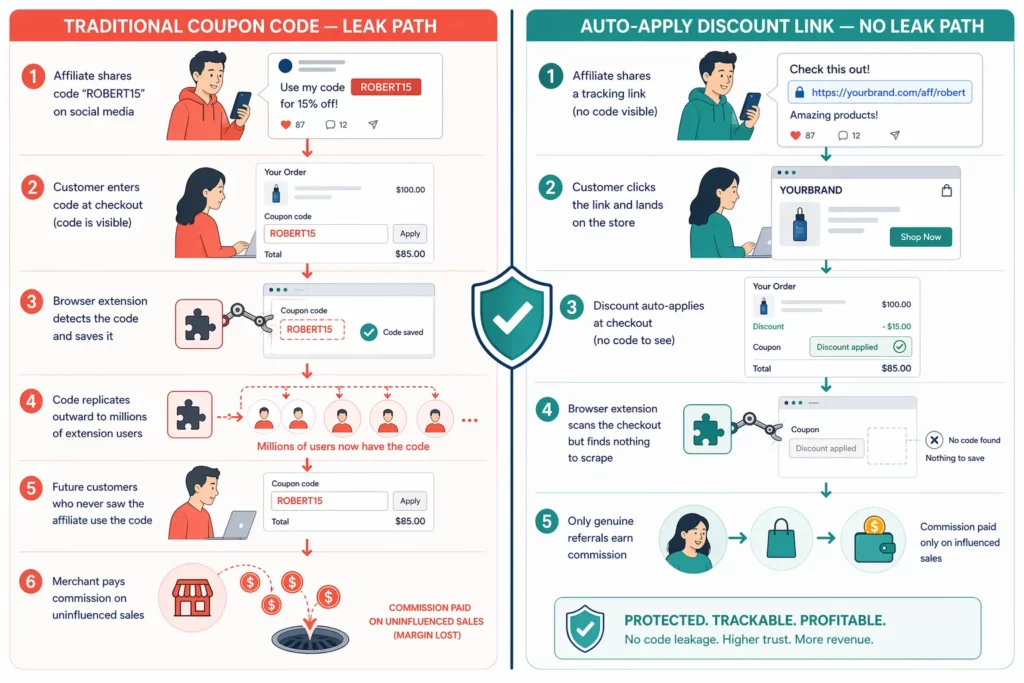
Auto-apply discount links eliminate leak risk at the root. Instead of giving affiliates a coupon code, the merchant sets a discount rate inside the affiliate program.
When a customer clicks the affiliate’s link, that discount applies at checkout automatically. No code is visible at any point, so extensions have nothing to scrape.
To see why that matters, you can consider how traditional coupon codes work. The leak path is predictable.
An affiliate shares a code like “ROBERT15” on social media. A customer enters it at checkout. Honey detects the code, saves it, and serves it to every future visitor. From that point on, you pay commission on orders Robert never influenced.
Auto-apply discount links break that chain at the source.
The affiliate shares a tracking link instead of a code.
When a customer clicks it, the app detects the referral and applies the discount at checkout without displaying any code. There is nothing for extensions to detect, save, or redistribute.
UpPromote’s Anti-leak Discount feature works this way. The merchant sets a discount percentage in program settings, and the system automatically applies it whenever a referred customer reaches checkout.
The two approaches differ across every dimension that matters for leak prevention:
| Traditional coupon code | Anti-discount discount link | |
| Customer enters code at checkout | Yes | No — applied automatically |
| Code visible publicly | Yes — anyone who knows it | No — embedded in link behavior |
| Extensions can scrape | Yes | No — no code to detect |
| Works for audio channels (podcast/live) | Yes (verbal code) | Limited — requires a click |
| Leak risk | High | Near zero |
| Tracking accuracy | Corrupted by leaked usage | Accurate — genuine clicks only |
The main trade-off is channel coverage.
Auto-apply links require a click. That works for blogs, emails, YouTube descriptions, and social media bios. It does not work for channels where the audience only hears a code — podcasts and live video being the two most common.
Audio-only affiliates still need a way to share the discount. The workarounds below keep leak risk low without abandoning those channels entirely:
- Link-in-bio redirect. The affiliate says “link in bio for 15% off” instead of reading a code. Viewers tap the bio link, which routes through the tracking URL and auto-applies the discount.
- QR code overlay. A QR code displayed in the video links to the affiliate’s tracked URL. Viewers scan, land on the store, and the discount applies on arrival.
- Single-use codes for audio-only affiliates. Reserve traditional codes exclusively for podcast and live-video partners, but make each code single-use to limit damage if it leaks.
Several affiliate apps now support link-based discounting, though pricing and implementation differ:
| App | Feature name | How it works | Starting price |
| UpPromote | Anti-leak discount | Discount set in program → auto-applies via affiliate link | $89.99/mo (Professional) |
| Social Snowball | Safelinks | Protected links — code only works through the link | $249/mo + 3% rev fee |
| LoudCrowd | Codeless Affiliate Discounts | Link-based discounts, no codes involved | Custom pricing |
Pricing as of early 2026. Check each app’s current pricing page for updates.
From the customer’s perspective, auto-apply links deliver a better checkout experience. The discount appears automatically. No hunting for codes, no friction at the payment step.
Method #2: Unique Single-Use Codes
Single-use codes limit leak damage by expiring after one redemption. If an extension scrapes the code, only one additional customer can use it, not thousands.
Instead of giving an affiliate one reusable code like “ROBERT15,” you generate a batch of unique codes: ROBERT-A1B2, ROBERT-C3D4, ROBERT-E5F6. Each code works exactly once.
If Honey scrapes ROBERT-A1B2, the worst case is one extra redemption. The code then expires, and the next customer gets a different one.
The main advantage is channel compatibility. Single-use codes still work for podcasts and live video; affiliates can read a code out loud, and the format stays familiar to customers.
The trade-offs are operational, not technical.
Affiliates need a steady supply of fresh codes, which adds management overhead. Customers who try an expired code get a confusing error message, which can generate support tickets.
And unlike auto-apply links, single-use codes do not prevent leaks. They only cap the damage per code at one order; the leak still happens.
If you use UpPromote, the Auto-generate coupon feature creates a unique code for each affiliate automatically. Usage limits on those codes are configured through Shopify’s discount settings.
Method #3: Coupon Extension Blockers
Extension blocker apps prevent Honey, Capital One Shopping, and similar tools from injecting coupon codes at checkout. They act as an immediate shield but they only stop auto-injection, not manual code entry.
The blockers work at the checkout level. When an extension tries to insert or test a code, the blocker intercepts the attempt and prevents it from applying. The customer completes checkout at the original price.
Two of the most established blocker apps on Shopify are KeepCart and Veeper, each with a different focus:
| App | Price | What it blocks | Key differentiator |
| KeepCart | Free–$199/mo | 40+ extensions (Honey, Capital One, Rakuten, Coupert, etc.) | Protected discount links + leak alerts across coupon sites |
| Veeper | Free–$349/mo | 139+ extensions | Smart Discounts ML — offers the smallest discount needed to convert |
Extension blockers make the most sense in two situations.
The first is when your store already runs traditional coupon codes and cannot migrate to auto-apply links immediately. Blockers provide protection while you plan the transition.
The second is when your store is on Shopify Plus, where checkout extensibility gives blockers deeper access and better coverage than on Basic or standard Shopify plans.
If you already use auto-apply discount links as your primary method, a blocker adds limited value. There is no code at checkout for extensions to inject.
The critical gap is manual entry. A customer who finds your affiliate code on RetailMeNot, copies it, and pastes it into the discount field bypasses the blocker entirely. That is the gap auto-apply links close.
Method #4: Leak Monitoring + Auto-Deactivation
Monitoring tools scan coupon sites and extension databases for your affiliate codes.
When they find a leak, they alert you and can auto-deactivate the compromised code. This approach is reactive — it catches leaks after they happen, not before.
The tool scans coupon sites for your codes, flags any that appear publicly, deactivates the leaked code, and issues a replacement to the affected affiliate.
The speed of that cycle determines how much damage a leak causes. Real-time scanning catches leaks within hours. Daily scans may leave a code exposed for a full day.
The available tools differ in how fast they close that window. KeepCart scans coupon sites and alerts merchants when codes surface publicly. Social Snowball’s Leaked Discount Code Center detects and deactivates compromised codes automatically.
For a zero-cost option, a weekly Google search for your brand name plus “coupon code” catches leaks that search engines have already indexed.
The fundamental limitation is timing.
Between the moment a code leaks and the moment it gets deactivated, every order using that code costs you margin and commission. Monitoring shortens that window but cannot close it entirely.
Method #5: New-Customer-Only Code Restrictions
This method restricts affiliate codes to first-time customers only. Returning shoppers cannot use leaked codes, but new customers still can.
The setup uses Shopify’s built-in discount eligibility setting. Set the code to “first-time customers only”; any returning customer who tries it sees an error instead of a discount.
The value is clear: returning customers already know your brand and are likely to buy at full price . Blocking them from using a leaked code protects margin on orders that would have happened anyway.
The gap is equally clear.
New customers arriving through Honey or RetailMeNot still get the discount and still trigger a commission payout, even though no affiliate referred them. The leak works exactly as before for any first-time buyer.
That is why this method ranks last. It covers roughly half the problem at best and none of the attribution corruption described in the earlier section.
Which Method Should You Use? (Decision Framework)
No single method works best for every store. The right approach combines prevention, limiting, and detection in layers, weighted by your store size, Shopify plan, and current setup.
The following framework maps four common store profiles to the combination most likely to close the largest share of leaks at the lowest cost:
| Store profile | Primary method | Secondary layer | Est. monthly cost |
| Small ($5K–10K/mo, Basic plan) | Auto-apply discount links | New-customer-only restriction | $0–90/mo (app plan) |
| Medium ($10K–30K/mo) | Auto-apply discount links | + Single-use codes for audio affiliates | $30–90/mo |
| Large ($30K–100K/mo, Plus plan) | Auto-apply discount links | + Extension blocker + monitoring | $90–280/mo |
| Still using traditional codes | Extension blocker | + Monitoring + migration plan to auto-apply | $30–190/mo |
Costs reflect affiliate app subscription + optional blocker app. Exact pricing depends on plan tier and tools selected.
The logic behind every combination is the same layered model.
The primary layer is prevention. Auto-apply discount links remove the code from checkout, which eliminates the root cause. This layer alone resolves the majority of leak exposure for most stores.
The secondary layer limits damage on channels where codes are unavoidable. Single-use codes for podcast affiliates or extension blockers for stores still running traditional codes fill that role.
UpPromote, for example, handles both layers in one app: Anti-leak Discount for prevention and Auto-generate coupon for single-use backup codes.
The third layer is detection. Monthly monitoring catches any leaks that slip through the first two layers. Even a manual Google search adds meaningful visibility at zero cost.
Most stores can implement all three layers within a month:
| Week | Action |
| 1 | Audit your store for existing leaks (see the checklist in the next section) |
| 2 | Enable auto-apply discount links in your affiliate program settings |
| 3 | Migrate audio-channel affiliates to single-use codes |
| 4 | Set up monthly monitoring — manual Google search or dedicated tool |
How to Audit Your Store for Existing Leaks Right Now
A five-minute audit tells you whether your store has active leaks right now. Most merchants are surprised by what they find — codes they assumed were private often turn up on the first search.
Run through these five checks in order. If any one of them returns a positive result, your codes have leaked:
- Google your brand name plus “coupon code.” If affiliate-specific codes appear in the results — on sites you did not authorize — the code has leaked.
- Install the Honey extension temporarily and visit your own checkout. If Honey suggests one of your affiliate codes, extensions are already distributing it.
- Search RetailMeNot and Coupons.com for your brand. Any affiliate codes listed on these aggregators confirm a leak beyond the extension ecosystem.
- Check your affiliate dashboard for commission spikes that do not match content activity. An affiliate whose sales jumped three to five times the average — without posting new content — may have a leaked code driving volume.
- Compare total orders using a specific affiliate code against total clicks on that affiliate’s link. If orders far exceed clicks — for example, 200 orders but only 50 link clicks — the gap represents orders from leaked code usage, not genuine referrals.
If at least one check turned up a leak, two steps matter immediately.
First, deactivate the compromised codes and issue replacements to the affected affiliates. Notify each partner directly — a short message explaining that their code was found on a public site and a new one has been issued keeps the relationship intact.
Second, enable auto-apply discount links before the next code leaks. The transition takes most stores less than a day, and it prevents the same problem from recurring.
What Changed in 2026?
The coupon leak landscape shifted significantly between late 2024 and early 2026 — driven by a public scandal, platform policy changes, and broader adoption of prevention tools.
✅ The Honey controversy changed the conversation.
A late-2024 investigation revealed that Honey was replacing affiliate codes with its own and hiding better coupons from shoppers.
The fallout was swift. Honey lost roughly 8 million of its 20 million Chrome users , and Rakuten removed the extension from its affiliate network in January 2026.
✅ Google tightened Chrome extension policies.
In response to the Honey revelations, Google updated its Chrome Web Store policies to restrict extensions that silently override affiliate attribution. Extensions that break these rules now face removal.
✅ Auto-apply discount links moved from niche to standard.
Multiple affiliate platforms now offer link-based discounting as a core feature rather than an add-on. The shift reflects growing merchant awareness that code-based tracking creates leak exposure by design.
✅ AI search introduced a new leak vector.
AI assistants now surface coupon codes in response to queries like “discount code for [brand].” Codes that were buried on page three of Google are now delivered in conversational answers — a new distribution channel most stores have not accounted for.
✅ Extension blockers expanded coverage.
Blocker apps have begun monitoring AI search surfaces alongside traditional coupon sites. The tools now track where codes appear across both legacy aggregators and AI-generated results.
Frequently Asked Questions
Do auto-apply discount links affect SEO?
No. Affiliate links with tracking parameters work like regular URLs for SEO purposes. Search engines ignore query parameters. The discount only applies when a customer clicks a specific affiliate link — organic visitors are not affected.
Can I take legal action against Honey for scraping coupon codes?
Difficult in practice. Multiple lawsuits have been filed against Honey since 2024, but early cases were dismissed for lack of standing. Most legal experts recommend prevention — blocking or auto-apply links — over litigation. Focus energy on solutions rather than lawsuits.
How do TikTok affiliates share discounts without a clickable link?
Three options work well. First, direct followers to a “link in bio” that routes through the affiliate’s tracked URL. Second, display a QR code in the video that links to the same URL. Third, assign single-use codes to TikTok affiliates only, limiting damage if the code leaks.
Is it legal to block coupon extensions like Honey at checkout?
Yes. Merchants have the right to control the checkout experience on their own store. Blocking third-party extensions from injecting codes at checkout is a legitimate business practice used publicly by many ecommerce brands.
What percentage of orders are typically affected by coupon leaks?
There is no verified industry benchmark. Estimates based on coupon extension penetration suggest that a meaningful share of coupon-tracked orders involve leaked codes. The five-minute audit checklist in this guide helps you measure your own store’s exposure directly.
I use GoAffPro’s free plan. Does it have auto-apply discount links?
GoAffPro’s free plan does not include auto-apply discount links. If coupon leaks are a concern, apps with built-in link-based discounting include UpPromote (from $89.99/mo) and Social Snowball (from $249/mo).
My affiliates are pushing back on switching from codes to links. How do I handle that?
Frame the switch as a benefit to them. With auto-apply links, their genuine referrals get full credit — no more Honey users stealing their commissions. Offering a small commission increase during the transition also helps smooth the change.
Can Shopify Basic plan stores block coupon extensions?
Limited. Shopify’s full checkout extensibility is available only on Plus plans. Basic and standard Shopify plans can use third-party blocker apps, but coverage is not as comprehensive. The best option for non-Plus stores is auto-apply discount links, which do not depend on checkout-level blocking.

Ellie Tran, a seasoned SEO content writer with three years of experience in the eCommerce world. Being a part of the UpPromote team, Ellie wants to assist Shopify merchants in achieving success through useful content & actionable insights.Ellie's commitment to learning never stops; she's always eager to gain more knowledge about SEO and content marketing to create valuable content for users. When she's not working on content, Ellie enjoys baking and exploring new places.

![How to Use Shopify Functions with Your Affiliate Program [2026 Guide]](https://static.uppromote.com/wp-content/uploads/2026/06/how-to-use-shopify-functions-with-affiliate-program-300x169.webp)

![How to Prevent Affiliate Fraud on Shopify: Self-Referral, Coupon Abuse & More [2026]](https://static.uppromote.com/wp-content/uploads/2026/06/how-to-prevent-affiliate-fraud-on-shopify-300x169.webp)