TL;DR
Integrating an affiliate app with Shopify requires zero code. The app connects through Shopify’s API, syncing products, orders, and customers automatically in under 15 minutes.
- Installation: One-click from the Shopify App Store, approve permissions, done
- Data sync: Products, orders, customers, and discounts — all automatic
- Optional integrations: Email tools (Klaviyo, Omnisend), subscription apps, PayPal
- Troubleshooting: Most issues resolve by reinstalling the app
- No developer needed: Setup wizard handles configuration step by step
“ Can I set up an affiliate app if I don’t know how to code? ”
The answer is yes. And the whole process takes less than 15 minutes.
Shopify affiliate apps are built for non-technical store owners. Installation means clicking “Add App” in the Shopify App Store, approving a few permissions, and following a setup wizard.
The app connects to your store through Shopify’s API and starts syncing products, orders, and customer data on its own. No theme editing, no developer.
Most merchants finish the full setup in under an hour. The bulk of that time goes to configuring commission rates and tracking preferences, not technical integration.
Where merchants do get stuck is two specific areas: understanding what permissions an app actually gets, and connecting third-party tools like Klaviyo or Recharge. This article covers both in plain language.
How Does a Shopify Affiliate App Connect to Your Store?
When you install an affiliate app from the Shopify App Store, it connects to your store through Shopify’s API — a secure channel that lets the app read your product catalog, orders, and customer list.
You approve what the app can access during installation, and Shopify controls every permission.
Three things happen behind the scenes after you click “Install.”
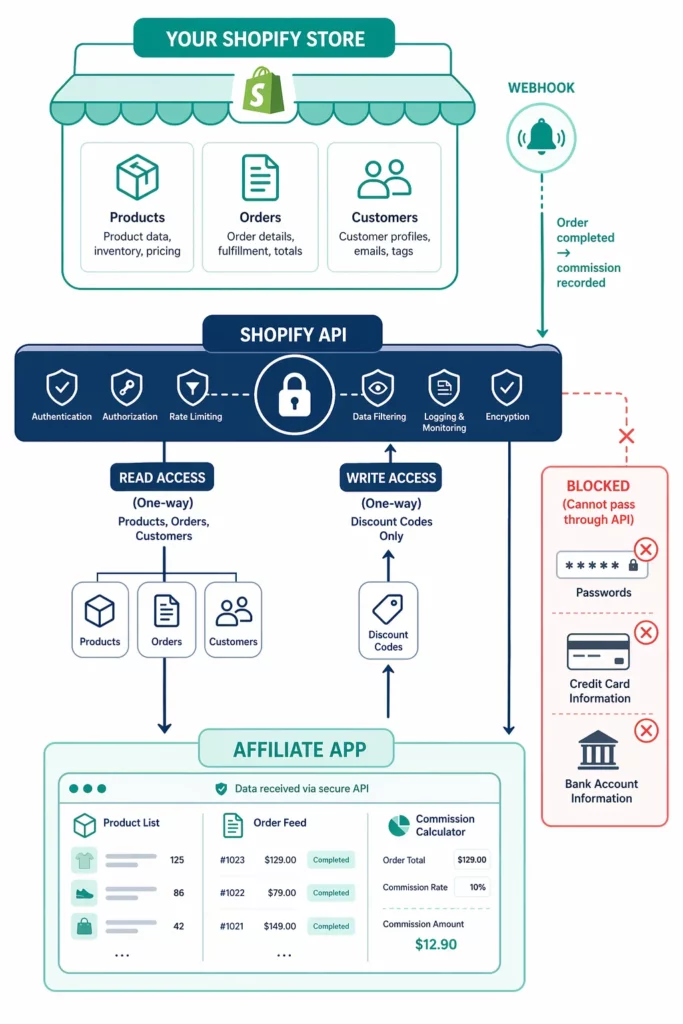
➡️ Shopify’s API gives the app controlled access to your store data. Think of it as a locked door where Shopify holds the key.
The app can read products, orders, and customers — but it cannot see your admin password, payment card numbers, or bank details.
All access is either read-only or scoped to specific actions like creating discount codes.
➡️ Webhooks notify the app when key events happen. When a customer completes checkout, Shopify sends a signal to the affiliate app with the order details and any discount code used.
The app checks whether the order matches an affiliate, records the commission, and moves on. This runs in the background without any action from you.
➡️ Discount codes sync between the app and Shopify. The app creates coupon codes for each affiliate, and those codes appear in your Shopify Discounts page.
When a customer enters a code at checkout, Shopify processes the discount and notifies the app, which attributes the sale to the right affiliate.
Here’s what an affiliate app can and cannot access once installed.
| What the app CAN access | What the app CANNOT access |
| Product catalog (names, prices, images) | Your Shopify admin password |
| Order data (amounts, products, customer email) | Payment card numbers |
| Customer list (names, emails, order history) | Bank account or payout details |
| Discount codes (create, read, deactivate) | Other apps’ data (unless integrated) |
| Store settings (currency, timezone) | Staff account credentials |
Shopify reviews every app before listing it on the App Store, and all permissions are visible to you during installation.
How to Install Any Affiliate App on Shopify (Step by Step)?
The installation process is the same for every Shopify affiliate app whether you choose UpPromote , GoAffPro , Refersion , or any other option.
Four steps, five minutes, no technical skill required.
Step 1: Find the app
Open your Shopify Admin, click “Apps” in the sidebar, and select the Shopify App Store button in the top-right corner. Type the app name or “affiliate marketing” in the search bar to browse options.
Step 2: Install the app
Click the app listing, then hit “Add App.” Shopify will show a permissions screen listing what the app wants to access — products, orders, customers, and discounts.
Review the list and click “Install App.” The app now appears in your Shopify Admin sidebar.
Step 3: Complete the setup wizard
Most apps launch an onboarding wizard right after installation.
The wizard walks you through setting your commission rate, choosing a tracking method, creating a registration page, and uploading your logo. Follow each screen to the end.
Step 4: Verify the connection
Check three things in the app dashboard: your store name displays correctly, your products appear in the product list, and recent orders show up in reports. If all three check out, the connection is live.
Which Third-Party Tools Should You Connect?
Your affiliate app handles tracking and commissions on its own. Connecting it to other tools in your stack, like email, subscriptions, payments, will save hours of manual work each month.
However, not every connection is urgent. The table below sorts the most common types by priority so you can focus on what matters for your store.
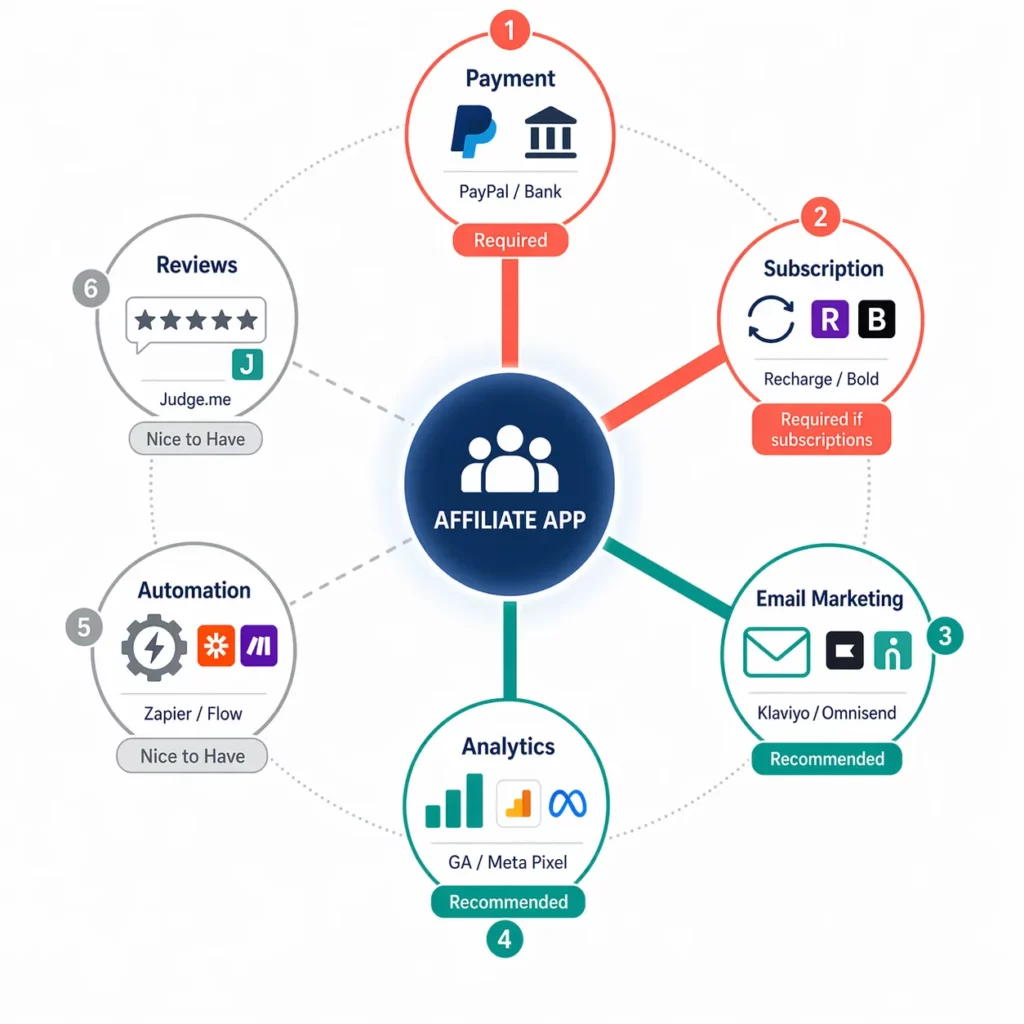
| Category | Common tools | What connecting does | Priority |
| Payment | PayPal, Wise (bank transfer) | Process affiliate payouts directly from the app | Required |
| Subscription | Recharge, Bold, Appstle, Seal, Recurpay | Track recurring commissions on subscription orders | Required if you sell subscriptions |
| Email marketing | Klaviyo, Omnisend, Mailchimp | Auto-sync affiliate list to your email platform for nurture sequences | Recommended |
| Analytics | Google Analytics, Meta Pixel | Track affiliate traffic sources and attribute conversions | Recommended |
| Automation | Shopify Flow, Zapier | Build custom workflows — e.g., new affiliate signup triggers a Slack notification | Nice to have |
| Reviews | Judge.me, Loox, Yotpo | Compare review rates between affiliate-driven and organic customers | Nice to have |
Two connections deserve a closer look because merchants ask about them most.
The email marketing connection syncs your affiliate list to your email platform. When a new affiliate gets approved, their info lands in a specific Klaviyo or Omnisend list on its own.
From there, you build the email flows yourself inside your email tool: welcome series, product launch alerts, payout reports. Your affiliate app feeds the contact data, then your email tool handles the rest.
The subscription connection solves a different problem. If your store sells subscription products, affiliates earn commission on the first order by default. But every renewal after that goes untracked unless the affiliate app connects to your subscription tool.
UpPromote , for example, integrates with five Shopify subscription apps — Recharge, Bold, Appstle, Seal, and Recurpay.
Once enabled, every recurring payment counts as a referral order. The affiliate earns commission on each renewal, not just the signup.
Shopify App Store App vs External Platform: Which Path?
Two paths exist for adding affiliate tracking to a Shopify store.
A Shopify App Store app connects in one click with zero code. An external platform like Impact, CJ Affiliate, or Tapfiliate connects through API keys or tracking code snippets pasted into your theme.
For most Shopify stores, the App Store route is the right choice. You can see why here.
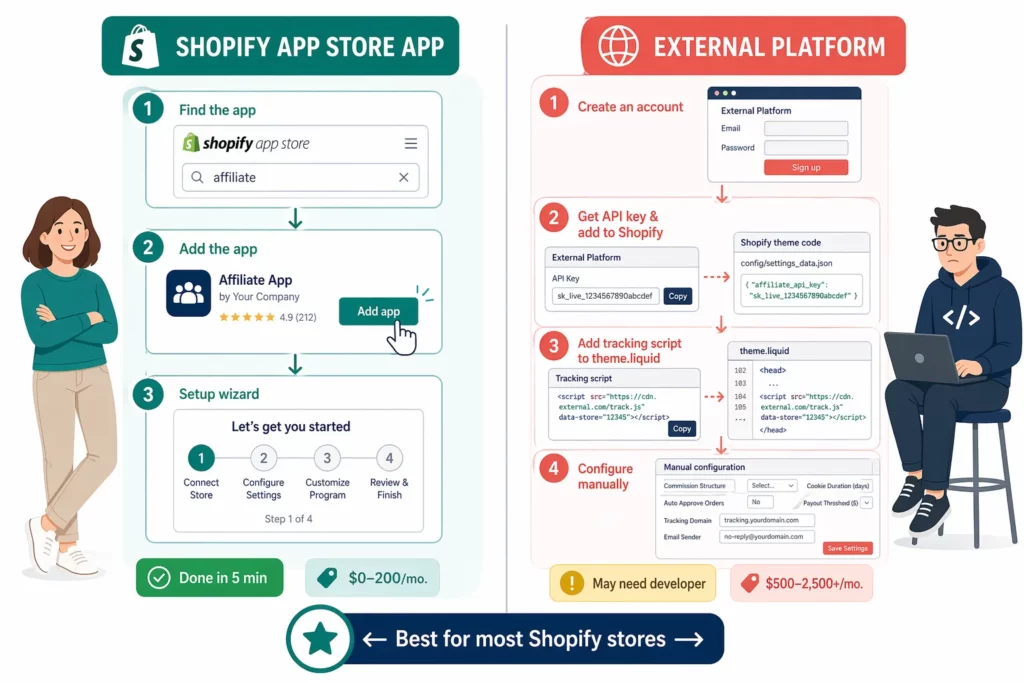
| Factor | Shopify App Store app | External platform |
| Installation | One-click from the App Store | API key setup + tracking code in theme |
| Technical skill | None | Basic (paste code into theme files) |
| Shopify data sync | Automatic — products, orders, customers | Manual config or API setup |
| Checkout tracking | Native — built into Shopify checkout | Custom — may need a developer |
| Cost | $0–$200/mo | Typically $500–$2,500+/mo |
| Best for | Stores selling only on Shopify | Multi-platform brands (Shopify + WooCommerce + BigCommerce) |
If your store runs on Shopify alone, a native app is the simpler path. Zero code, native checkout tracking, and lower cost.
5 Common Integration Issues (and How to Fix Them)
Most setup issues resolve in under 15 minutes without a developer. The fixes below cover the problems merchants hit most often after installing an affiliate app.
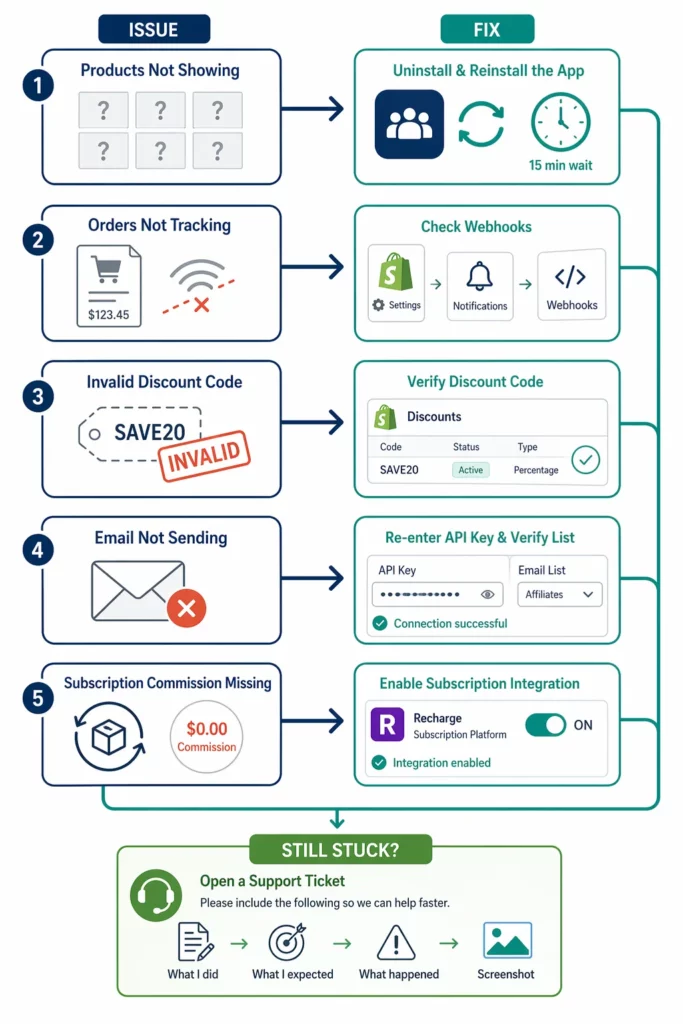
| Issue | Likely cause | No-code fix |
| Products not showing in app | Permissions incomplete or Shopify sync delay | Uninstall the app → reinstall → re-approve all permissions. Wait 15 minutes for the sync to complete. |
| Orders not tracking | Webhook not firing or checkout conflict | Go to Shopify Settings → Notifications → confirm webhooks are active. Reinstall the app if the problem continues. |
| Discount code shows “invalid” | Code not created in Shopify or already expired | Open Shopify Admin → Discounts → verify the code exists, is active, and has not passed its expiry date. |
| Email integration not sending | Wrong API key or list not mapped | Re-enter the API key in the app’s integration settings. Check that the correct list or segment is selected in your email tool. |
| Subscription orders missing commission | Subscription app integration not enabled | Open the affiliate app’s integration settings and enable your subscription app (Recharge, Bold, etc.). Check the app’s docs for any extra setup steps. |
A quick reinstall fixes most sync and tracking problems. It forces Shopify to reset the API connection and refresh all permissions.
Contact app support when a reinstall does not help, tracking works on some orders but not others, or commissions come out wrong. Custom checkouts and headless Shopify stores often need hands-on help too.
One tip speeds up every support ticket: include what you did, what you expected, what happened, and a screenshot. Detailed tickets get solved two to three times faster than vague ones.
What Changed in 2026?
Two shifts this year affect how affiliate apps connect with Shopify stores.
Simpler connections are becoming the norm
Most top affiliate apps now let you enable email and subscription integrations in one or two clicks from a settings page. The days of copying long API keys for basic connections are fading.
Shopify Functions are replacing Scripts
Shopify Scripts — the old tool for custom discount and shipping logic — stops working on June 30, 2026 .
Affiliate apps that used Scripts for commission rules are moving to Shopify Functions. No action needed from merchants — app developers handle the migration.
Frequently Asked Questions
Do I need Shopify Plus to integrate an affiliate app?
No. A Basic Shopify plan is enough for the vast majority of affiliate app features. Plus is only needed if you want to customize the checkout information, shipping, and payment steps or run API-level commission scripts. Most merchants run affiliate programs on Basic or standard Shopify plans without issues.
Does installing an affiliate app slow down my store?
The impact is minimal. Affiliate apps add a small tracking script that runs in the background. If you notice a real slowdown after install, contact the app’s support team — it is likely a setup issue, not a built-in limit.
I use a custom theme or headless Shopify. Will an affiliate app still work?
Custom themes work fine in most cases because affiliate apps connect through Shopify’s API, not through your theme. Headless setups (Hydrogen, Oxygen) are more complex and may need extra configuration. Check with the app’s support team before committing to a paid plan.
Can I run two affiliate apps on the same store?
You can, but it is not recommended. Two apps tracking the same orders create duplicate commissions, conflicting data, and confused affiliates. Pick one app. If it lacks a feature you need, use Zapier or the app’s API to bridge the gap.
If I uninstall an affiliate app, do I lose my data?
It depends on the app. Most store affiliate data on their own servers, so reinstalling recovers it. However, uninstalling breaks active affiliate links right away, stops all tracking, and freezes pending commissions. Export your data before uninstalling, and notify your affiliates if you plan to switch apps.

Ellie Tran, a seasoned SEO content writer with three years of experience in the eCommerce world. Being a part of the UpPromote team, Ellie wants to assist Shopify merchants in achieving success through useful content & actionable insights.Ellie's commitment to learning never stops; she's always eager to gain more knowledge about SEO and content marketing to create valuable content for users. When she's not working on content, Ellie enjoys baking and exploring new places.

![How to Use Shopify Functions with Your Affiliate Program [2026 Guide]](https://static.uppromote.com/wp-content/uploads/2026/06/how-to-use-shopify-functions-with-affiliate-program-300x169.webp)

![How to Prevent Affiliate Fraud on Shopify: Self-Referral, Coupon Abuse & More [2026]](https://static.uppromote.com/wp-content/uploads/2026/06/how-to-prevent-affiliate-fraud-on-shopify-300x169.webp)