TL;DR
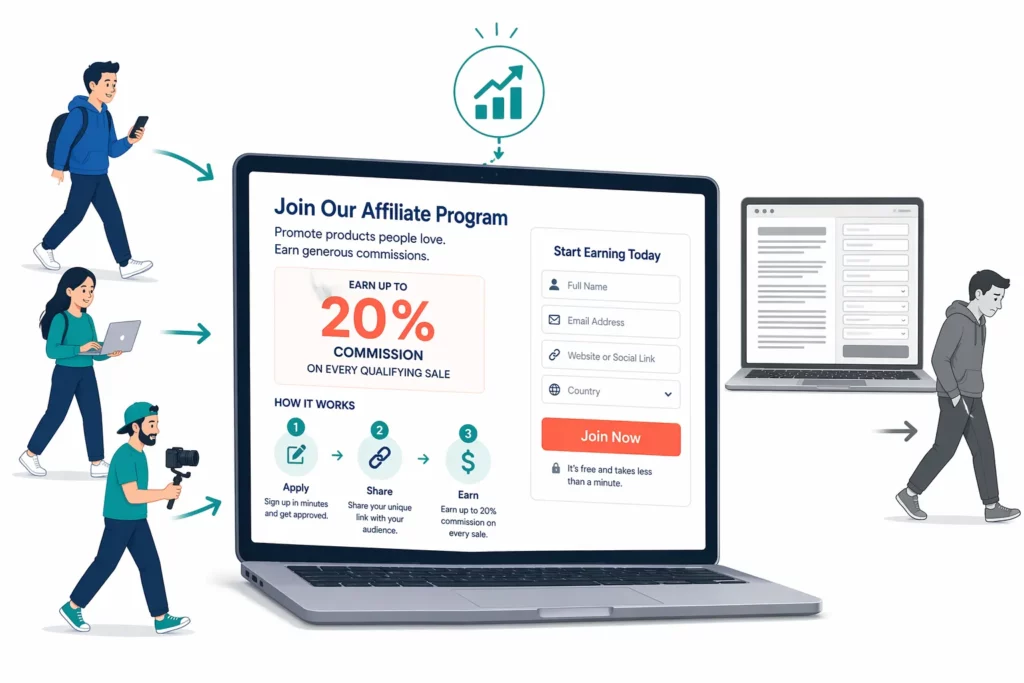
Your affiliate signup page needs to answer three questions in five seconds — how much affiliates earn, how the program works, and how to join — or most visitors will leave without applying.
- Top conversion driver: Commission rate visible above the fold
- Form length: Pages with four to five fields convert significantly higher than pages with ten or more
- Social proof impact: Adding affiliate count or testimonials lifts conversion measurably (UpPromote data, 2025–2026)
- Biggest mistake: Building the page but never linking to it from your site
Your affiliate signup page is the first thing potential partners see. It’s the landing page for your entire program, and it decides whether affiliates join or bounce.
The problem is that most Shopify merchants build this page with a paragraph of description and a form. No commission rate in sight, no social proof, no “how it works” section. The result is a page that converts at the low single digits.
The fix isn’t a redesign. It’s a checklist. High-converting registration pages share ten specific elements, and most take under an hour to add.
This guide breaks down each one, with a field-by-field form audit, an above-the-fold formula, and placement strategies to drive traffic once your page is live.
What Makes an Affiliate Signup Page Convert? (The 3-Second Test)
Affiliates decide whether to apply or leave within the first few seconds on your page.
That decision comes down to three pieces of information: how much they earn, how the program works , and how to sign up .
Most low-converting pages bury the commission rate inside a paragraph, explain the program in a wall of text, and ask for twelve fields before an affiliate can even apply.
High-converting pages do the opposite. They lead with a specific commission number, show three to four steps with icons, and keep the form short.
The difference between these two approaches shows up across every element on the page. Here’s what that gap looks like in practice:
| Element | Low-Converting Page | High-Converting Page |
| Headline | “Join Our Team!” (vague) | “Earn 20% Commission Promoting [Brand]” (specific) |
| Commission rate | Buried in paragraph 3 | Large font, above the fold |
| How it works | 500-word explanation | 3–4 steps with icons |
| Social proof | None | “Join 500+ affiliates” + testimonial |
| Form length | 10–12 fields | 4–5 fields |
| CTA button | “Submit” | “Start Earning Today” |
| Earnings expectation | Not mentioned | “$200–500/month for active affiliates” |
| Trust signals | None | Payment logos + payout schedule |
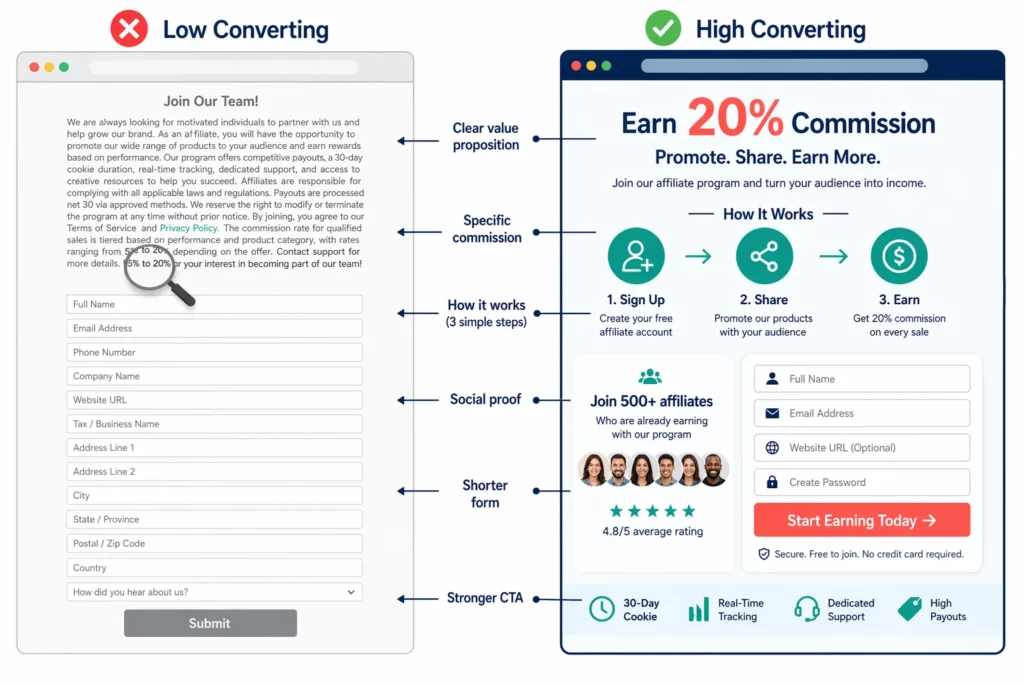
The two rows that matter most are commission rate and form length. A commission number buried in body text forces affiliates to hunt for the answer to their first question.
Form length compounds the problem. Ten or more fields ask affiliates to invest effort before they know if the program is worth joining.
Social proof reinforces both. When affiliates see that hundreds of others already joined and earn consistently, the decision to fill out a short form feels low-risk.
10 Must-Have Elements for Your Affiliate Registration Page
Ten elements separate registration pages that convert from pages that collect dust. But four of them, headline, commission rate, “how it works,” and signup form, drive most of the impact.
Getting those four right matters more than perfecting the other six.
The following full checklist covers all ten, ranked by their influence on an affiliate’s decision to apply.
| # | Element | Why It Matters | Where to Place It | Impact |
| 1 | Specific headline — “Earn [X]% Commission Promoting [Brand]” | First impression, names the offer | Above the fold, H1 | High |
| 2 | Commission rate in large text | The first thing affiliates evaluate | Above the fold, near headline | Very high |
| 3 | “How It Works” in 3–4 steps with icons | Reduces uncertainty, builds confidence | Above the fold or just below | High |
| 4 | Short signup form — 4–5 fields max | Fewer fields mean fewer drop-offs | Above the fold or right column | Very high |
| 5 | Social proof — “Join 500+ affiliates” or testimonial | Builds trust through peer validation | Near the form | High |
| 6 | Average earnings — “$200–500/mo for active affiliates” | Sets realistic expectations | Near commission rate | Medium |
| 7 | Payment details — schedule + methods (PayPal, bank transfer) | Transparency builds trust | Below “How it works” | Medium |
| 8 | Cookie duration — “30-day tracking window” | Shows fairness in attribution | Near commission details | Low–Med |
| 9 | Marketing materials preview — sample banners or images | Shows affiliates they’ll get support | Below main content | Low–Med |
| 10 | Mini FAQ — 3–5 questions answered on the page | Removes objections before they form | Bottom of page | Medium |
Elements one through four belong above the fold — the area visible before scrolling. There’s one way to arrange them so affiliates see everything they need in a single screen:
- Sign up (30 seconds) – Name
- Get your unique link + code – Email
- Share with your audience – Website / Social URL
- Earn [X]% on every sale – Audience size (dropdown)
– [CTA: Start Earning Today] [Below: Payment logos | “Paid monthly via PayPal”]
Both columns work together. The left side answers “ how does this work? ” while the right side lets affiliates act on that answer without scrolling.
If you use UpPromote, the registration page editor lets you add, remove, and reorder these fields, and preview the layout before publishing.
For stores that want a more polished look without custom design work, UpPromote offers professionally designed registration templates with more layout options built in.
What the page asks matters just as much as how it looks.
Neonic Pickleball , a sports brand, used its detailed registration page to screen affiliates before approval. That filtering step helped build a high-quality roster — affiliate marketing now drives 70% of total revenue.
How to Optimize Your Registration Form (Fields That Help vs Fields That Kill)
The registration form is where most affiliate signup pages lose applicants. Shorter forms, from four to five fields, convert at significantly higher rates than forms with ten or more.
The instinct is to ask for everything upfront. But most of that information isn’t needed at the signup stage; it belongs later, after approval.
You can check the table below to separate fields by whether they help conversion, are optional, or should be cut.
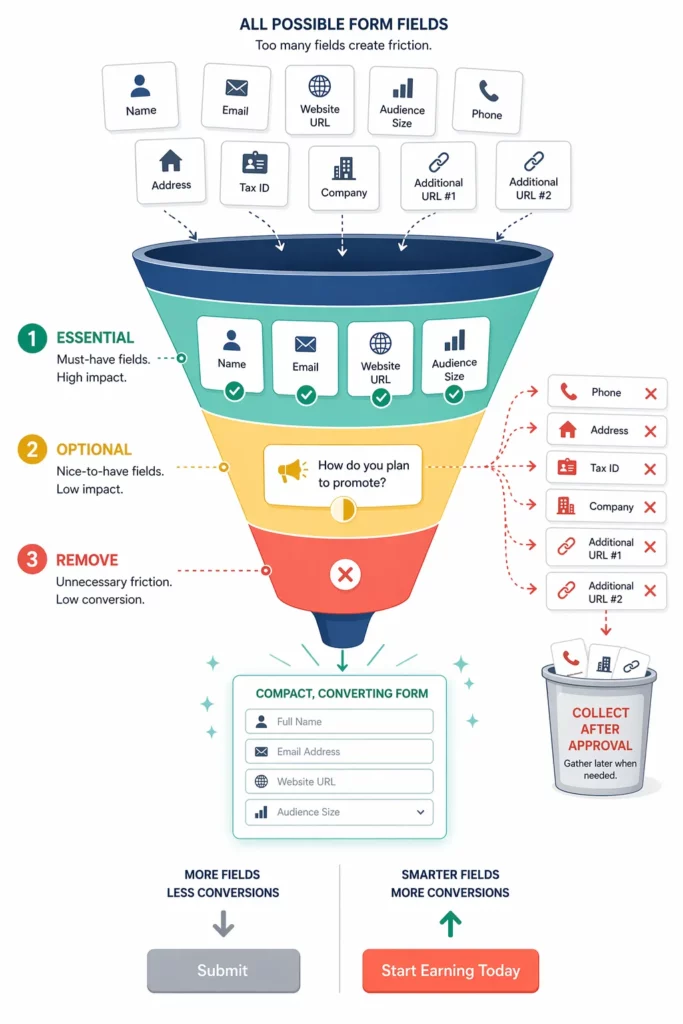
| Field | Status | Why |
| Name | Essential | Identification + personalization |
| Essential | Communication + account setup | |
| Website or Social URL | Essential | Lets you vet audience and content quality |
| Audience size (dropdown) | Essential | Quick qualification without manual review |
| How they plan to promote (dropdown) | Optional | Helpful for segmentation, not critical at signup |
| Phone number | Remove | Scares applicants — email is enough for initial contact |
| Full address | Remove | Only needed at payout, not at signup |
| Tax ID or SSN | Remove | Collect after approval, not before |
| Company name | Remove | Not relevant for individual affiliates |
| 3+ URL fields | Remove | One primary URL is enough to evaluate fit |
The pattern is clear: collect only what you need to make an approval decision . Name, email, one URL, and audience size are enough to vet an applicant.
Tax information, payment details, and mailing addresses belong in the post-approval onboarding flow, not on the signup form.
Beyond the fields themselves, CTA button copy matters more than most merchants expect. Generic labels like “Submit” give affiliates no reason to feel motivated.
Buttons with an action verb plus a benefit — “Start Earning Today” or “Get My Affiliate Link” — outperform generic labels because they show what happens next.
One more detail worth testing: use dropdowns instead of open text fields wherever possible.
A dropdown for audience size (under 1K, 1–10K, 10–50K, 50K+) takes two seconds. An open text field asking “describe your audience” takes thirty, and most applicants won’t bother.
Where Should You Place Your Affiliate Page (And How to Drive Traffic to It)?
A well-built registration page means nothing if no one sees it.
Most affiliate signups come from a handful of placement point, and the single highest-traffic source is a link in your website footer.
The most common mistake is building the page and then never linking to it. An affiliate who has to Google “[your brand] affiliate program” might find a competitor’s page before yours.
The six placement strategies below are ranked by how many signups each one typically drives.
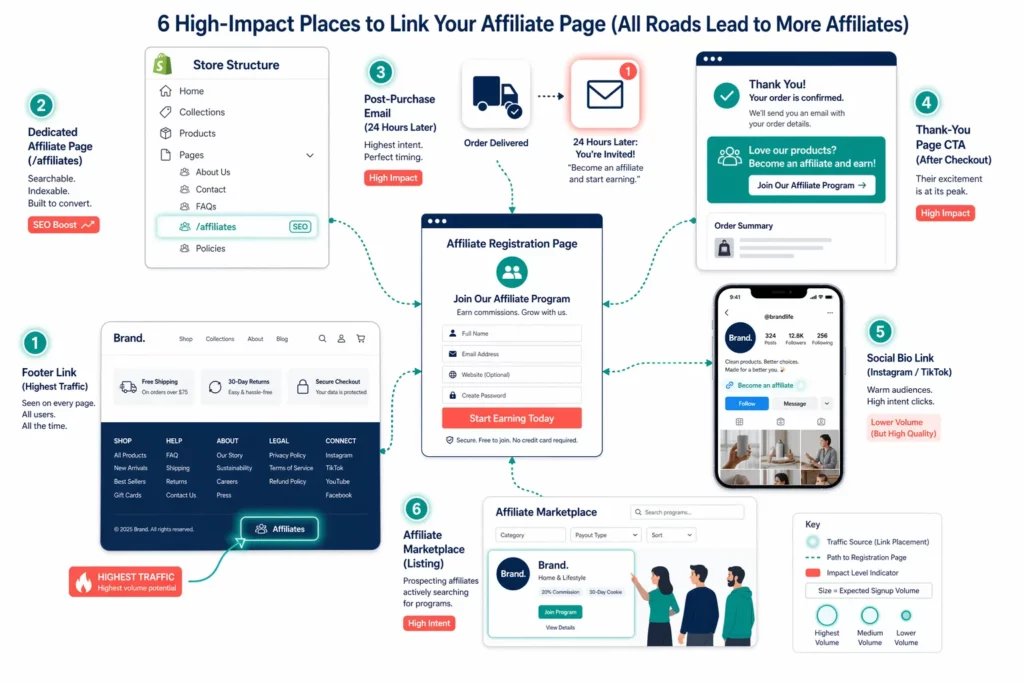
| Source | How to Set It Up | Expected Result |
| Website footer link | Add “Affiliates” or “Earn With Us” to your footer navigation | Majority of organic signups |
| Dedicated page URL | yourstore.com/pages/affiliates — SEO-indexable | Passive discovery via search |
| Post-purchase email | Send 24 hours after delivery: “Love [product]? Earn by sharing it.” | High open rate, strong conversion |
| Thank-you page banner | Banner or popup after checkout | Captures peak buyer excitement |
| Social media bio | “Become an affiliate” link in Instagram/TikTok bio | Steady low-volume signups |
| Marketplace listing | List your offer on an affiliate marketplace | Passive, ongoing recruitment |
The footer link matters most because it’s always visible.
Affiliates who are browsing your store, checking products, reading your story, scanning your policies,will look for it.
Jenni Bag , a fashion brand, linked an open registration form from their website — no paid recruitment, no manual outreach. That single placement brought in over 2,000 affiliates.
For passive recruitment beyond your own traffic, the UpPromote Marketplace lets affiliates browse and apply to your program directly, no outreach required on your end.
What’s Changing for Affiliate Signup Pages in 2026?
Affiliate signup pages are shifting in three directions — each affecting how your page looks, where it lives, and whose brand it carries.
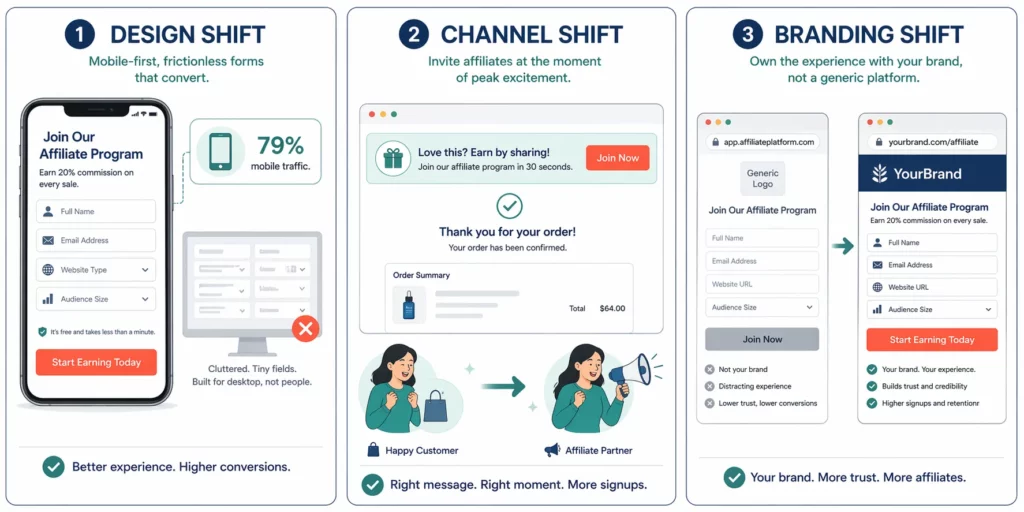
The first shift is design
Seventy-nine percent of Shopify store traffic now comes from mobile , yet mobile converts at roughly half the desktop rate (Brenton Way, 2026). A form that breaks on a phone screen loses most potential applicants.
The fix is structural: dropdowns instead of open text fields, a single-column layout, and a CTA button sized for tapping. A short explainer video — thirty to sixty seconds — can build confidence faster than text alone.
The second shift is channel
Post-purchase enrollment is now standard. More programs add a CTA to the thank-you page, catching customers at peak excitement.
The third shift is branding
Generic app-hosted registration pages are giving way to branded portals. Merchants host their signup form on their own domain, so affiliates see the store’s brand on every page, not a third-party app.
Frequently Asked Questions
Should I use a form built into my Shopify page or an app-generated form?
An app-generated form is the better choice for most stores. It connects directly to your affiliate dashboard, so approved affiliates get their tracking links and coupon codes without any manual data transfer. Most affiliate apps provide an embed code you can paste into any Shopify page. The form goes live in minutes.
How many fields should my affiliate signup form have?
Four to five fields is the sweet spot. Name, email, website or social URL, and audience size give you enough information to make an approval decision. Collecting tax details, payment information, or mailing addresses at signup adds friction that drives applicants away — gather those after approval instead.
Should I auto-approve all affiliate applications?
Not for external affiliates — vet them before approving. For customer referrals, auto-approval works well because those applicants already know your brand. A practical setup is to auto-approve applicants whose email matches an existing customer record and manually review everyone else.
Does my affiliate registration page need SEO optimization?
Yes. Use a clean URL like yourstore.com/pages/affiliates and include your target commission rate in the title tag and meta description. An indexed registration page helps affiliates find your program when they search for opportunities in your niche. Without it, they may land on a competitor’s page first.
Do I need a separate landing page in addition to the registration form?
For most stores, a single page combining program details with the signup form is enough. A separate landing page makes sense once you have over a hundred affiliates, testimonials, and earnings data worth showcasing. Until then, one combined page handles both jobs.
My registration page has zero signups after two weeks — what’s wrong?
Three causes explain most dead registration pages. First, no links anywhere on your site point to it; add a footer link and a post-purchase email. Second, commission is below your niche average; compare and adjust. Third, the form has too many fields, cut to four or five.

Ellie Tran, a seasoned SEO content writer with three years of experience in the eCommerce world. Being a part of the UpPromote team, Ellie wants to assist Shopify merchants in achieving success through useful content & actionable insights.Ellie's commitment to learning never stops; she's always eager to gain more knowledge about SEO and content marketing to create valuable content for users. When she's not working on content, Ellie enjoys baking and exploring new places.

![How to Use Shopify Functions with Your Affiliate Program [2026 Guide]](https://static.uppromote.com/wp-content/uploads/2026/06/how-to-use-shopify-functions-with-affiliate-program-300x169.webp)

![How to Prevent Affiliate Fraud on Shopify: Self-Referral, Coupon Abuse & More [2026]](https://static.uppromote.com/wp-content/uploads/2026/06/how-to-prevent-affiliate-fraud-on-shopify-300x169.webp)