TL;DR
Most Shopify stores will benefit from running both a customer referral program and an affiliate program. The two channels target different audiences with different mechanics, while sharing one app dashboard.
- Referral: Existing customers share with friends for store credit or discount
- Affiliate: External creators promote publicly for cash commission
- Why both: Referral captures customer trust, while affiliate captures creator reach
- Setup time: Roughly 30 minutes per program
- Cost: $0–$60/month for one app that handles both
Most Shopify merchants treat customer referrals and affiliate programs as interchangeable. Yet the mechanics couldn’t be more different.
A customer who texts “use my link, you get $10 off” to a friend isn’t doing the same thing as a YouTube creator pitching that product to 50,000 followers.
One leans on private trust, while the other leans on public reach. Picking one and ignoring the other can leave half your word-of-mouth revenue on the table.
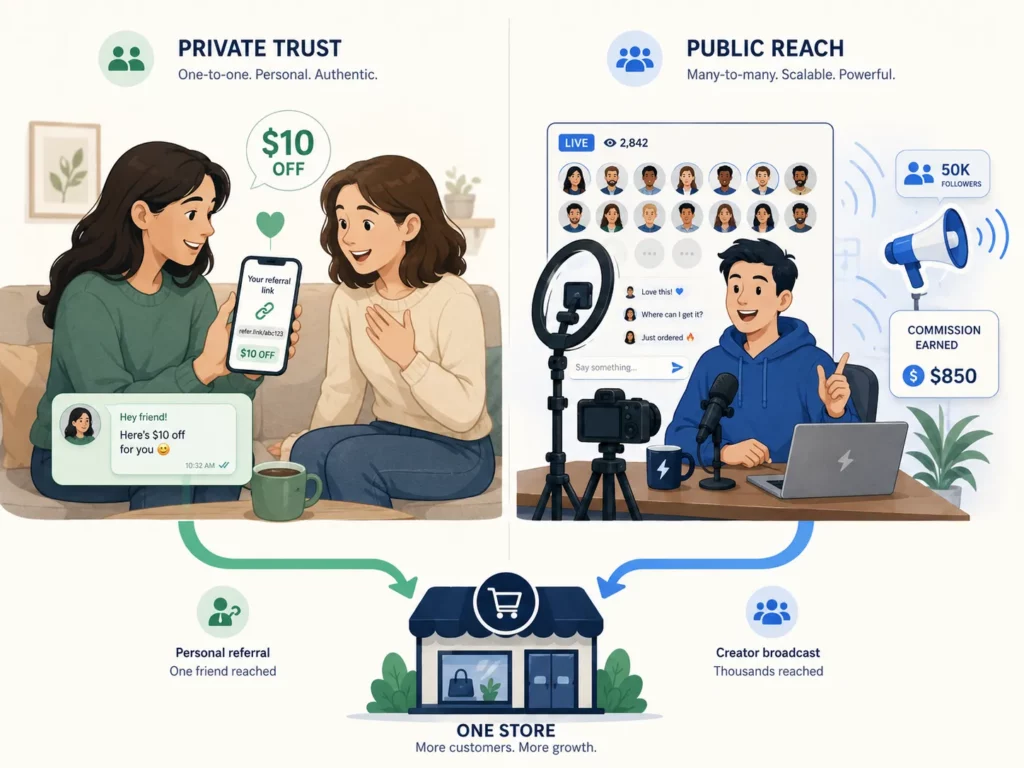
The numbers support running both. Referred customers carry a 16% higher lifetime value than non-referred customers (Wharton research).
The affiliate channel, meanwhile, delivers a 12:1 average return on ad spend across all sectors (PMA 2022 Industry Study). Two channels, two audiences, two revenue streams.
This guide will break down the difference, when to launch each, and how to set up a customer referral program in about 30 minutes. The setup will run alongside your existing affiliate program without conflict.
Referral Program vs Affiliate Program: What’s the Actual Difference?
A customer referral program rewards your existing customers for sending friends to your store.
An affiliate program, by contrast, pays outside creators a commission on the sales they drive. The promoters, the rewards, and the reach all differ.
The biggest gap comes down to one fact about the promoter: have they bought from you? Referrers are customers who already own and love your product, while affiliates may never have bought from your store before promoting it.
ReferralCandy makes this distinction the foundation of their referral programs guide. Every operational difference between the two programs flows from there.
Side by side, the gap shows up across nine factors, from who promotes to how much each sale costs the merchant.
| Dimension | Customer Referral Program | Affiliate Program |
| Who promotes | Existing customers sharing with friends | External creators, influencers, bloggers |
| Motivation | Personal trust, small reward | Commission income from public promotion |
| Sharing method | Private: text, DM, email to friends | Public: blog posts, YouTube, social media |
| Audience size per promoter | Small (personal network) | Large (creator following, can hit 100K+) |
| Trust level | Highest (personal recommendation) | Medium-high (creator credibility) |
| Typical reward | $10 store credit + friend gets $10 off | 10–20% cash commission per sale |
| Reward cost to merchant | Low (store credit recycles into sales) | Higher (cash leaves the business) |
| Scale ceiling | Limited by customer base | Unlimited (recruit more affiliates) |
| Best for | Repeat-purchase, LTV growth | New acquisition, broader reach |
Why both channels need to exist
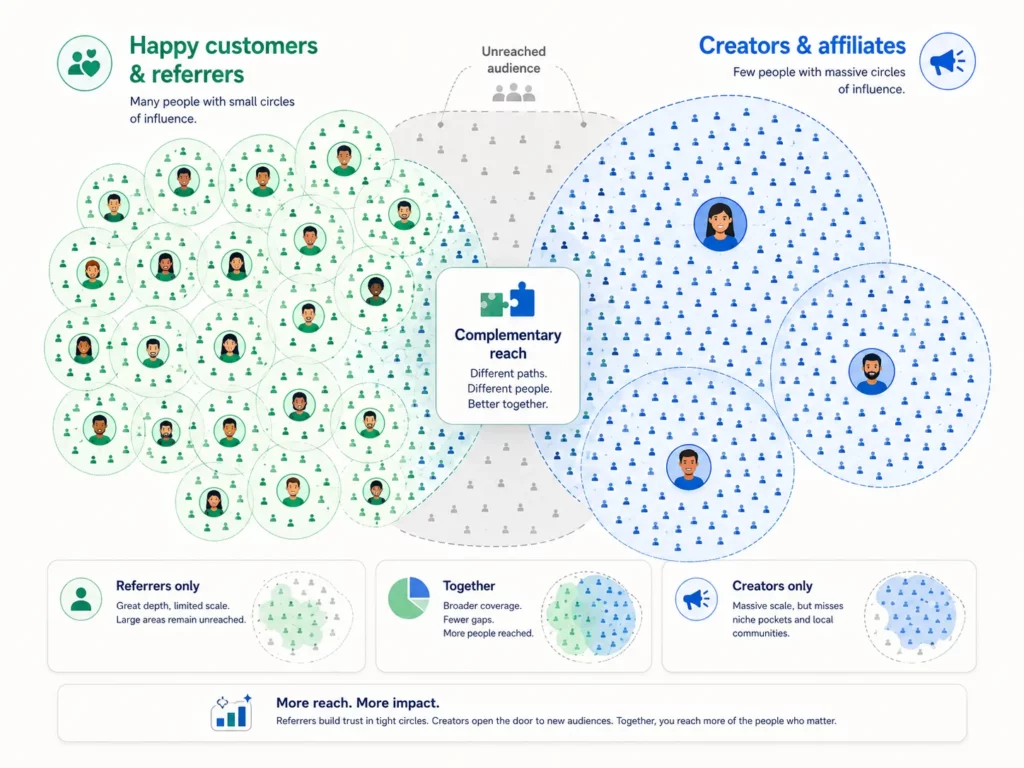
Reading the table raises an obvious question: do you need both, or will one program reach enough?
For most stores, the answer is both, because each captures an audience the other can’t.
A referral program turns every happy customer into a possible promoter. Yet each one can only share with the 10–200 people they personally know. Reach stops there.
As a result, skipping the referral side leaves the natural voice of your customer base quiet: happy customers who would’ve shared a link if you’d asked.
By contrast, an affiliate program does the opposite. Bloggers, influencers, and creators can reach audiences your customers never will, but they earn on commission rather than personal trust.
Without the affiliate side, you may never connect with the creators who want to build content around your brand for income.
Fortunately, most Shopify apps in this space handle both program types from one dashboard, including UpPromote, ReferralCandy, Social Snowball, and BixGrow. Running both will cost only a little more than running one, since the same app powers both.
When Should You Launch Referral, Affiliate, or Both?
With the case for running both settled, the next question is timing. Launch them together, or stagger one before the other?
For most Shopify stores, both at once will work. A few situations, however, call for starting with one and adding the other later.
Your monthly order volume drives most of the decision, with product category nudging it one way or the other.
| Store Situation | Launch First | Then Add | Timing |
| New store (<100 orders/mo) | Referral | Affiliate at 200+ orders/mo | Month 1 → Month 3 |
| Growing store (100–500 orders/mo) | Both at once | — | Now |
| Established (500+ orders/mo) | Both at once | Optimize each over time | Now |
| High repeat rate (subscriptions, consumables) | Referral first | Affiliate for new audiences | Month 1 → Month 2 |
| High-ticket, low repeat ($200+ AOV) | Affiliate first | Referral once buyer pool grows | Month 1 → Month 2 |
Why “both at once” works for most stores
The “both at once” rows cover the majority of Shopify stores. Adding a second program costs little extra in time or money. The downside risk also stays near zero, since payouts only trigger on real sales.
Setup runs about 30 minutes per program. The same app handles both, so the second program adds only a few extra settings rather than a full second build.
Add cost to the picture and it stays favorable. Most apps either offer a free tier or charge $30–$60 per month for both programs combined. The bundled price runs far below what two separate apps would cost.
For so little investment, the payoff is large. From Day 1 you get two acquisition channels live. One pulls referrals from your customer base; the other pulls traffic from outside creators.
When sequencing makes more sense
The “both at once” approach works for most stores. A few specific patterns, however, call for sequencing one program before the other.
Stores doing fewer than 100 orders a month should start with referral. The reason is: affiliate recruitment takes weeks, while a few post-purchase emails can get referrals moving in days.
Moreover, subscription and consumable brands also lean toward referral first. Each renewal cycle gives repeat customers another chance to share. Volume builds over time, without extra work from you.
High-ticket stores with thin customer bases run the opposite play. With few existing customers to recruit as referrers, affiliate-driven acquisition needs to come first. Referral can follow once the buyer pool grows large enough to sustain it.
How to Set Up a Customer Referral Program on Shopify
With timing decided, the setup itself stays straightforward. Shopify doesn’t ship with a built-in referral feature.
Therefore, for customer-to-customer referrals, you’ll work through a third-party app from the Shopify App Store. Affiliate tracking runs the same way.
The full setup takes about 30 minutes from start to finish. It begins with the foundation question every Shopify program runs into: which app will host the build?
Step 1: Choose an app (or extend your existing one)
If you already run an affiliate program, you can usually extend the same app.
UpPromote, for example, offers Customer Referral on its Growth plan from $29.99/month. The feature sits alongside the affiliate program in the same dashboard.
The next decision is what each side of a referral actually earns.
Step 2: Decide your reward structure
The most effective referral programs use 2-sided rewards. Both the referrer and the friend get something. Without that, one side has no reason to act.
A common starting point: $10 store credit for the referrer when their friend buys, plus $10 off the friend’s first order. From there, adjust to your average order value and category.
These common categories tend to land in predictable ranges:
| Brand Type | Referrer Gets | Friend Gets | Why It Works |
| Beauty ($40–80 AOV) | $10 credit | $10 off first order | Sweet spot: enough value, affordable for the brand |
| Fashion ($60–120 AOV) | 15% off next order | 15% off first order | Percentage matches varying cart sizes |
| Subscription ($30/mo) | Free month | 50% off first month | Trial incentive for subscriptions |
| High-ticket ($200+ AOV) | $25 credit | $25 off | Higher value matches higher AOV |
| Budget ($15–30 AOV) | $5 credit | $5 off | Proportional to product price |
Once both reward amounts are set, you can move into the app to configure the program itself.
Step 3: Create the program in your app
Configuration takes about 10 minutes. The settings include program type (separate from your affiliate program), the referrer reward, the friend reward, eligibility rules, and any product exclusions.
Most stores set eligibility to first-time customers only. The goal is acquisition, not rewarding existing-customer recommendations.
Common exclusions include gift cards, bundles, and already-discounted SKUs that would otherwise stack with the referral discount.
Once the program is built, traffic to it comes from where you place the sharing prompts.
Step 4: Add sharing touchpoints
A referral program with no visibility produces no referrals. The highest-converting touchpoints sit right after the purchase moment, when customer excitement peaks.
With UpPromote’s Customer Referral, you can choose among three display types to cover the common touchpoint patterns. Each can be customized for color, copy, and placement to match your storefront.
Widget. A floating button on your storefront. Clicking it opens a popup where customers register and get their unique referral link.
Post-purchase signup. An app block on the Shopify thank-you or order-status page (new Shopify checkout only). A “show only once per customer” toggle prevents repeat prompts on later purchases.
Landing page. An embeddable signup form for any page of your store, useful for a dedicated /refer-a-friend page or footer placement.
On the friend’s side, a Friend Incentive popup appears when someone arrives through a referral link, surfacing the discount they’re about to get at checkout.
The app also sends an automatic reward email to the referrer once their payout processes, with a button to redeem the credit in your store.
Step 5: Test before going live
Create a test referral end-to-end. Use the referrer’s link to visit the store from a different browser or device, then complete a purchase as the friend.
Verify three things: the discount applied at checkout, the friend got marked as a new customer, and the referrer’s reward showed up in their account.
Five minutes of testing saves hours of customer-service work later, when a real referrer asks why their reward didn’t trigger.
How to Manage Referral and Affiliate Programs from One Dashboard
Setup gets the programs live. The day-to-day question, however, is how they will work side by side in the same tool.
The answer comes down to clean separation. In practice, most apps let you set up each program on its own. The rules, rewards, and reports stay distinct, while both live in the same dashboard.
The differences show up across seven key settings:
| Setting | Referral Program | Affiliate Program |
| Reward type | Store credit or discount | Cash commission (%) |
| Who joins | Any customer (auto or opt-in) | Approved partners only |
| Enrollment | Post-purchase popup or email | Application → review → approval |
| Tracking | Referral link or code | Affiliate link or code |
| Payout | Auto store credit or discount | Manual or auto PayPal |
| Partner portal | Simple: link + earnings view | Full: link, code, materials, stats |
| Marketing materials | Minimal (share link) | Full kit (images, banners, guides) |
Each setting can be tuned on its own.
For example, a merchant might run a $10 referral with store credit alongside a 15% affiliate commission paid out via PayPal. Both live in the same tool, with no rule conflicts between them.
Run both well and the numbers compound. SilverCeuticals drives nearly 30% of total revenue through affiliate marketing while running an active customer referral program. The two channels reinforce each other rather than compete.
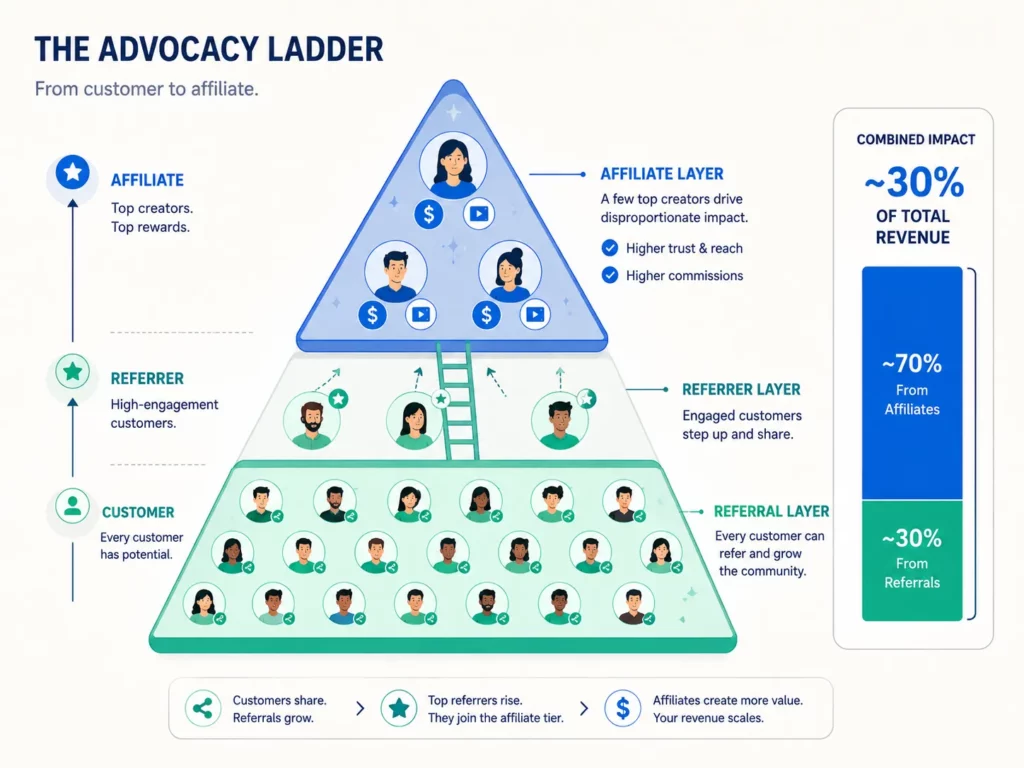
Underneath those top earners runs a steady stream of customer referrals. The entry-level layer catches advocacy early, before it can grow into something bigger.
The deliberate two-layer structure is what produces the 30% share. Customers don’t all become affiliates, but every customer can become a referrer first. From there, the strongest referrers tend to rise into the affiliate program over time.
Should Referral Rewards Be Store Credit, Cash, or Discount?
Within the referral side, one decision shapes the economics more than any other: the type of reward you give. For most Shopify stores, store credit tends to deliver the best return.
It costs less than cash to issue, feels almost as appealing to customers, and pulls them back to your store to spend it.
Each reward type carries its own cost-and-appeal trade-off:
| Reward Type | Cost to Merchant | Appeal to Customer | Drives Repeat Purchase? | Best For |
| Store credit | Low (COGS only, ~30–40% of face value) | High (feels like “free money”) | Yes (must return to spend) | Most referral programs |
| Cash (PayPal) | Full face value | Very high | No (spend anywhere) | Affiliate programs, top referrers |
| Discount (% off) | Cart × discount % | Medium | Yes (incentive to buy again) | Simple setup |
| Free product | COGS of product | High | Yes (try new product) | New product launches |
| Points | Depends on redemption rate | Medium-low | Yes (accumulate) | Loyalty program stores |
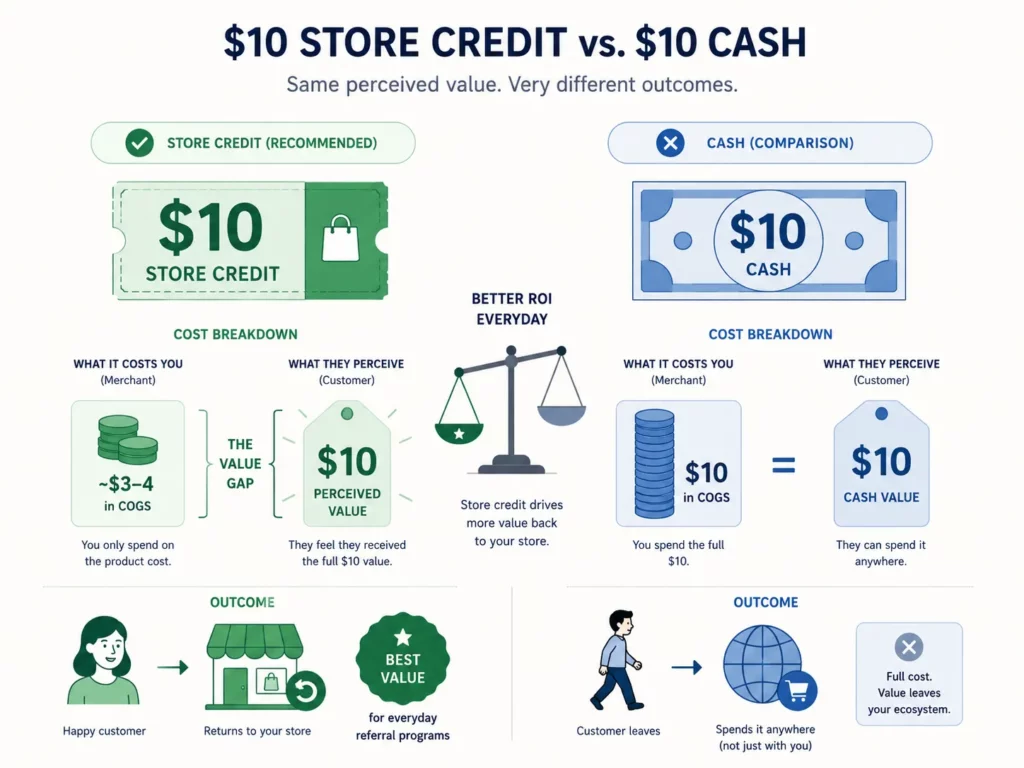
The economics explain why.
A $10 store credit costs the merchant roughly $3–4 in actual COGS when the customer redeems it. The redemption is a discount on a future order rather than a cash payout.
A $10 cash payout, by contrast, costs the full $10. The money leaves the business, and the customer can spend it anywhere.
Cash rewards may convert slightly better in practice, since they feel more like real money to the customer. The lift tends to be small, though, and doesn’t justify the cost gap for everyday referral programs.
5 Mistakes to Avoid When Running Both
Even with the right setup, a few patterns show up when merchants run both programs side by side. Each one has a quick fix.
Mistake 1: Setting the same reward for both programs
A $10 store credit might be the right referral incentive, but it’s the wrong affiliate payout. Customers want simplicity, while affiliates want income they can spend anywhere. Different audiences, different expectations.
Mistake 2: Using vague program names
Calling both programs “Our Referral Program” confuses participants. Use “Refer a Friend” for the customer side and “[Brand] Affiliate Program” for the creator side, with separate signup flows for each.
Mistake 3: No upgrade path from referrer to affiliate
A customer who drives 5+ referrals signals real promoter potential. Without an upgrade path, they stay capped at $10 store credit. Invite top referrers into the affiliate program, where they can earn cash commission instead.
Mistake 4: Letting the two programs compete for credit
What if a customer in both programs refers a friend? Without a priority rule, the same sale could trigger both rewards or neither. Set a default in your app: active affiliates get attribution; everyone else stays with referral.
Mistake 5: Promoting only one program
Launching both is half the work; promoting them is the other half. Affiliates often get a website footer and outreach emails, while referral programs sometimes get nothing. Promote both: post-purchase for referral, website + outreach for affiliate.
What Changed in 2026?
The mistakes above have been familiar for years. What’s shifted in 2026 is how merchants and apps now approach running both programs together.
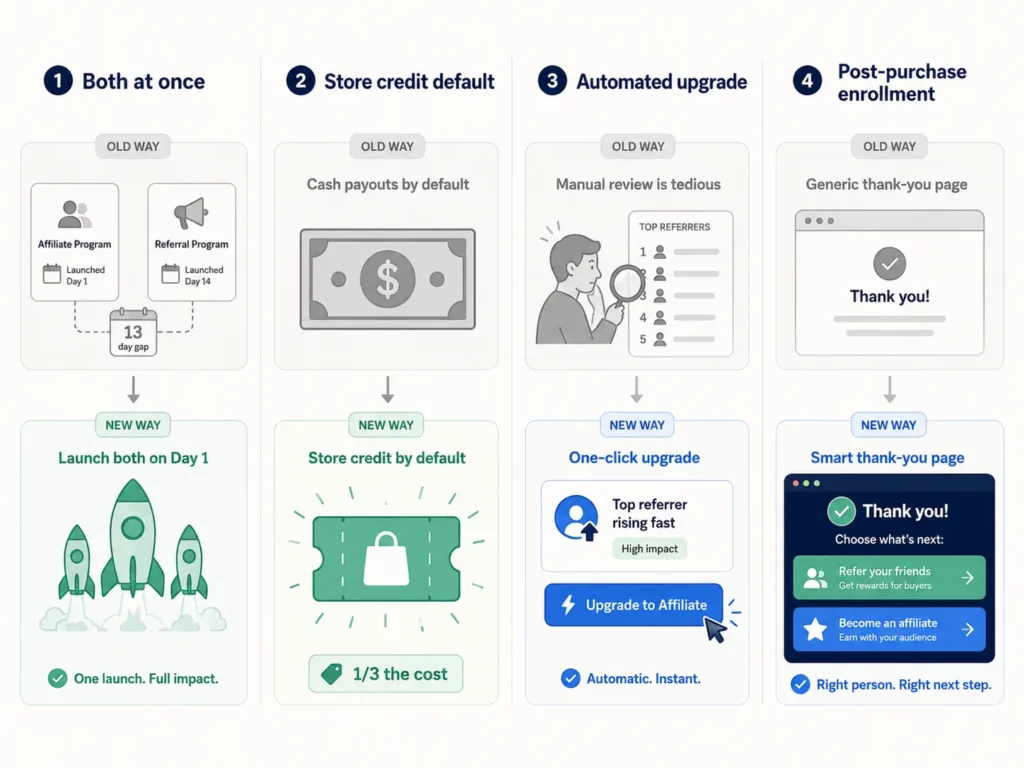
➡️”Both at once” became the default.
New stores launch both programs from Day 1, since the same app handles them and there’s little downside to running them in parallel.
➡️Store credit gained ground as the referral default.
More brands shifted to store credit over cash for referrer rewards, matching the math: roughly one-third the cost while keeping appeal close to par.
➡️Referral-to-affiliate upgrade went automated.
Apps started surfacing top referrers and prompting one-click upgrades, retiring the manual scan-the-leaderboard step.
➡️Post-purchase enrollment became table stakes.
The thank-you page now carries both prompts: a referral CTA for buyers, plus an affiliate CTA for creators who land there.
Frequently Asked Questions
Do I need separate apps for referral and affiliate?
No. UpPromote, ReferralCandy, Social Snowball, and BixGrow all support both program types in one app. Using two separate apps creates tracking conflicts, doubles your subscription cost, and confuses customers who land on competing signup flows.
Can a customer be in both programs at the same time?
Yes, with priority rules. If the customer is an active affiliate, attribution should go to the affiliate program (the higher-value path). Otherwise it stays with referral. Most apps let you set this default in the tracking rules.
Does a customer referral program need formal terms or an agreement?
Less than affiliate. Referral terms can run a few sentences (“Share your link, your friend buys, you both earn $10. One reward per unique friend. No self-referrals.”). Affiliate programs need a full agreement covering commission rates, payment timing, and brand usage rules.
Is store credit more expensive for the merchant than a percentage discount?
The opposite. A $10 store credit costs the merchant roughly $3–4 in COGS at redemption. A 10% discount on a $100 order cuts margin by the full $10 upfront. Store credit also pulls the customer back; discounts don’t.
How many referrals should I expect per month?
The number depends on customer base size and program visibility. A store doing 1,000 orders a month with strong post-purchase promotion will see 50–100 referral shares and 2–5 completed referrals each month. Stores with weaker visibility see fewer.
Does a referral program use cookie tracking like affiliate programs?
Yes, the mechanics are similar. A clicked referral link drops a cookie, the friend’s purchase triggers attribution, and the referrer earns their reward. Cookie windows for referrals tend to be shorter (14–30 days), since friends often buy soon after a personal recommendation.

Ellie Tran, a seasoned SEO content writer with three years of experience in the eCommerce world. Being a part of the UpPromote team, Ellie wants to assist Shopify merchants in achieving success through useful content & actionable insights.Ellie's commitment to learning never stops; she's always eager to gain more knowledge about SEO and content marketing to create valuable content for users. When she's not working on content, Ellie enjoys baking and exploring new places.

![How to Use Shopify Functions with Your Affiliate Program [2026 Guide]](https://static.uppromote.com/wp-content/uploads/2026/06/how-to-use-shopify-functions-with-affiliate-program-300x169.webp)

![How to Prevent Affiliate Fraud on Shopify: Self-Referral, Coupon Abuse & More [2026]](https://static.uppromote.com/wp-content/uploads/2026/06/how-to-prevent-affiliate-fraud-on-shopify-300x169.webp)