TL;DR
Your affiliate dashboard determines whether partners stay active or quietly stop promoting. Merchants with transparent, real-time reporting retain up to 25% more affiliates within the first six months.
- #1 retention driver: Real-time earnings visibility
- Must-have elements: 7 (earnings, stats, tiers, payouts, materials, links, updates)
- Setup time: ~30 minutes with most Shopify affiliate apps
- Biggest mistake: Delayed data that leaves affiliates guessing
- Result: Self-sufficient partners who promote without hand-holding
You recruit 50 affiliates. Month one, 15 are active. By month three, eight. By month six, five. That’s a 90% drop-off rate.
The cause is rarely commission rates or product quality. It’s visibility. Affiliates post content and have no way to see how many clicks they generated.
They drive sales with no way to confirm commission was recorded. They wait for payouts with no way to check the status. Each gap compounds the uncertainty until promoting stops feeling worth the effort.
That pattern shows up in the data. Merchants who provide transparent, real-time reporting retain up to 25% more affiliates within the first six months.
The reverse is equally clear. When reporting lags, payouts are unclear, or support goes silent, programs collapse quietly (Foursixty, 2026).
Your dashboard is the communication layer between you and every partner. This guide walks through seven essential elements, a 30-minute setup process, and behavioral nudges that turn passive affiliates into consistent promoters.
Why Is Your Affiliate Dashboard the #1 Retention Tool?
A dashboard is more than a reporting screen. It’s the primary tool that keeps affiliates engaged between payouts, and the quality of that experience directly predicts whether they stay or leave.
The reason comes down to what affiliates can and can’t see when they log in. Each gap in visibility creates a different kind of friction, and the friction compounds.
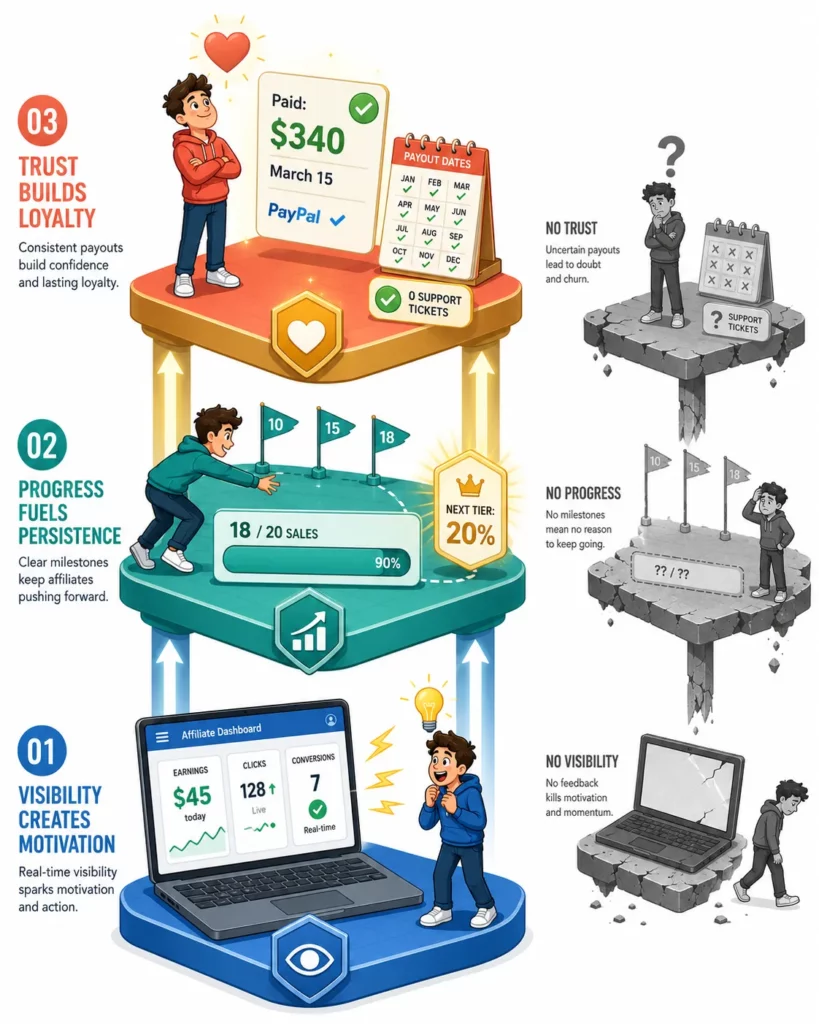
Visibility creates motivation. When an affiliate sees “42 clicks today, 3 sales, $45 earned,” the feedback is immediate. That confirmation turns a one-time post into a daily habit.
Without it, affiliates promote into a void. But even with real-time data, results only answer one question: “Is this working?”
Progress fuels persistence. Affiliates also need to know where those results are taking them. An affiliate at 18 out of 20 sales to reach the next commission tier has a concrete reason to push harder this week.
That finish-line effect narrows focus and increases output. It falls apart, though, if affiliates aren’t confident the money will actually arrive.
Trust builds loyalty. A clear payout record showing “$340 paid on March 15 via PayPal” removes the single biggest source of frustration. When that history is vague or missing, “Where’s my money?” emails start and the relationship deteriorates.
These three layers compound. Programs that rely on spreadsheets or email updates see high support volume and low engagement.
A full dashboard with real-time data, progress tracking, and self-serve tools changes that equation. Partners work independently and stay active longer.
What Are the 7 Must-Have Elements for an Affiliate Dashboard?
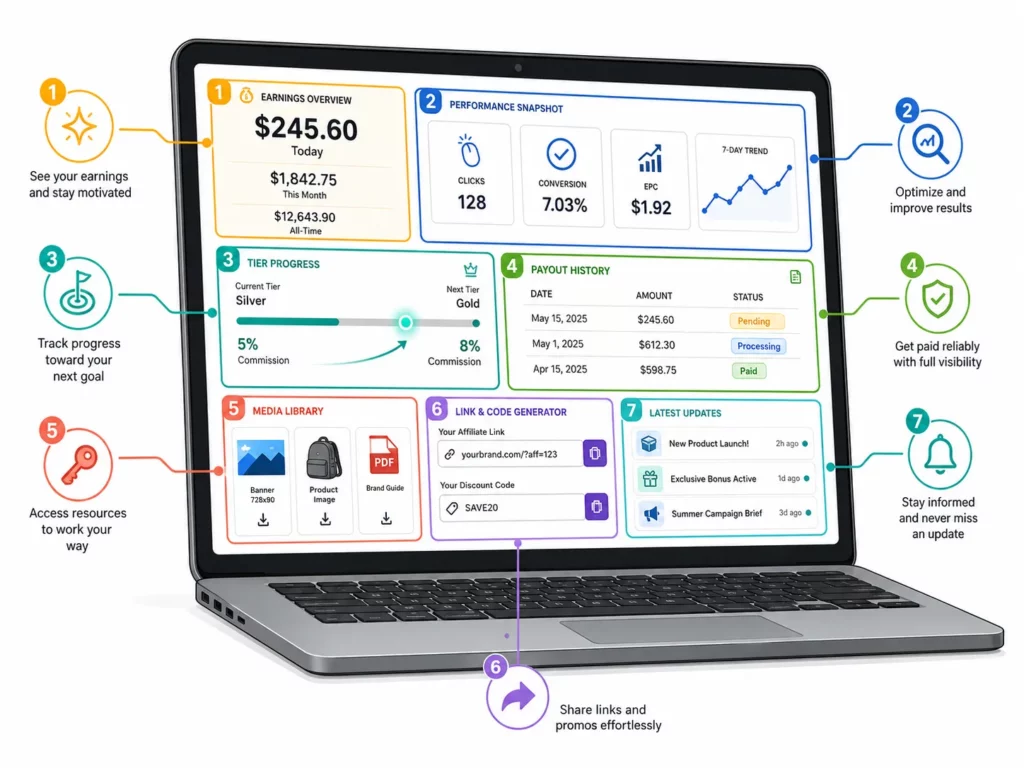
Seven elements turn a basic login page into a dashboard affiliates open daily. Each one removes a reason for partners to email you.
Together, they create a self-serve experience that keeps affiliates active.
| # | Element | What the Affiliate Sees | Why It Matters |
| 1 | Real-time earnings | Today: $X. This month: $Y. All-time: $Z | Immediate proof that effort converts to income |
| 2 | Click and conversion stats | Clicks, conversions, conversion rate, EPC | Shows which content works so affiliates can optimize |
| 3 | Tier progress | “18/20 sales to Silver tier (15% → 20%)” | Gamification that pushes affiliates toward the next milestone |
| 4 | Payout history and status | Pending: $120. Next payout: Apr 15. Paid: $340 | Eliminates “where’s my money?” questions |
| 5 | Media library | Images, banners, sample captions, brand guide | Self-serve materials without waiting for the merchant |
| 6 | Link and code generator | Personal affiliate link + discount code with copy button | Core sharing tool with zero friction |
| 7 | Updates feed | New products, seasonal campaigns, bonus offers | Keeps affiliates informed without a separate email chain |
Performance data: the foundation affiliates check first
Earnings, click stats, and tier progress form the core of every dashboard visit. Real-time earnings should be the first thing affiliates see when they log in: today, this week, this month, all-time.
When an affiliate sees “$12 earned today,” the boost is instant. That feedback loop turns occasional posting into a daily habit.
Click and conversion stats take that feedback one level deeper. Beyond how much they earned, affiliates need to see how they earned it.
Clicks show traffic volume, conversions show traffic quality, and earnings per click reveals which channels perform best. That data helps affiliates double down on what works.
Tier progress adds a goal layer. Programs with tiered commissions give affiliates a reason to push beyond their current level. An affiliate at 90% of the threshold for a higher rate has a concrete reason to promote harder this week.
Payout transparency: the trust layer
Clear payout history solves the most common affiliate complaint. Every partner should see three states: pending, processing, and paid, each with the date and amount.
When those states are visible, affiliates stop asking about payment status. When they’re hidden, trust erodes fast, and affiliates quietly move to programs where the money trail is clear.
Self-serve resources: the independence layer
The final three elements move affiliates from dependent to independent. A media library gives them banners, product images, and brand guides they can download without emailing you.
With UpPromote, there’s a media gallery where merchants upload assets and affiliates grab what they need. Everything stays current without email threads or shared drive links.
Link and code access matters just as much. A one-click copy button for affiliate links and discount codes removes friction between intent and action.
An update feed also rounds out the dashboard. New product launches, bonus offers, and campaign news belong inside the portal, not scattered across emails that affiliates miss.
How Do You Set Up a Branded Affiliate Portal on Shopify?
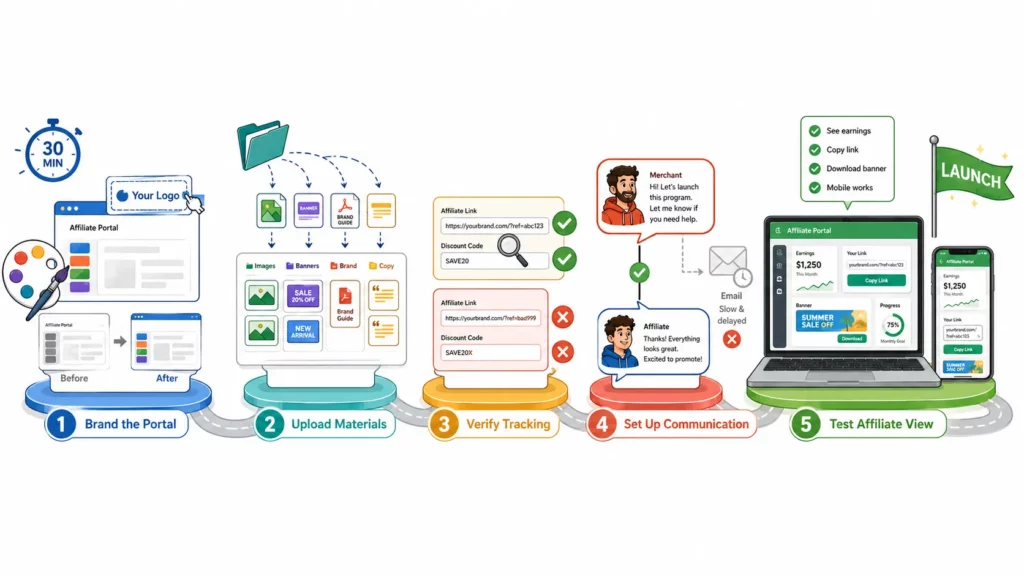
A complete affiliate portal takes about 30 minutes to set up, and most Shopify affiliate apps handle the technical side without a developer. The work is closer to filling out a profile than building a website.
The setup starts with the piece affiliates notice first: your branding.
Step 1: Brand the portal
Upload your logo, set your brand colors, and match the portal’s look to your store. The goal is a seamless experience from your site to the affiliate login.
Affiliate software like UpPromote include a visual registration page editor that handles layout, colors, and form fields, so the portal matches your store without custom code.
Step 2: Upload materials to your media library
Add product images, banners, sample captions, and your brand guide. Then, organize by category or product line so affiliates can find what they need fast.
Step 3: Verify tracking links and codes
Create a test affiliate account and confirm that links and codes work at checkout. A broken link on day one kills trust fast.
Step 4: Set up a communication channel
Affiliates will have questions, and email alone creates lag. A built-in messaging system lets partners ask and get answers without switching platforms.
UpPromote offers in-app chat, connecting merchants and affiliates inside the same tool.
Step 5: Test the affiliate view
Log in as a test affiliate and walk through the full experience. Can you see earnings? Copy your link? Download a banner? Does everything work on mobile? Fix friction before inviting real partners.
Independent reviewers have noted the difference a polished portal makes. EcommerceGold described the UpPromote affiliate dashboard as “well designed and professional, giving a good impression for partners” (EcommerceGold).
What Behavioral Nudges Turn Passive Affiliates into Active Promoters?
A dashboard gives affiliates information. Nudges give them a reason to act on it.
The difference between a program where 20% of affiliates post regularly and one where 60% do often comes down to what happens after login.
Recognition drives competition
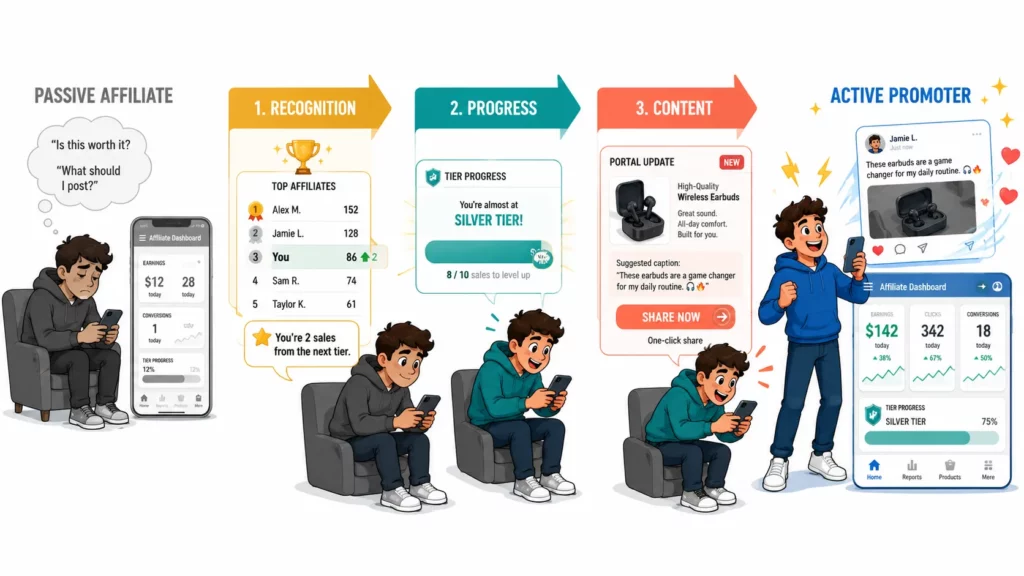
Some programs add a monthly top-performers widget to their portal. When partners see peers earning, it creates healthy pressure.
Leaderboards work best with 20 or more active affiliates. Smaller programs get the same effect with a monthly shoutout email. Either way, competitive energy sharpens when paired with a clear path to better rates.
UpPromote’s auto-tier feature turns this into a system. It moves affiliates to higher commission programs when they hit milestones. An affiliate who crosses $5,000 in total sales can auto-upgrade from 5% to 10%, with no manual work.
A well-timed notification sharpens that effect. “You’re 2 sales away from a rate increase” can close the gap. But even a motivated affiliate needs something to post.
Content makes promotion easier
The final nudge layer removes the work of creating from scratch. When a new product launches, a portal update with images and suggested captions gives affiliates a ready reason to share.
Without that material, affiliates need to write their own copy, find images, and guess the messaging. Most won’t bother.
Holbrook Pickleball built motivation into their program with monthly sales contests and performance rewards. The approach drove an 87% boost in referral orders, along with 173 new affiliate signups and an 86% rise in affiliate revenue.
What Dashboard Mistakes Kill Affiliate Motivation?
Most affiliate programs don’t fail because of technology. They fail because of execution gaps that show up in the daily dashboard experience.
Six mistakes below account for most of that damage.
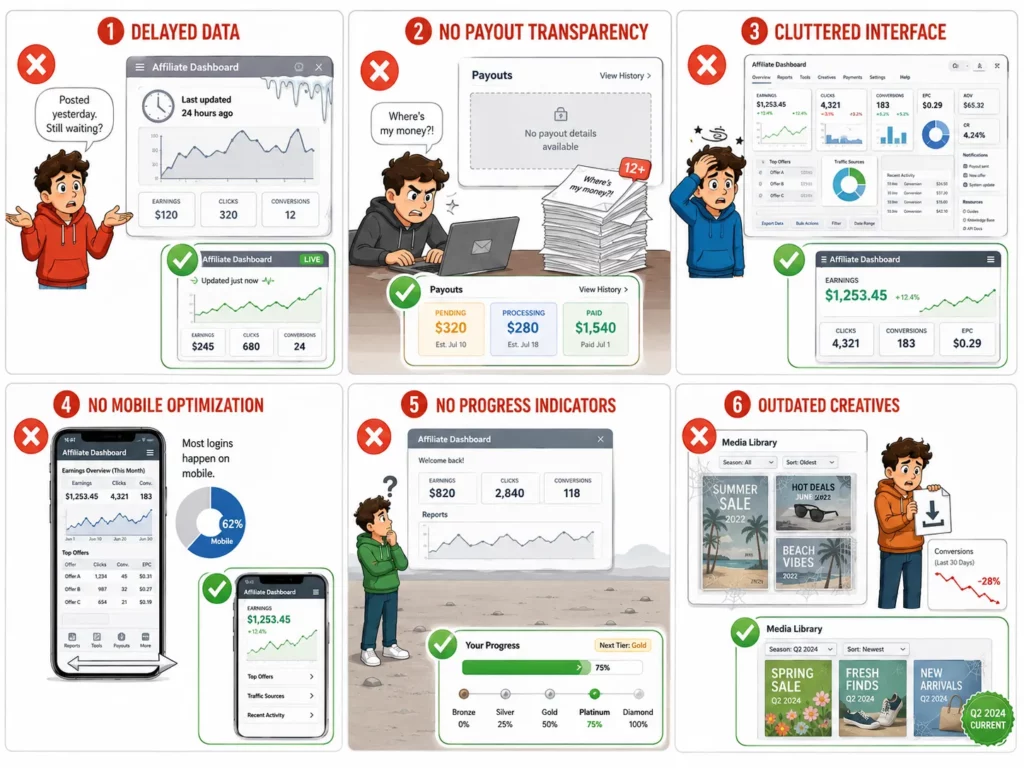
| Mistake | Impact | Fix |
| Delayed data (daily batch instead of real-time) | Affiliate posts, waits 24 hours, wonders “did it work?” | Enable real-time click and sale tracking |
| No payout transparency | “Where’s my money?” emails pile up | Show pending, processing, and paid status in the portal |
| Cluttered interface | Affiliate overwhelmed on first login, stops returning | Put earnings first, details second |
| No mobile optimization | 60%+ of affiliate logins happen on phones | Use a mobile-responsive portal template |
| No progress indicators | “Am I doing well?” uncertainty | Add tier progress and milestone markers |
| Outdated creatives | Affiliates share old images, conversion drops | Update your media library every quarter |
The common thread across all six is the affiliate’s perspective.
Merchants build dashboards thinking about what data to display. Affiliates experience dashboards thinking about what to do next.
Checking the portal monthly from the affiliate’s side will catch most of these. Log in as a test affiliate, try both desktop and mobile, and fix what feels slow or confusing.
Frequently Asked Questions
Can affiliates customize their own dashboard?
In most apps, no. The merchant controls branding, layout, and which elements are visible. Affiliates interact with the portal by copying links, downloading materials, and viewing stats, but they don’t change the design. This keeps the experience consistent across all partners.
What is the difference between an affiliate dashboard and a merchant admin panel?
They serve different audiences. The dashboard is what affiliates see: earnings, links, materials, and payout status. The admin panel is what merchants see: all affiliates, all orders, fraud alerts, and program settings. Affiliates never see other partners’ data or program-level controls.
Should I add a leaderboard to my affiliate portal?
It depends on program size. Leaderboards work well with 20 or more active affiliates, where the competition feels natural. For smaller programs, a monthly email highlighting top performers achieves the same effect without making the ranking feel sparse.
How do I fix a confusing affiliate dashboard?
Start with three changes. Move the earnings summary above the fold so it’s the first thing affiliates see. Record a short video walkthrough. Then test the mobile view, since most affiliates log in from their phones. If confusion persists, a quick screen-share call builds loyalty fast.
Do I need a developer to customize my affiliate portal?
No, for most Shopify affiliate apps. Logo, brand colors, and element visibility are handled through no-code settings. A custom domain like affiliates.yourbrand.com is available on higher-tier plans without development work. A fully custom UI would require a developer, but that’s rare outside enterprise programs.
Does an affiliate dashboard replace Google Analytics?
No. They track different things. The dashboard shows affiliate-specific data: their earnings, their clicks, their conversions. Google Analytics shows site-wide traffic, including the overall performance of your affiliate channel. Merchants use both. They’re complementary, not interchangeable.

Ellie Tran, a seasoned SEO content writer with three years of experience in the eCommerce world. Being a part of the UpPromote team, Ellie wants to assist Shopify merchants in achieving success through useful content & actionable insights.Ellie's commitment to learning never stops; she's always eager to gain more knowledge about SEO and content marketing to create valuable content for users. When she's not working on content, Ellie enjoys baking and exploring new places.

![How to Use Shopify Functions with Your Affiliate Program [2026 Guide]](https://static.uppromote.com/wp-content/uploads/2026/06/how-to-use-shopify-functions-with-affiliate-program-300x169.webp)

![How to Prevent Affiliate Fraud on Shopify: Self-Referral, Coupon Abuse & More [2026]](https://static.uppromote.com/wp-content/uploads/2026/06/how-to-prevent-affiliate-fraud-on-shopify-300x169.webp)