TL;DR
Ten KPIs cover what matters in your affiliate dashboard. Structure reviews in three tiers: daily health check, weekly trends, monthly strategy, and attach a specific action to every metric.
- Top metric: EPC (Earnings Per Click) — combines traffic quality, conversion, and AOV
- Healthy activation rate: 10–20% of affiliates generating sales
- Commission ROI baseline: 5:1; top programs hit 12:1+
- Review cadence: Daily (2 min), Weekly (15 min), Monthly (60 min)
You open your affiliate dashboard every morning. Clicks, orders, commissions, the numbers are there. But can you explain why Affiliate A drives $3,000 a month while Affiliate B drives $50?
That gap matters more than the top-line revenue number. Revenue climbed 20% last month, but profit shrank because refund rates spiked. The dashboard held the answer. Most merchants never looked for it.
The diagnosis often starts with one metric: activation rate. Industry benchmarks put a healthy range at 10–20% of affiliates actively generating sales.
If 100 affiliates signed up and fewer than 10 ever made a sale, you have a structural problem, not a traffic problem. Your dashboard already holds the evidence.
This article covers ten KPIs that matter, a three-tier review framework, and action playbooks that turn each data point into a specific next step.
How Often Should You Check Your Affiliate Dashboard?
Checking every metric every day creates two problems: overwhelm and inaction. Splitting your review into three tiers solves both.
Three tiers keep the workload realistic.
| Frequency | Time | Metrics | Question It Answers |
| Daily | 2 min | Clicks, orders, revenue (today vs. yesterday) | “Is anything broken right now?” |
| Weekly | 15 min | EPC, conversion rate, activation rate, AOV, top/bottom 5 affiliates | “How is the program trending?” |
| Monthly | 60 min | All 10 KPIs + LTV, refund rate, commission ROI, new vs. returning | “Is this program profitable, and what should change?” |
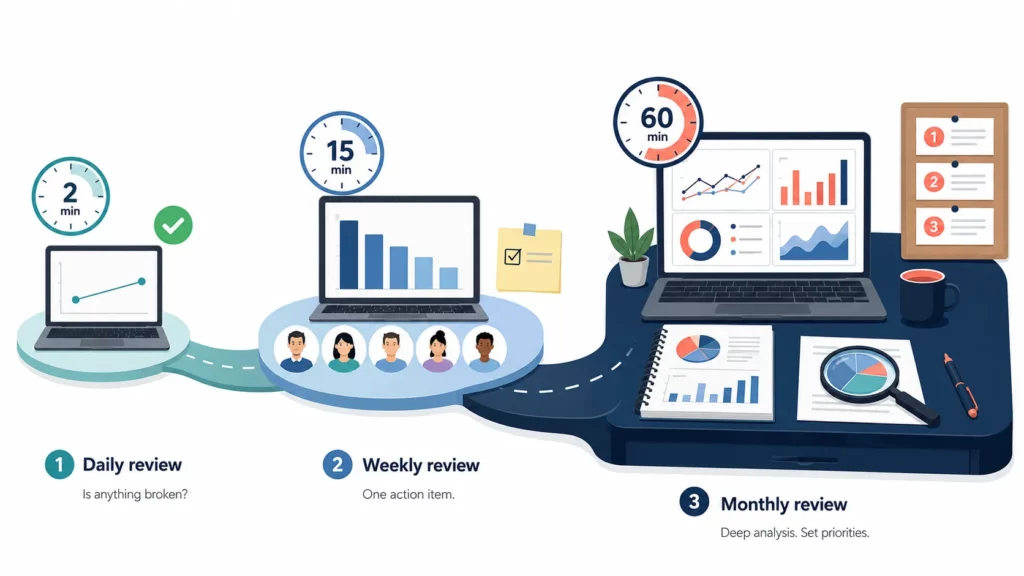
The daily check takes two minutes. Compare today’s clicks, orders, and revenue against yesterday’s numbers, and ask one question: is anything broken?
If traffic dropped 50% overnight, something needs fixing now. If everything looks normal, close the tab. That is the entire daily review.
The weekly review picks up where the daily check leaves off. One bad day is noise, but three straight weeks of declining EPC point to something deeper: content fatigue, audience mismatch, or a competitor offering better terms.
Fifteen minutes every Monday will give you enough signal to catch those patterns before they turn into a monthly crisis.
The monthly review goes one level further. Activation rate, commission ROI, and refund rate all need a full month of data before they tell a reliable story.
That is when strategic decisions happen: adjust commission rates, recruit harder, or remove affiliates who stopped producing. Block sixty minutes on the first of each month, and walk away with three priorities for the weeks ahead.
Which Affiliate KPIs Actually Matter?
Most affiliate dashboards show dozens of numbers, but only a handful change the decisions you make each week.
Those metrics fall into five layers: traffic quality, conversion, affiliate engagement, profitability, and customer acquisition.
| # | KPI | Formula | Benchmark | Red Flag | Check |
| 1 | EPC | Revenue ÷ Clicks | Varies by niche | Declining 3+ weeks | Weekly |
| 2 | Conversion Rate | Sales ÷ Clicks × 100 | 1–5% | <1% | Weekly |
| 3 | Activation Rate | Active affiliates ÷ Total × 100 | 10–20% | <5% | Monthly |
| 4 | Commission ROI | Revenue ÷ Commissions Paid | 5:1+ | <3:1 | Monthly |
| 5 | New vs. Returning | First-time orders ÷ Total orders × 100 | 50–70% new | <30% new | Monthly |
| 6 | Clicks | Total affiliate link clicks | Track trend | Sudden 50%+ drop | Daily |
| 7 | Revenue | Total $ from affiliate sales | Track trend | Declining 3+ weeks | Daily |
| 8 | AOV | Revenue ÷ Orders | Match store average | >15% below store avg | Weekly |
| 9 | Refund Rate | Refunds ÷ Affiliate orders × 100 | <5% | >10% | Monthly |
| 10 | Customer LTV | Avg lifetime revenue per affiliate customer | Track vs. organic | Below organic LTV | Monthly |
Clicks, revenue, AOV, refund rate, and customer LTV appear in the table with benchmarks you can reference during reviews. The five below need more than a quick glance.
EPC (Earnings Per Click): The Single Best Quality Metric
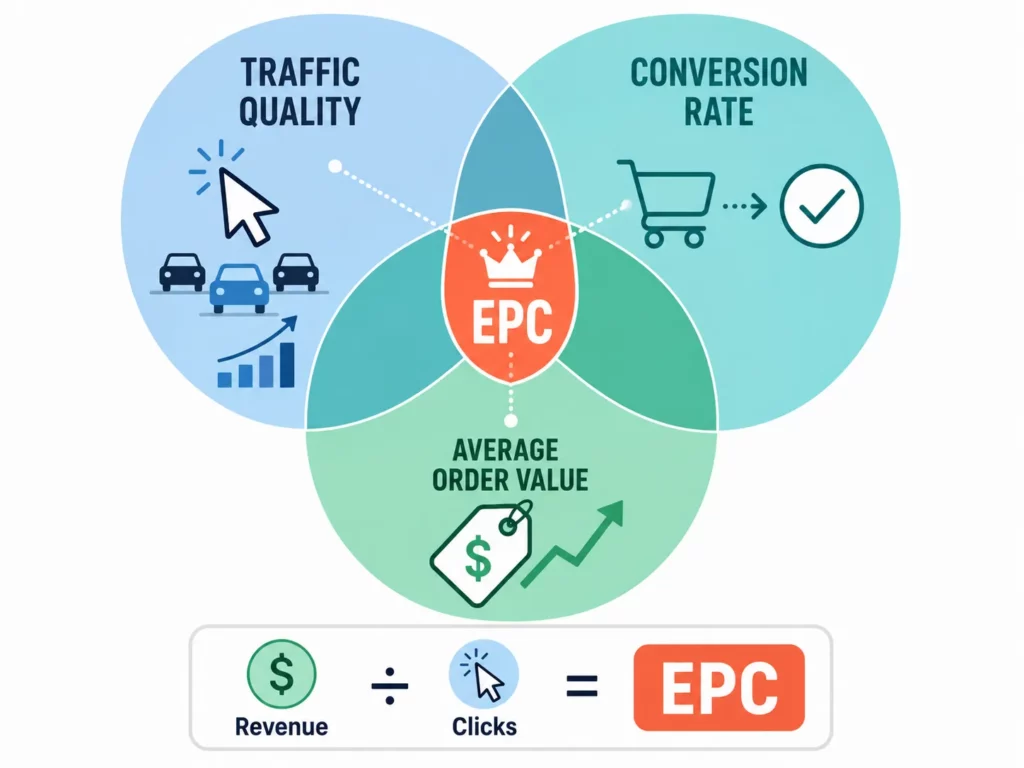
EPC combines traffic quality, conversion rate, and order value into one number. If you could track only one metric, this would be it.
The formula: total affiliate revenue divided by total clicks. The absolute number matters less than the trend.
Three or more weeks of declining EPC points to content fatigue, audience mismatch, or landing pages that stopped converting. Start diagnosis with the landing page: mobile speed, product availability, and offer accuracy.
Conversion Rate: Where Traffic Quality Shows Up
If EPC drops but click volume holds steady, conversion rate tells you where the leak is. High traffic plus low conversion means the wrong audience is arriving, or the page is not closing.
Affiliate traffic on ecommerce stores converts at 1–5% depending on niche and traffic source. Below 1% for two straight weeks, check the affiliate’s audience fit first, then the product page.
Activation Rate: Your Program’s Health Score
Strong conversion rates mean nothing if only five out of fifty affiliates are promoting. Activation rate measures what share of total affiliates have made at least one sale.
A healthy range is 10–20% (GoAffPro, 2026). Below 5%, the problem is usually onboarding: affiliates signed up but never got clear first steps or content assets.
The fix starts with a direct message to inactive affiliates: what is blocking you? The answer points to missing materials, unclear terms, or a product they cannot position.
Commission ROI: The Profitability Check
Active affiliates who convert well still do not guarantee profit. Commission ROI tells you whether each sale earns enough to justify the payout.
The formula: total affiliate revenue divided by total commissions paid. A 5:1 ratio is the baseline, and top programs reach 12:1 (Shopify, 2025).
Below 3:1, look at three culprits: commission rate too high, coupon stacking leaking margin, or too many coupon-site affiliates in the mix.
If a handful of affiliates drag ROI down, tiered structures help. UpPromote can automatically move top performers to a higher commission tier while keeping the base rate lower for newer partners.
New vs. Returning Customers: The Acquisition Test
A profitable program still wastes money if affiliates discount for repeat buyers who would have purchased anyway. The new-versus-returning split exposes that.
Aim for 50–70% first-time customers from affiliate orders. Below 30%, you are paying commission on customers you already own.
One fix: set a higher commission on first-time orders and a lower rate on repeats. UpPromote’s new customer commission can help detect whether the buyer has ordered before and applies the right rate automatically.
What Does a Structured Weekly and Monthly Review Look Like?
The three-tier framework only works if you follow the same process each time. Two templates keep reviews focused and repeatable.
The 15-Minute Weekly Review (Every Monday)
Your weekly review has one job: spot trends early enough to act on them. Five steps, same order every Monday.
- Compare this week against last week. Pull total clicks, orders, and revenue. Note the direction: up, down, or flat.
- Sort affiliates by revenue. Are the same names on top, or did someone new break through?
- Check the bottom five active affiliates by EPC. Look for a pattern: same niche, same platform, same content type.
- Track EPC week over week. Three consecutive drops deserve investigation.
- Write one action item. Not a list. One task you will complete before next Monday.
Most affiliate apps let you filter by date range and sort by EPC or revenue. UpPromote includes these filters on the free plan, so the comparison takes seconds.
Every weekly review should end with exactly one action item. Not three, not a vague plan.
One specific task: send new product images to affiliates, message your top performer, or review five pending applications. Fifty-two of those per year compound faster than marathon sessions.
The 60-Minute Monthly Deep-Dive (First of the Month)
Weekly reviews spot fast trends, but some decisions need a wider lens. The monthly deep-dive covers four areas in fifteen minutes each.
- Program health. Total affiliates versus last month, activation rate trend, new signups versus churned, and any backlog of pending applications.
- Revenue and profitability. Total affiliate revenue, commission ROI (above or below 5:1), average commission per order, and refund rate on affiliate orders.
- Affiliate performance. Top 20% get a thank-you or reward. Middle 60%: pick three to nurture with fresh content ideas. Bottom 20% inactive for 90+ days: send a check-in or archive.
- Strategic decisions. Commission rate adjustments, recruitment channel changes, seasonal content updates, and any fraud or coupon-leak signals from the month.
Walk away from each monthly review with three written priorities for the next thirty days. Not ten. Three.
If commission ROI dropped below 5:1, that is priority one. If activation rate fell, onboarding goes to the top. The constraint forces ranking, and ranking forces focus.
Which Dashboard Red Flags Require Immediate Action?
Not every problem waits for your Monday review or your first-of-the-month deep-dive. Some signals require same-day action.
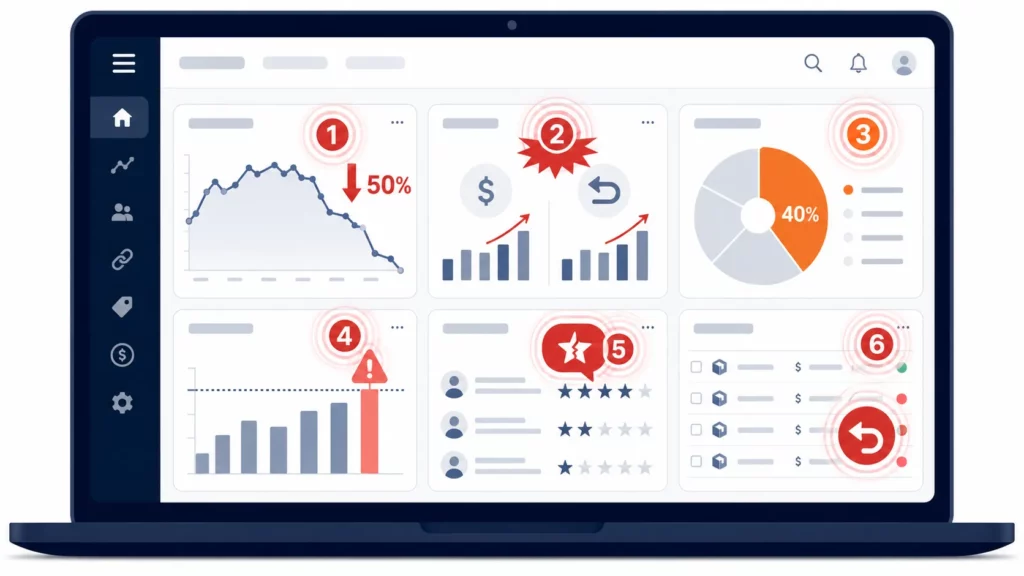
| Alert | Threshold | Likely Cause | Immediate Action |
| Clicks drop 50%+ overnight | Day-over-day | Tracking broken or affiliate link down | Check tracking, reinstall if needed |
| Revenue spike + refund spike | Same period | Fraud or fake orders | Pause suspicious affiliate, investigate |
| One affiliate = 40%+ of revenue | Any review | Concentration risk | Recruit more affiliates to diversify |
| Commission payout > 25% of revenue | Monthly | Rate too high or coupon abuse | Review commission structure |
| Negative reviews mentioning affiliate | Anytime | Affiliate making false claims | Contact affiliate, review content |
| Refund rate > 15% on affiliate orders | Monthly | Traffic quality or fraud | Investigate source affiliates |
The most dangerous pattern on this list is concentration risk. If one affiliate generates 40% or more of your revenue and stops promoting, your program loses nearly half its output overnight.
Fraud signals deserve the fastest response. Tools like UpPromote flag self-referrals, duplicate IPs, and disposable email signups automatically, and the detection is included on the free plan.
For everything else, the two-minute daily scan from the first section catches most red flags before they escalate.
How Do You Turn Dashboard Data Into Better Affiliate Performance?
Every metric in this article should point to a specific next step. There are three scenarios that come up most often: a top performer worth investing in, a mid-performer worth diagnosing, and dead weight worth clearing out.
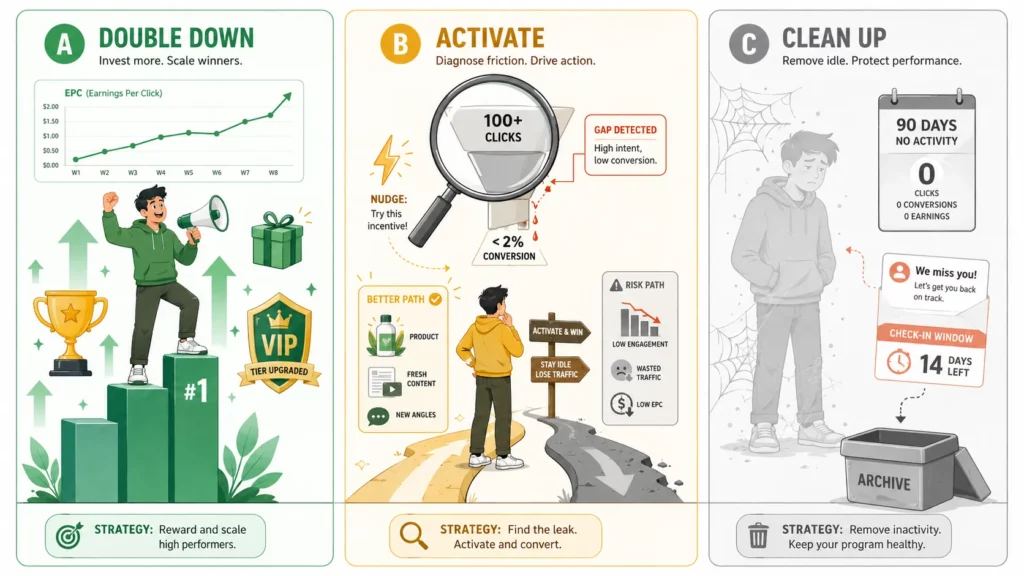
Playbook A: Double Down on Top Performers
The signal is an affiliate with EPC well above your program average. This person found an audience and an angle that converts.
Message them directly and ask what is working. Offer a commission tier upgrade, early product access, or co-branded content. The goal is to get them to promote more, not just maintain their current pace.
Playbook B: Activate Mid-Performers
Top performers find their own momentum. Mid-performers have the traffic but not the conversion, and they need a push.
The signal: 100 or more clicks but below 2% conversion. The cause is one of three things: wrong product, outdated content, or a missing incentive.
Send better product images and suggest your best-converting SKU. A short-term bonus works well here.
Playbook C: Clean Up Dead Weight
Mid-performers can be activated. Affiliates with zero clicks for 90 days probably cannot.
Send one check-in: are you still interested, here is what changed since you joined. Wait 14 days. No response and no activity means archive.
Removing inactive affiliates is not punitive. It cleans your data, lifts your activation rate, and frees attention for partners who are promoting.
What Changed in Affiliate Analytics in 2026?
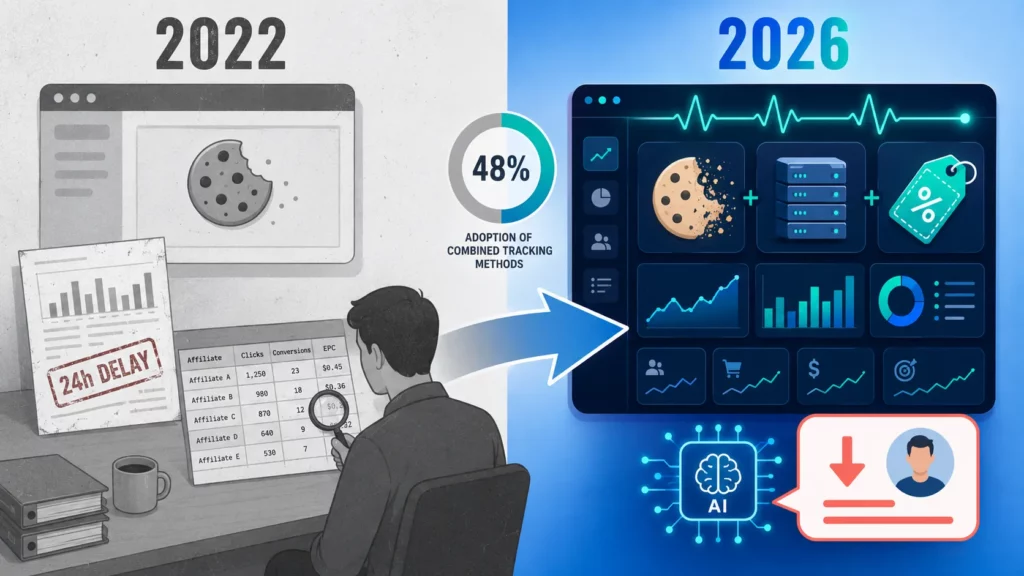
Three shifts are reshaping how merchants read their dashboards this year.
Cookie-based click tracking is less reliable than it was two years ago. Forty-eight percent of programs now combine cookies with server-side tracking, up from 24% in 2022 (Digital Applied, 2026). Coupon attribution has become a critical backup.
Real-time dashboards are the new baseline. Programs reporting on a 24-hour delay lose affiliates to competitors who show earnings as they happen.
AI-powered recommendations are early but growing. Some dashboards surface alerts like “Affiliate X’s EPC dropped 40% this week” or forecast next month’s revenue from current trends.
The accuracy varies, but the direction is clear: dashboards are moving from passive reports to active diagnosis.
Frequently Asked Questions
What is the single most important affiliate metric for beginners?
EPC (Earnings Per Click). It combines traffic quality, conversion rate, and order value into one number. Start by tracking EPC weekly. Once you understand the pattern, layer in conversion rate and activation rate. Tracking all ten KPIs from day one leads to overwhelm.
What does an affiliate analytics dashboard typically show?
Most dashboards display clicks, orders, revenue, commission totals, top affiliates, and conversion rates. Advanced dashboards add filters by date range, program, and individual affiliate, plus exportable reports for deeper analysis.
Is a 3% affiliate conversion rate good?
Yes. Affiliate traffic on ecommerce stores converts at 1–5% depending on niche. A 3% rate sits in the healthy range. Below 1% signals a traffic quality or landing page problem. Above 5% is strong — shift focus to volume rather than further optimization.
What should I compare affiliate metrics against?
Three comparisons matter. Affiliate AOV versus store average: are affiliate customers spending the same or more? Affiliate conversion versus paid ads: is the return stronger? Affiliate-acquired customer LTV versus organic: are these customers valuable long-term?
An affiliate has 10,000 clicks but zero sales — what is wrong?
Check four things in order: bot traffic or click fraud, audience mismatch, broken landing page, and product page problems like pricing or reviews. Start with fraud. If IP patterns look normal, move to audience fit, then page performance.
How long should I wait before removing inactive affiliates?
Ninety days with zero clicks is the standard threshold. Send a check-in message first, then wait 14 days. Still no response means archive. Exception: seasonal affiliates like holiday bloggers should be tagged as seasonal and kept in the program year-round.

Ellie Tran, a seasoned SEO content writer with three years of experience in the eCommerce world. Being a part of the UpPromote team, Ellie wants to assist Shopify merchants in achieving success through useful content & actionable insights.Ellie's commitment to learning never stops; she's always eager to gain more knowledge about SEO and content marketing to create valuable content for users. When she's not working on content, Ellie enjoys baking and exploring new places.

![How to Use Shopify Functions with Your Affiliate Program [2026 Guide]](https://static.uppromote.com/wp-content/uploads/2026/06/how-to-use-shopify-functions-with-affiliate-program-300x169.webp)

![How to Prevent Affiliate Fraud on Shopify: Self-Referral, Coupon Abuse & More [2026]](https://static.uppromote.com/wp-content/uploads/2026/06/how-to-prevent-affiliate-fraud-on-shopify-300x169.webp)