TL;DR
Setting up a Shopify affiliate program takes about two hours and can start at $0 with a free app plan.
- Total setup time: ~2 hours for a fully operational program
- Cost to start: $0 — multiple apps offer free plans
- Steps: 10, each with an estimated time
- First affiliate sale: ~14 days when the full checklist is followed
- Minimum requirement: 30%+ product margins and 50+ orders/month
You’ve decided to launch an affiliate program on Shopify. The next question, the one that stalls most merchants, is where to begin.
Apps to install, commission rates to set, affiliates to recruit: each decision compounds, and getting the order wrong wastes weeks.
The economics are part of why merchants commit to this channel — affiliate programs return $12 for every $1 spent on average. But economics alone don’t tell you which app to install or what commission rate to set.
But Shopify doesn’t include built-in affiliate tracking. You need a third-party app and the right setup to run one.
This guide breaks setup into 10 steps — each with an estimated time, decision tables, and a pre-launch checklist.
What Do You Need Before You Start? (Prerequisites Checklist)
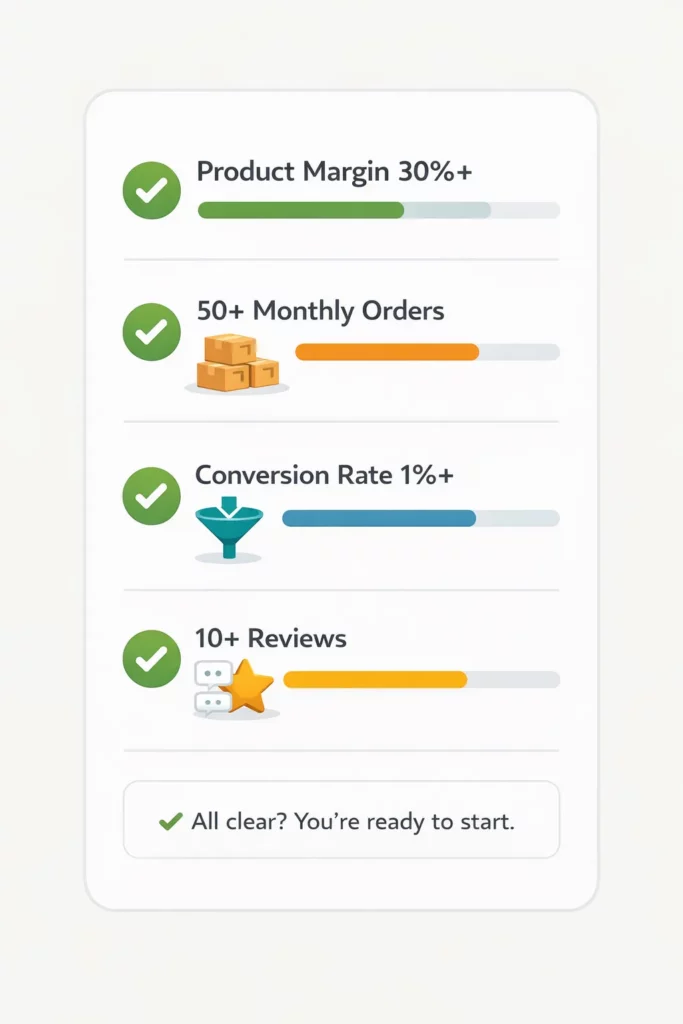
Before setting up an affiliate program, your store needs to clear four prerequisites: product margins above 30%, 50+ monthly orders, conversion rate above 1%, and 10+ reviews.
Missing any of these? Fix it first — affiliate traffic amplifies what your store already does.
The table below shows the minimum bar for each metric, plus the ideal benchmark to aim for.
| Prerequisite | Minimum | Ideal | Why it matters |
| Product margin | 30% | 50%+ | After a 10–20% commission, you still need to profit |
| Monthly orders | 50 | 200+ | Proves product-market fit before scaling |
| Conversion rate | 1% | 2–3% | Affiliate traffic must convert — low CR drives affiliates away |
| Product reviews | 10+ | 50+ | Affiliates link to product pages; no reviews, no conversions |
| Average order value | $30 | $75+ | AOV × commission rate sets affiliate earnings per sale |
| Profit margin clarity | Known per SKU | Documented | Commission must be based on real margins, not estimates |
The conversion rate matters most. Affiliates send traffic, but a store converting at 0.5% frustrates affiliates into quitting within weeks — every referral click becomes a lost commission.
Beyond the four metrics above, you’ll need five assets ready before opening any affiliate app:
- High-res product images: Both lifestyle shots and white-background product images
- Brand logo files: PNG with transparent background, ready for affiliate use
- Margin data per product: Know your real profit margin per SKU or category
- Payment account: PayPal Business account (or another payout method for affiliates)
- 1–2 hours of uninterrupted time: Enough to complete the core setup in one sitting
Step 1: Define Your Goals, Budget, and Commission Structure (20 min)
Before installing any app, you need to lock three decisions: your goal, your budget, and your commission structure.
The commission rate formula starts here — pay affiliates 30–50% of your net profit margin per sale.
Set SMART Goals First
What does success look like in 6 months? Pick a target that’s specific enough to measure against monthly data, not “more affiliate sales” but a concrete revenue share or affiliate count.
| Goal | Conservative | Average | Aggressive |
| Affiliate revenue share at month 6 | 5–8% of total | 10–15% | 15–25% |
| Active affiliates | 10–20 | 20–50 | 50–100 |
| Monthly affiliate revenue (on a $10K/mo store) | $500–$800 | $1,000–$1,500 | $1,500–$2,500 |
A target without a commission rate is wishful thinking. Affiliates pick programs by what they earn per sale, so commission is the next number to set.
Calculate Your Commission Rate
The commission formula is simple: take your net profit margin per product, then pay affiliates 30–50% of it.
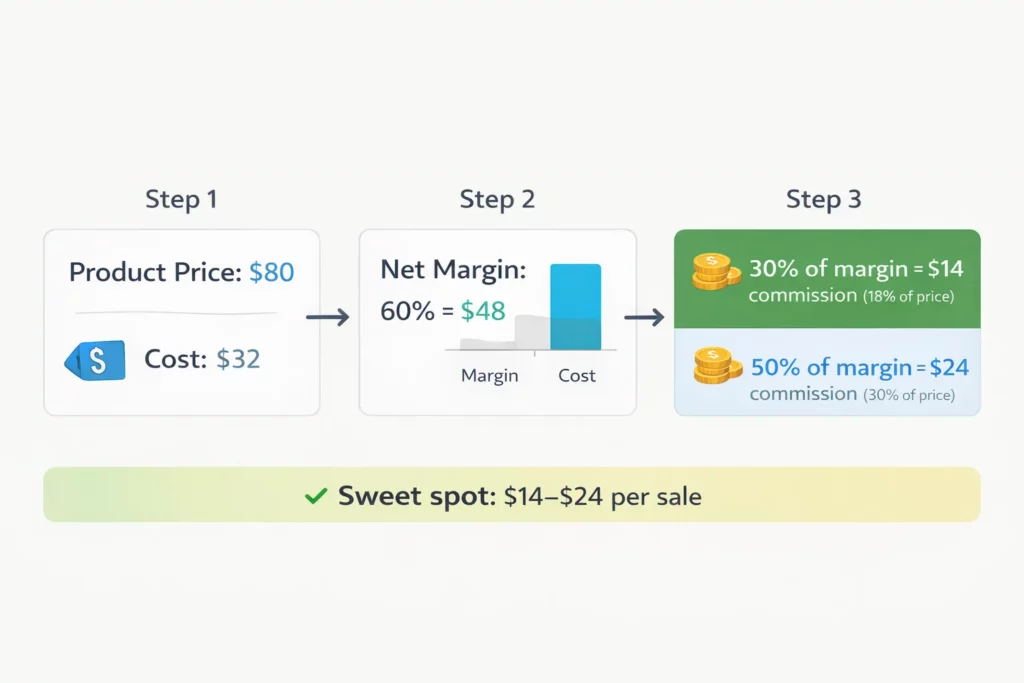
A product priced at $80 with $32 in costs has a 60% margin — $48 profit per sale. A 30–50% slice of that means $14–$24 commission, or 18–30% of price.
Industry benchmarks help you sanity-check the result against what affiliates expect in your category.
| Industry | Recommended rate | Avg. per sale | Competitive range |
| Beauty & Cosmetics | 15–25% | $8–$20 | 10–30% |
| Fashion & Apparel | 12–20% | $8–$15 | 8–25% |
| Health & Wellness | 15–25% | $6–$15 | 10–30% |
| Food & Beverage | 10–15% | $4–$8 | 5–20% |
| Electronics & Tech | 5–12% | $10–$30 | 3–15% |
| Home & Garden | 10–18% | $6–$15 | 8–22% |
| Digital Products | 20–40% | $5–$20 | 15–50% |
| Subscription Products | 15–30% + recurring | $5–$15/mo | 10–35% |
Source: UpPromote data (2024-2025).
Plan Your Budget
With commission set, the last piece is budget allocation. App cost plus commission spend should land between 2–4% of total revenue.
| Store revenue | App budget | Monthly commission budget | Total marketing % |
| $5K–$10K/mo | $0–$30/mo | $75–$375 | 1.5–3.75% |
| $10K–$30K/mo | $30–$60/mo | $300–$1,125 | 2–3.75% |
| $30K–$100K/mo | $60–$200/mo | $900–$3,750 | 2–3.75% |
→ For deeper guidance on rate-setting, see our Complete Guide to Commission Rates.
Step 2: Choose the Right Affiliate App for Your Store (15 min)
With goals and budget locked in, the next decision is which app to run them on.
Shopify doesn’t include built-in affiliate tracking, so you need an app from the Shopify App Store. Six apps lead the category: UpPromote, BixGrow, GoAffPro, Social Snowball, Refersion, and ReferralCandy. Pick based on store size, budget, and required features.
Master Comparison: 6 Affiliate Apps for Shopify
| Feature | UpPromote | BixGrow | GoAffPro | Social Snowball | Refersion | ReferralCandy |
| Rating (reviews) | 4.9★ (3,297) | 4.9★ (1,205) | 4.7★ (892) | 4.7★ (187) | 4.7★ (483) | 4.9★ (1,453) |
| Free plan | ✅ Free to install (200 orders/mo) | ✅ Free plan (50 orders/mo, 30 affiliates) | ✅ Free plan (unlimited affiliates) | Free to install (custom paid plan) | ✅ Free Marketplace listing | ❌ (7-day free trial) |
| Starting paid price | $29.99/mo | $14.99/mo | $49/mo | Custom (book demo) | $39/mo | $39/mo |
| Revenue / success fee | 2% (Growth) → 1% (Enterprise) | None | None | Custom | 3% (Launch) → 1% (Scale) | 10.5% (Basic) → 1.5% (Scale) |
| Built for Shopify badge | ✅ | ✅ | ❌ | ❌ | ❌ | ✅ |
| MLM / multi-tier | ✅ | ✅ (Pro plan) | ✅ | ❌ | ❌ | ❌ |
| Anti-coupon-leak | ✅ (Professional) | ✅ (Pro plan) | ❌ | ✅ | ❌ | ❌ |
| Auto-payout PayPal | ✅ (Professional) | ✅ (Pro plan) | ✅ (paid) | ✅ | ✅ | ✅ |
| Custom affiliate portal | ✅ (white-label) | ✅ | ✅ (paid) | ✅ | ✅ | ✅ |
| Best for | All-around, all sizes | Budget-focused starters | Unlimited free affiliates | Custom enterprise plans | Influencer/enterprise | Referral + affiliate hybrid |
All ratings, review counts, prices, and fees verified directly from each app’s listing on apps.shopify.com on April 16, 2026. Higher-tier plans typically carry lower percentage fees — see each app’s Shopify App Store pricing page for full details.
With the feature comparison in front of you, the choice comes down to three matches. Match your store stage, your budget tolerance, and the features that solve a real problem to the right app.
Decision Guide: Which App Fits Your Store?
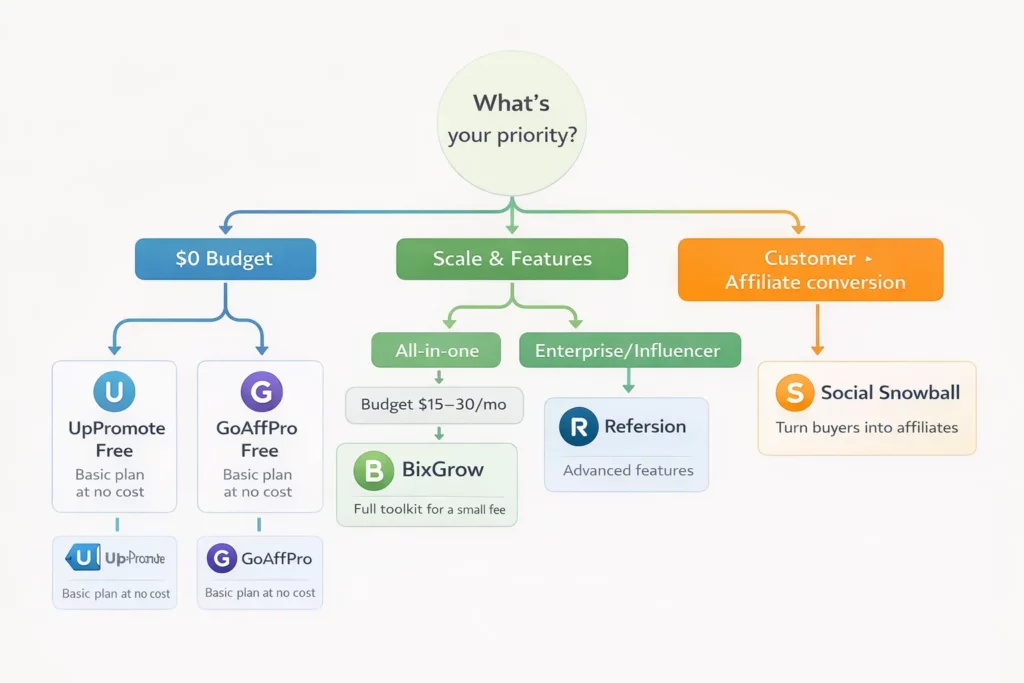
If you still don’t know which app to go, let’s check the table below to find out.
| If you… | Pick | Why |
| Are starting fresh with $0 budget | UpPromote Free or GoAffPro Free | Free plans cover the first 6+ months of validation |
| Need basics on a $15–$30/mo budget | BixGrow | Lower-cost paid plan; fraud protection on Pro tier |
| Want all-in-one for long-term scale | UpPromote Growth | Built-in marketplace, balanced feature/price ratio |
| Focus on customer-to-affiliate conversion | Social Snowball | Auto-enroll at thank-you page; custom pricing requires demo call |
| Run an enterprise/influencer-heavy program | Refersion | Deep analytics, steeper learning curve |
| Want referral and affiliate in one app | ReferralCandy | Dual program, no marketplace |
⛔Common Mistake: Picking the cheapest app. A budget app without fraud detection costs more in coupon leaks than the subscription saves. Anti-leak protection and auto-payout pay for themselves within months.
You should also notice that most affiliate apps charge a percentage of affiliate revenue on top of the subscription. UpPromote (2% on Growth), Refersion (3% on Launch), and ReferralCandy (10.5% on Basic) all use this model.
On $10,000/month in affiliate sales, a 3% fee adds $300/month above the base price. So, it’s essential to read the pricing page before committing — higher tiers usually carry lower percentage fees.
→ For a deeper feature-by-feature comparison, see our Affiliate App Comparison Guide.
Step 3: Install and Configure Your Affiliate App (15 min)
With your app selected, installation takes under 5 minutes.
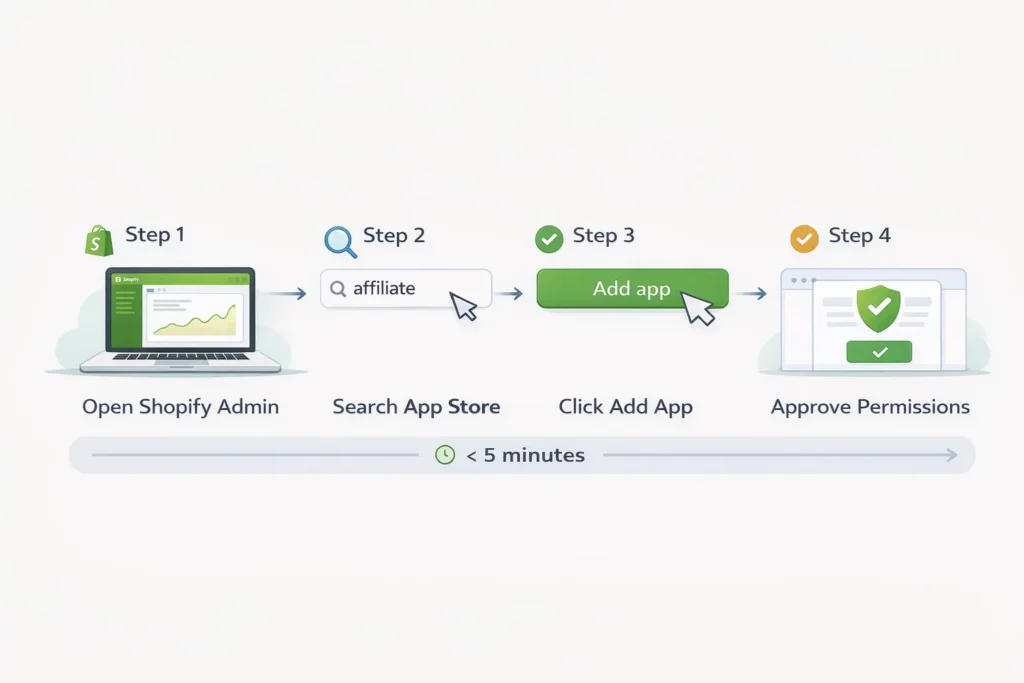
Open Shopify Admin, search the app in the App Store, click Add App, approve permissions, and open the dashboard. Then configure 5 basic settings before inviting any affiliate.
- Store name + logo: Displayed in the affiliate-facing portal
- Currency: Match your Shopify store currency exactly
- Timezone: Required for accurate report timestamps
- Notification emails: Admin alerts plus the affiliate welcome email
- Terms & Conditions: The affiliate agreement (more on this below)
Most settings carry over from your store, but one item gets skipped: Terms & Conditions.
The affiliate agreement protects your brand by defining how affiliates can promote, what FTC disclosures they must use, and how payment terms work. Draft it before launch.
→ For a ready-to-edit template, see our Affiliate Program Agreement Guide.
Step 4: Set Up Your Commission Rules (15 min)
Commission rules decide whether affiliates join and stay. Configure four basics at minimum: base rate, cookie duration, commission type (% vs fixed), and excluded products.
Add auto-tier commission and new-customer bonuses once you have 3 months of data.
| Setting | Recommended | Why |
| Base commission rate | 15% (adjustable) | Mid-range across most categories — easy to raise or lower after data |
| Commission type | Percentage (%) | Scales with AOV; fixed-rate only works if AOV is consistent |
| Cookie duration | 30 days (60–90 for high-ticket) | 30 days is the industry standard; longer for $200+ products |
| Products excluded | Low-margin items, sale items | Don’t pay commission on items you already lose money on |
| Holding period | 30–60 days | Protects against refund-driven commission losses |
| Minimum payout | $25–$50 | Avoids transaction fees eating small payouts |
The settings above are the floor — every store needs them on day one. Advanced commission settings come later, once you have data showing which affiliates are worth incentivizing more.
For example, you can add auto-tier commission and new-customer bonuses once you have 3 months of data.
Auto-tier commission promotes top affiliates into higher-paying programs automatically. Tools like UpPromote allows you to set multiple milestones based on sales, commissions earned, or downline volume.
SaleDress, an apparel brand, used auto-tier commission to reward top performers. The result was amazing: $1.8M+ in affiliate revenue from 5,000+ affiliates and 30K+ orders within 1.5 years.
Beyond auto-tier, there are two refinements that help mature programs.
New-customer commission pays a higher rate on first-time buyers — typically 20% versus 15% for repeat purchases — pushing affiliates toward acquisition over retention.
Besides, Product-specific commission lets you push high-margin products with higher rates and protect low-margin items with lower ones.
→ For a deeper rate-setting framework, see our Complete Guide to Commission Rates.
Step 5: Configure Affiliate Tracking (10 min)
Commission rules decide what affiliates earn, but only if your tracking attributes each sale to the right affiliate. Get tracking wrong and you’ll pay the wrong affiliate, or worse, none at all.
Three tracking methods exist: affiliate links, coupon codes, and direct pixel tracking.
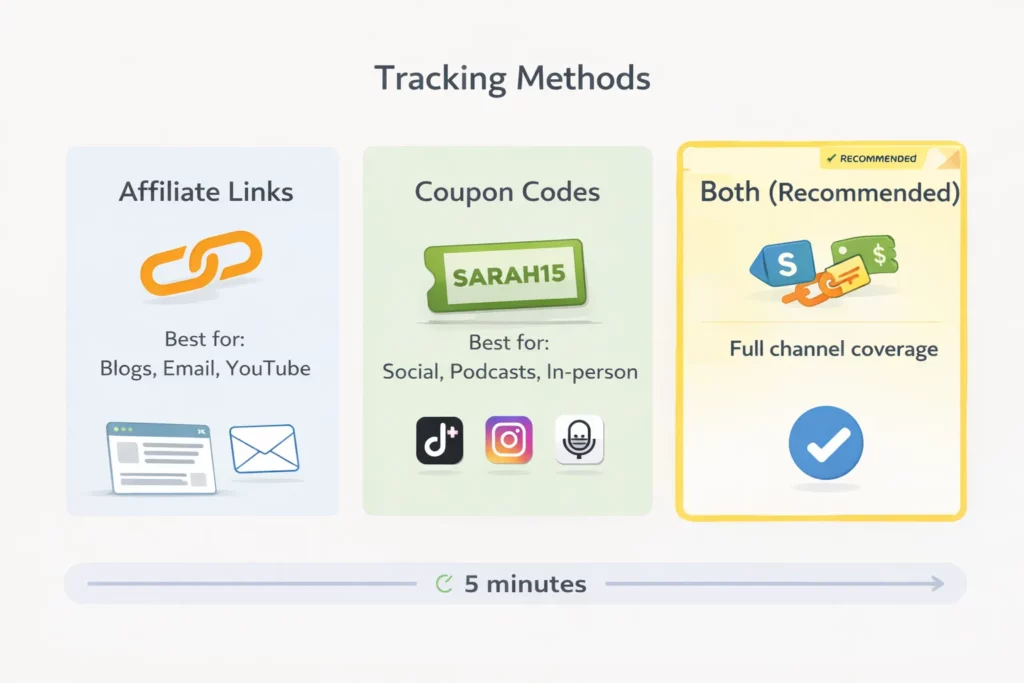
| Method | How it works | Best for | Trade-off |
| Affiliate links | Unique URL per affiliate, cookie-based | Blogs, email, YouTube descriptions | Doesn’t track contexts without clickable links (TikTok, podcasts) |
| Coupon codes | Unique code per affiliate, tracked at checkout | Instagram, TikTok, podcasts, in-person | Risk of coupon leak to deal sites |
| Both (recommended) | Each affiliate gets one link + one code | Every channel | Requires a tracking-priority rule when both fire |
Most apps assign a unique link to each affiliate by default.
Some, like UpPromote, let you assign one coupon code per affiliate on the free plan, with unlimited coupons on Professional+. Running both gives you full channel coverage.
Set a Tracking Priority Rule
When a customer clicks one affiliate’s link but uses another’s coupon, your tracking priority decides who gets credit.
Last-click-wins is the default. The affiliate touching the customer last gets the commission.
Cookie Duration: Match Your Decision Cycle
Cookie duration controls how long after a click a purchase still earns commission for the affiliate. The right number depends on how long your customers take to decide.
| Product type | Cookie duration | Why |
| Impulse buy (<$50) | 7–14 days | Customers decide fast |
| Standard ($50–$200) | 30 days | Industry default |
| High-ticket ($200–$500) | 60 days | Research takes longer |
| Very high-ticket ($500+) | 90 days | Multi-week decision cycle |
Some brands set cookies too short for high-ticket products.
A 7-day cookie on a $300 item means a customer who researches for 2 weeks generates no commission for the affiliate who introduced them. The affiliate quits.
→ For a deeper comparison, see our guide on Link vs Coupon Tracking.
Step 6: Build Your Affiliate Registration Page (20 min)
With tracking configured, you need a place for affiliates to sign up.
The registration page is the affiliate’s first impression of your program. It must answer three questions in 5 seconds: how much you pay, how the program works, and how to apply.
The 10 elements below are what high-converting pages have in common.
| # | Element | Why it matters |
| 1 | Clear headline (“Earn [X]% promoting [Brand]”) | Affiliate sees the offer instantly |
| 2 | Commission rate displayed prominently | The #1 factor affiliates evaluate |
| 3 | Cookie duration (“30-day tracking window”) | Affiliates need to know the timeframe |
| 4 | Payment schedule + methods | Transparency builds trust |
| 5 | “How it works” in 3–4 steps with icons | Reduces signup confusion |
| 6 | Signup form: name, email, website/social, audience size | Enough to vet, not enough to deter |
| 7 | Social proof (“Join 500+ affiliates”) or short testimonial | Lifts conversions on signup pages |
| 8 | Average earnings (“$200–$500/month for active affiliates”) | Sets realistic expectations |
| 9 | Marketing materials preview | Shows affiliates they’ll be supported |
| 10 | FAQ section (3–5 questions) | Cuts down on support emails |
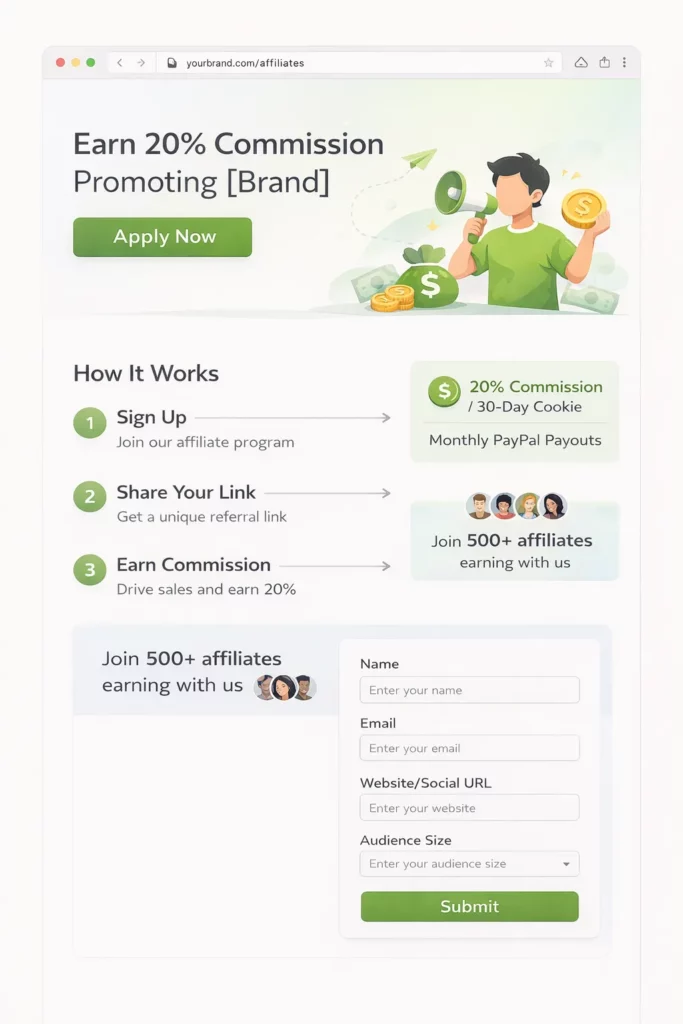
Element 7 — social proof — has the biggest impact on signup rates. Adding “Join 500+ affiliates earning with us” or one short testimonial lifts conversions over a page without it.
Most apps include a registration page editor on free plans. UpPromote, for example, lets you customize the form layout, colors, logo, and fields without code. That keeps the affiliate-facing page on-brand from day one.
One more thing to remember is that a registration page only converts the affiliates who reach it. Place links across the five surfaces below — each catches a different type of incoming affiliate.
- Website footer: Add an “Affiliates” link — over half of incoming affiliates look here first
- Dedicated URL: yourdomain.com/pages/affiliates works well for direct linking
- Post-purchase email: “Love [product]? Earn commission promoting it”
- Social media bios: Link to the registration page from Instagram, TikTok, and LinkedIn
- Marketplace listing: List your program on UpPromote Marketplace or similar networks
Step 7: Prepare Marketing Materials for Affiliates (30 min)
Once affiliates can find and join your program, give them the assets to promote it.
Affiliates with ready-made materials promote more — and stay closer to brand guidelines. Prepare product images, banner ads, brand guidelines, descriptions, and 5–10 sample social posts.
The 30 minutes you invest now saves hours of one-off requests later.
| Material | Format | Quantity | Priority |
| Lifestyle product images | JPG/PNG, 1080×1080 + 1200×628 | 10–15 | Required |
| Product images (white background) | PNG transparent | 5–10 per top product | Required |
| Banner ads | 728×90, 300×250, 160×600, 1080×1080 | 3–4 sizes × 2–3 designs | Required |
| Brand guidelines | 1 file | Required | |
| Product descriptions | Text/Doc | 2–3 paragraphs per top product | Recommended |
| Sample social posts | Text + image suggestions | 5–10 ready-to-post | Recommended |
| Video clips (product demos) | MP4, 15–60 sec | 2–3 | Nice to have |
| Email copy templates | Text | 2–3 templates | Nice to have |
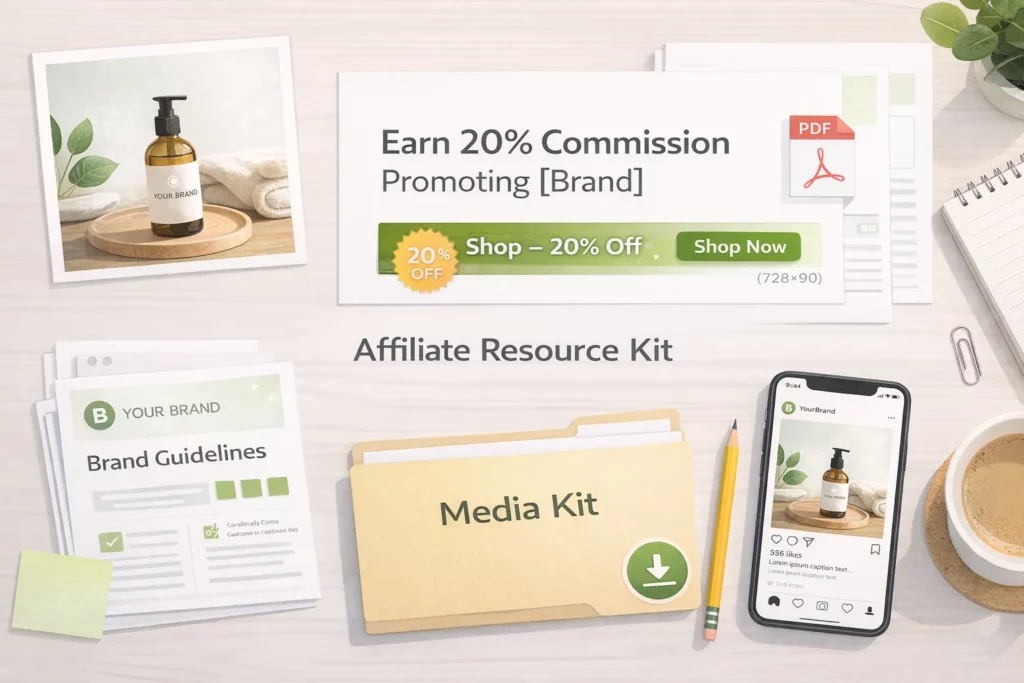
A shared media gallery lets affiliates self-serve assets without emailing you each time. UpPromote’s media gallery, for example, holds 50MB on the free plan and unlimited on Professional+. That fits product photos, banners, and short video clips.
A beauty brand Mysteek Naturals centralizes their affiliate assets in a media gallery so newly approved affiliates can start promoting within minutes of signup.
Step 8: Set Up Payment and Fraud Protection (10 min)
With marketing materials ready, two operational settings remain before launch.
You need to configure two things: payment method (PayPal works for most stores) and fraud protection (anti-coupon-leak, self-referral blocking, holding period).
Payment Method: Pick the Right Payout Channel
Payment setup is straightforward.
Most stores use PayPal for cash payouts and store credit for customer referral — a dual system that matches what each affiliate type prefers.
| Method | Best for | Pros | Cons |
| PayPal | Most external affiliates | Widely accepted, auto-payout available | PayPal fees (~2.9% + $0.30) |
| Bank transfer (Wise) | High-volume programs | Lower fees on large payouts | Slower, more setup |
| Store credit | Customer-referrers | $0 cash cost, drives repeat purchase | External affiliates prefer cash |
| Gift cards | Hybrid programs | Flexible | Not preferred by professional affiliates |
Fraud Protection: Four Settings to Enable
Fraud protection needs more attention than payment. Three settings should be on before any affiliate joins, and you should add a fourth — manual approval — for the first 90 days.
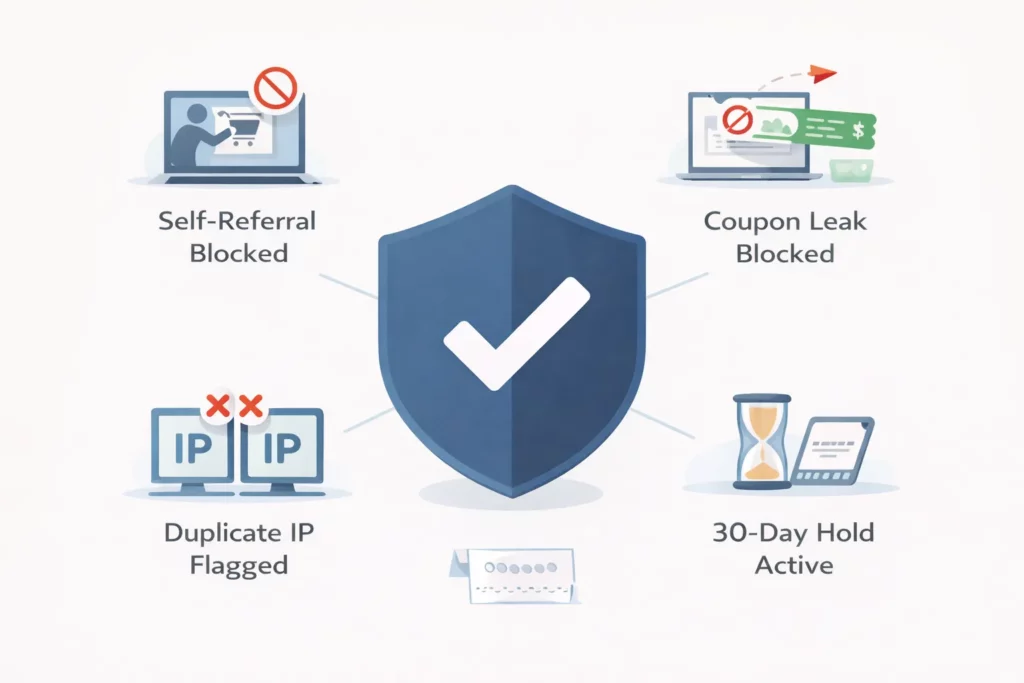
| Setting | What it does | Enable? |
| Self-referral blocking | Prevents affiliates from buying through their own link | ✅ Required |
| Anti-coupon-leak (auto-discount) | Stops codes from spreading to deal sites | ✅ Required |
| IP duplicate detection | Flags multiple orders from the same IP | ✅ Recommended |
| Holding period (30–60 days) | Holds commission until refund window closes | ✅ Required |
| Manual approval | Reviews each application before approval | ✅ For first 90 days |
UpPromote includes fraud detection on the free plan, flagging self-referrals, duplicate IPs, and disposable email signups before they cost you commission.
Paired with the 30-day holding period from the table above, most fraudulent payouts get caught before they leave your account.
Apollo Scooters used the fraud detection feature to filter affiliates and protect program integrity. Vetted affiliates and program segmentation drove 15–20% of total revenue from affiliate marketing.
Step 9: Recruit Your First 10–20 Affiliates (1–2 hours)
With payment and protection ready, the next move is finding affiliates to pay.
Don’t wait for affiliates to find you. Recruit from four warm sources for the fastest first batch.
The list should include: top customers, social followers tagging your products, niche bloggers via cold email, and a marketplace listing.
First-Week Recruitment Plan
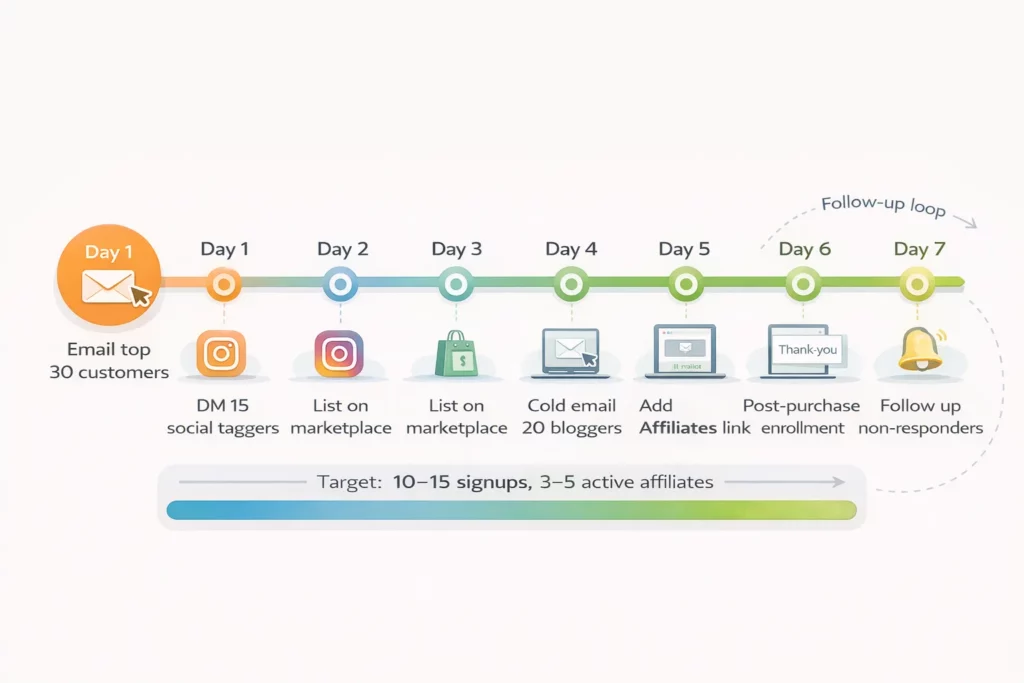
A structured first week beats scattered outreach. The plan below targets 10–15 signups and 3–5 active affiliates by Day 7 — enough to validate the model before scaling spend.
| Day | Action | Target | Channel |
| 1 | Email top 30 customers (bought ≥2 times) | 5–8 signups | Customer email |
| 2 | DM 15 people tagging or mentioning your products | 2–3 signups | Instagram DMs |
| 3 | List your program on a marketplace | Passive ongoing | Marketplace |
| 4 | Cold email 20 niche bloggers | 1–2 signups | Email outreach |
| 5 | Add “Affiliates” link to footer + nav | Passive ongoing | Website |
| 6 | Enable post-purchase enrollment (thank-you page CTA) | Passive ongoing | Post-purchase |
| 7 | Follow up non-responders from Day 1–4 | 2–3 more | Follow-up emails |
Customer invites convert highest.
Customer-affiliates show activation rates roughly twice those of cold-recruited affiliates. They already trust the product and have something honest to say about it.
Customer Invite Email Template
A short email outperforms a long one. Keep the customer invite under 80 words and lead with the specific reward.
Subject: You love [product] — want to earn sharing it?
Hi [Name],
You’ve ordered [product] [X] times — thank you!
We just launched an affiliate program: earn [X]% commission
every time someone buys through your link.
As a loyal customer, you’ll get [X+5]% — higher than standard.
Join in 30 seconds: [Link] [Your Name]
Snogo Straws built its affiliate program around customer conversion — using physical referral cards and a customized registration form to turn buyers into promoters. Affiliate marketing now drives 25% of total sales.
Beyond direct outreach, marketplaces handle passive discovery.
Listing your program on a marketplace like UpPromote Marketplace lets affiliates browse, apply, and self-onboard. That handles the 3–8% of signups that come without your team lifting a finger.
→ For the full 12-channel recruitment playbook, you’d better check out How to Recruit Affiliates on Shopify.
Step 10: Launch, Test, and Monitor (30 min + ongoing)
With your first batch of affiliates incoming, the last step before launch is verifying the system works end-to-end.
Test first, then launch. Run a purchase through your own affiliate link to confirm tracking works, then monitor 5 KPIs weekly for the first 3 months once you’re live.
Stores that clear the full checklist below see their first affiliate sale within 14 days on average . The test step is what closes the gap from setup to revenue.
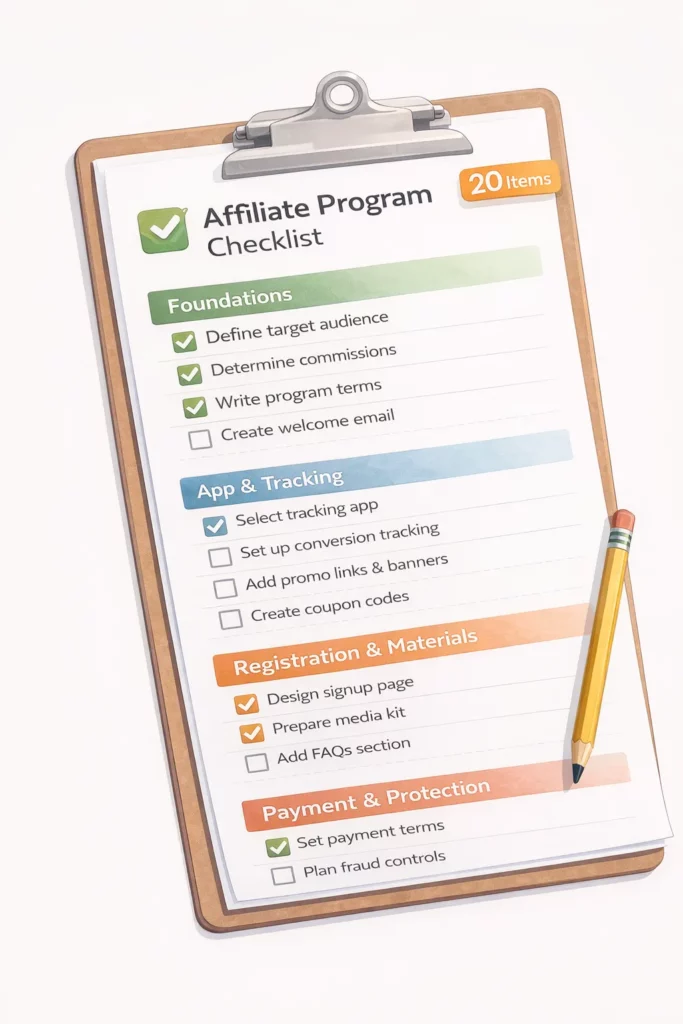
Master Pre-Launch Checklist (20 Items)
Before going live, every store should clear this 20-item checklist. Print it, screenshot it, or paste it into a doc — every item needs a check before you invite a single affiliate.
FOUNDATIONS
☐ Product margins calculated per SKU
☐ Commission rate set against industry benchmark
☐ Cookie duration configured (30 days standard, 60–90 high-ticket)
☐ Low-margin products excluded from commission
APP & TRACKING
☐ Affiliate app installed and configured
☐ Tracking tested with affiliate link (test purchase passed)
☐ Tracking tested with coupon code (test purchase passed)
☐ Commission calculated correctly on test order
REGISTRATION & MATERIALS
☐ Affiliate registration page live and reviewed
☐ Commission rate displayed prominently on registration page
☐ “Affiliates” link added to website footer
☐ Media kit uploaded (images, banners, brand guidelines)
☐ Affiliate welcome email configured
PAYMENT & PROTECTION
☐ Payment method configured (PayPal or alternative)
☐ Holding period set (30–60 days)
☐ Self-referral blocking enabled
☐ Anti-coupon-leak enabled (if available on plan)
RECRUITMENT
☐ Customer invite email drafted
☐ Top 30–50 customers identified for first outreach
☐ Marketplace listing live (if available)
Pre-Launch Test (Run Before Going Live)
The checklist confirms setup. The test confirms it works.
- Create a test affiliate account (yourself or a team member)
- Generate the affiliate link and coupon code
- Place a real test order through the affiliate link
- Verify the order appears in the affiliate dashboard
- Verify the commission calculates correctly
- Verify the affiliate receives the notification email
- Repeat with the coupon code instead of the link
If all 7 steps pass, go live. If any fail, fix the broken piece before inviting affiliates — debugging tracking after 50 sign-ups is much harder than fixing it now.
After Launch: 5 KPIs to Monitor Weekly
Once you’ve gone live, the first 90 days are about monitoring. Five metrics below tell you whether the program is on track.
| KPI | Target (months 1–3) | How to calculate | If below target |
| Affiliate signups | 5–10/week | Dashboard count | Increase outreach effort |
| Click volume | 100+/week | Dashboard count | Send affiliates content ideas |
| Conversion rate | 1–3% | Sales ÷ Clicks | Landing page issue, not affiliate issue |
| Active affiliate ratio | 20–30% | Affiliates with ≥1 sale ÷ Total | Onboarding needs work |
| Revenue per active affiliate | $100+/month | Affiliate revenue ÷ Active | Commission may need a lift |
Two of these KPIs catch the most common problems.
A low signup-to-active ratio means onboarding has issues. A low click-to-sale ratio points to landing pages, not the affiliates sending traffic.
First 90 Days: What to Expect
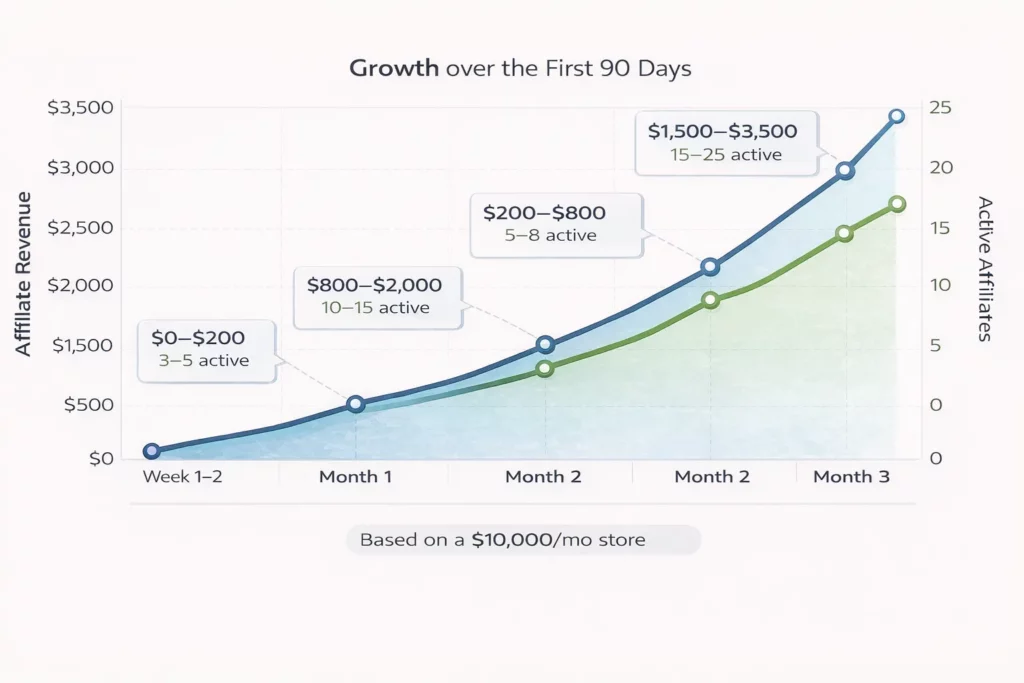
Those KPIs translate into a predictable timeline. The numbers below assume a $10K/mo store running this complete setup.
| Timeline | Milestone | Affiliate revenue (est.) |
| Week 1–2 | 10–15 affiliates signed up; test orders pass | $0–$200 |
| Month 1 | 20–30 affiliates; 5–8 active; first consistent sales | $200–$800 |
| Month 2 | 40–60 affiliates; 10–15 active; optimization begins | $800–$2,000 |
| Month 3 | 60–100 affiliates; 15–25 active; stable channel | $1,500–$3,500 |
Frequently Asked Questions
These are the questions Shopify merchants ask most often when planning their first affiliate program.
How long does it take to set up an affiliate program on Shopify?
The full setup takes about 1–2 hours for the core setup (Steps 1–8) plus another 1–2 hours for the first round of recruitment (Step 9). Most stores are up and running within half a day. The first affiliate sale typically arrives within 14 days of launch.
Does Shopify have a built-in affiliate program feature?
Shopify Collabs is the closest built-in option but focuses on influencer-creator partnerships, not full affiliate programs. Most merchants use third-party apps from the Shopify App Store — UpPromote, BixGrow, GoAffPro, and Refersion.
These apps offer deeper features for tracking, fraud detection, multi-tier commissions, and automated payouts.
Do I need Shopify Plus to run an affiliate program?
No. The Basic Shopify plan ($29/month with annual billing) supports affiliate programs without limitation. Shopify Plus is only necessary for API-level customization or enterprise features.
Most merchants run successful affiliate programs on Basic or Grow plans.
What’s a reasonable commission rate for a Shopify affiliate program?
A reasonable commission rate is 30–50% of your net profit margin per product. In practice, that means 10–20% of price for physical products and 20–30% for digital.
Industry ranges: Beauty 15–25%, Fashion 12–20%, Health 15–25%, Electronics 5–12%, Food 10–15%. Start mid-range and adjust after 3 months.
Should I auto-approve affiliates or review each application?
Be selective with external affiliates — vet bloggers, influencers, and creators for audience quality and brand fit before approval. Auto-approve customer-referrers since they already know your brand.
A typical balance: approve around 70% of applications and reject the rest as spam or off-brand.
Does an affiliate program help with SEO and AI search visibility?
Yes. Affiliate partners create backlinks (blogs, reviews), brand mentions (social, podcasts), and review content (YouTube, TikTok). These signals shape how AI and traditional search engines rank and cite brands.
Affiliate links should carry rel=”nofollow” or rel=”sponsored” attributes — most affiliate apps handle this automatically.
Can I run a Shopify affiliate program without paying for an app?
Yes. Several apps offer free plans for the first months of validation. UpPromote’s free plan handles up to 200 referral orders per month with unlimited affiliates; GoAffPro’s free plan has no order cap but limits some features.
Most stores can validate on a free plan before upgrading once affiliate revenue clears $1,000/month.
When should I hire an affiliate manager instead of self-managing?
Hire an affiliate manager once you reach 100+ active affiliates or affiliate revenue exceeds $20,000/month. Below those thresholds, 3–5 hours per week of self-management is enough.
A dedicated manager costs $2,000–$5,000/month but can double or triple program revenue through better recruitment, vetting, and support.

Ellie Tran, a seasoned SEO content writer with three years of experience in the eCommerce world. Being a part of the UpPromote team, Ellie wants to assist Shopify merchants in achieving success through useful content & actionable insights.Ellie's commitment to learning never stops; she's always eager to gain more knowledge about SEO and content marketing to create valuable content for users. When she's not working on content, Ellie enjoys baking and exploring new places.

![How to Use Shopify Functions with Your Affiliate Program [2026 Guide]](https://static.uppromote.com/wp-content/uploads/2026/06/how-to-use-shopify-functions-with-affiliate-program-300x169.webp)

![How to Prevent Affiliate Fraud on Shopify: Self-Referral, Coupon Abuse & More [2026]](https://static.uppromote.com/wp-content/uploads/2026/06/how-to-prevent-affiliate-fraud-on-shopify-300x169.webp)