TL;DR
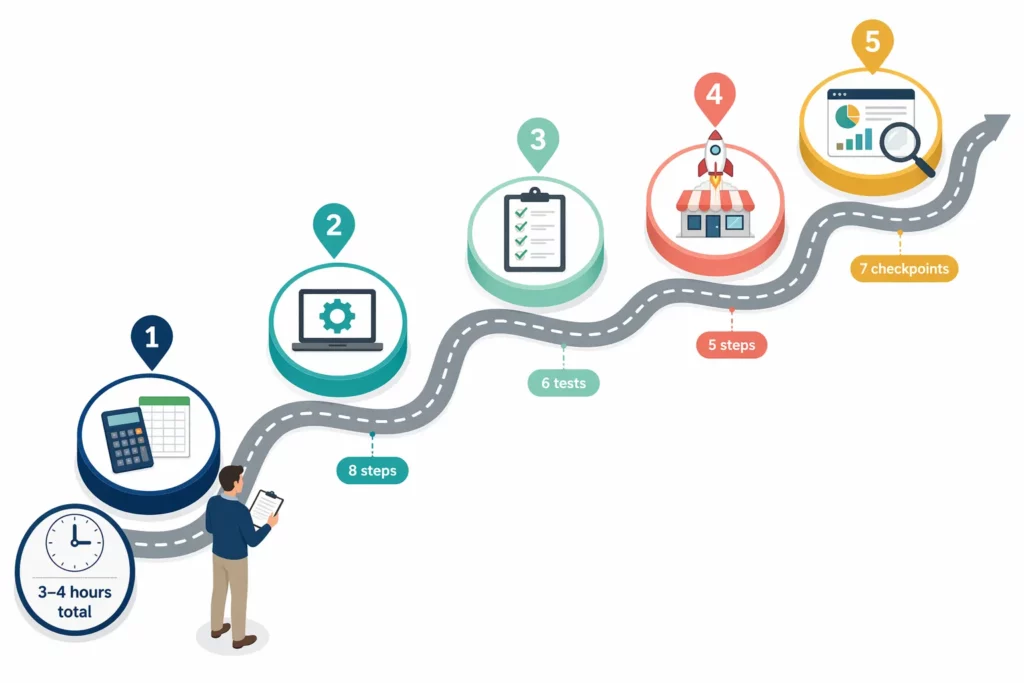
Launching a Shopify affiliate program takes 30 steps across five phases. And you can finish everything in one afternoon if your margins and product images are ready.
- Total time: 3–4 focused hours across all five phases
- Most-skipped steps: Margin calculation, tracking tests, fraud protection
- Launch day target: 8–15 signups from existing customers and social taggers
- First-month benchmark: 5–15 active affiliates generating initial sales
- Critical rule: Test every tracking method before inviting a single affiliate
You’ve read the guides, chosen your app, and decided on a commission rate. Now it’s time to launch.
But between “ I’m ready ” and “ a program that actually works ” sit 30 steps. Skipping any of them creates a failure point that gets harder to fix once affiliates arrive.
The pattern from successful Shopify affiliate launches is clear. Merchants who complete every step, especially tracking tests and fraud protection, reach their first sale weeks earlier.
Those who skip testing typically face tracking disputes within the first month.
The following checklist covers the full launch in five phases, from margin math to your first 30-day review. Each step has an estimated time and a link to the detailed guide if you need to go deeper.
Bookmark this page or print it. This is the single document you need on launch day.
Your Affiliate Program Launch Follows Five Phases
Phase 1: What Should You Prepare Before Installing Any App? (10 Steps)
[Est. time: 45–60 minutes]
These ten steps happen before you touch any software.
They lock the financial decisions and marketing materials that every technical setting depends on. Get them wrong, and no app can fix the foundation.
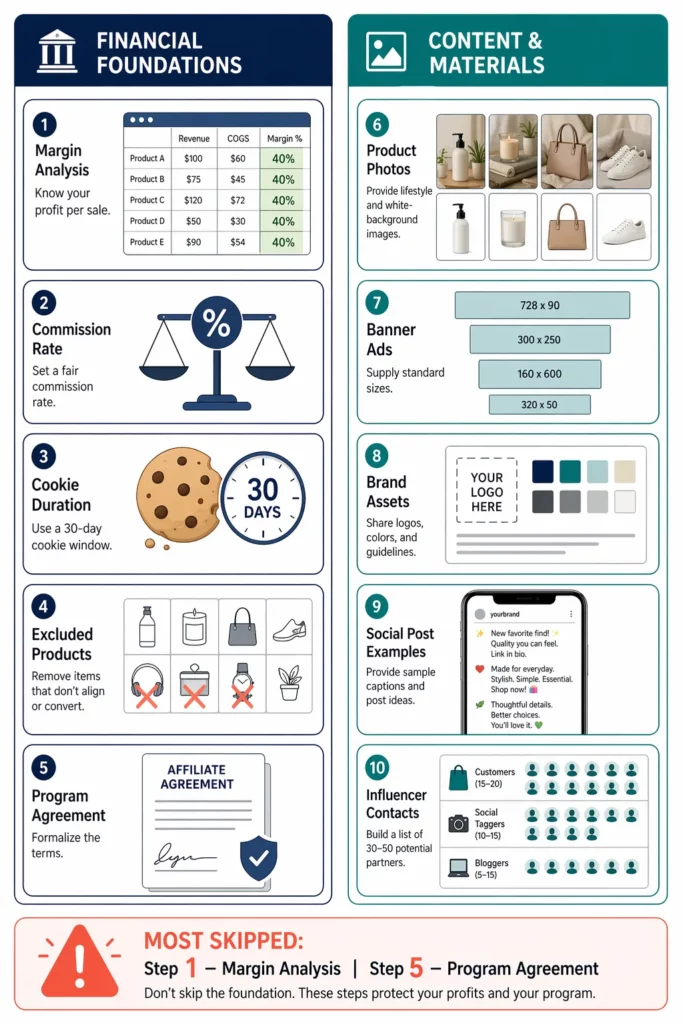
Financial Foundations (Steps 1–5)
☐ 1. Calculate your net profit margin per product
You need the exact number before setting any commission rate. Build a quick spreadsheet: product, price, COGS, shipping, fees, net margin percent. ⏱️15 min
☐ 2. Set your commission rate based on margin
The safe range is 30–50% of your net margin — a product with 50% margin supports a 15–25% commission. ⏱️ 5 min · → Commission Rates Guide
☐ 3. Choose your cookie duration
30 days for standard products, 60–90 for high-ticket items ($200+), 7–14 for impulse buys under $30. ⏱️2 min
☐ 4. List products excluded from commission
Sale items, clearance, loss leaders, gift cards, and anything below 15% margin. ⏱️ 10 min
☐ 5. Write your affiliate agreement
Cover commission terms, FTC disclosure, prohibited promotion methods, and coupon policy — this document protects you when an affiliate crosses a line. ⏱️ 15–30 min · → Agreement Template
Content and Materials (Steps 6–10)
The financial decisions are set. The next five steps build the materials your affiliates will use from day one.
☐ 6. Collect product images for affiliates
Aim for 10–15 lifestyle shots and 5–10 product-on-white images in standard sizes (1080×1080 for social, 1200×628 for blogs). ⏱️ 15 min to collect existing
☐ 7. Create 3–4 banner ad designs
Standard sizes: 728×90, 300×250, 160×600, and 1080×1080.
Each banner needs a product image, discount offer, and clear CTA. Free tools like Canva have templates ready to use. ⏱️ 20–30 min
☐ 8. Draft a brand guidelines document
Tone of voice, approved claims, prohibited claims, logo rules, color codes, and FTC disclosure requirements — all in one page affiliates can reference before posting. ⏱️ 15–20 min
☐ 9. Write 2–3 sample social posts
Give affiliates a starting point: an Instagram caption with image suggestions, a TikTok script outline, and a blog review paragraph template. ⏱️15 min
☐ 10. Identify your first 30–50 potential affiliates
Your top 30 repeat customers go first, followed by 10–15 people who have tagged your products on social media, and 5–10 niche bloggers you can find through a quick search. ⏱️ 20–30 min · → Recruitment Playbook
⚠️ Most-skipped steps: Step 1 (margin math) and Step 5 (agreement). Skipping margin calculation leads to commissions that eat your profit on every sale. Skipping the agreement leaves you exposed when an affiliate violates your guidelines.
Phase 2: How Do You Configure Your App and Tracking? (8 Steps)
[Est. time: 45–60 minutes]
With your foundation ready, the next eight steps install and configure the software. Every setting here should be tested in Phase 3 before you invite a single affiliate.
☐ 11. Install your affiliate app
Free plans from apps like UpPromote include link and coupon tracking, fraud detection, a registration form builder, and an analytics dashboard — enough for a complete launch. ⏱️ 5 min · → App comparison guide
☐ 12. Configure basic settings
Store name, logo, currency (match Shopify), timezone, admin notification email. ⏱️ 5 min
☐ 13. Set your commission rules
Enter your base rate from Step 2, choose percentage-based commission, apply product exclusions from Step 4, and set a minimum payout threshold — $25 is standard. ⏱️ 10 min ·
☐ 14. Configure tracking and attribution
Enable both affiliate links and coupon codes. Set your cookie duration from Step 3, and check your app’s attribution priority — most apps use a hierarchy rather than simple last-click. ⏱️10 min · → Tracking Setup
☐ 15. Build your affiliate registration page
Commission rate goes above the fold. Add a “How it works” section in 3–4 steps, keep the signup form to 4–5 fields, include social proof, and paste your agreement text into the terms field. ⏱️ 15–20 min · → Signup Page Guide
☐ 16. Upload marketing materials to the affiliate portal
Add the images, banners, brand guide, and sample posts from Phase 1. Organize by folder or category if your app supports it. ⏱️ 10 min
☐ 17. Enable fraud protection
Turn on self-referral blocking and IP duplicate detection to catch the most common fraud patterns before they cost you commission. UpPromote includes fraud detection on the free plan, flagging suspicious signups automatically. ⏱️ 5 min · → Coupon Leak Prevention
☐ 18. Set up your payment method
Most apps support several payout options, including PayPal, bank transfer, store credit, or manual payment outside the app. Pick the method that fits your affiliates, set a payout schedule, and run a small test to confirm the connection works. ⏱️ 10 min
⚠️ Do not skip Step 17: Every day without fraud protection is a day of potential self-referral commissions and leaked codes. Enable it the moment you install your app, not “later.”
Phase 3: How Do You Test Tracking Before Inviting Affiliates? (6 Tests)
[Est. time: 15–20 minutes]
At this point you’ve installed the app, enabled tracking, and built the registration page — but you have no proof any of it works. These six tests take fifteen minutes and prevent weeks of dispute resolution.
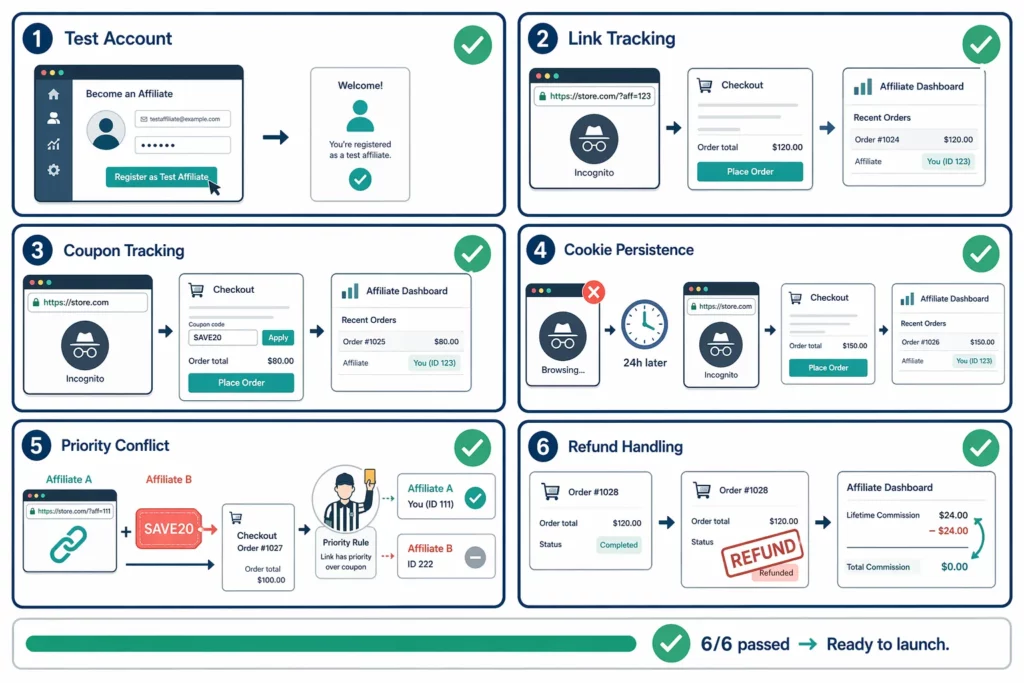
☐ 19. Create a test affiliate account
Register yourself or a team member as an affiliate so you can run every test from the affiliate’s perspective. ⏱️ 2 min
☐ 20. Test link tracking
Generate a test affiliate link, open it in an incognito browser, add a product, and complete checkout. Confirm the order appears in the affiliate dashboard with the correct commission amount. ⏱️ 3 min
☐ 21. Test coupon tracking
Open a fresh incognito window with no affiliate link. Add a product, enter the test coupon code at checkout, and complete the order. Confirm the discount applied and the order credited the right affiliate. ⏱️ 3 min
☐ 22. Test cookie persistence
Click an affiliate link, close the browser without buying, then return a day later and purchase without re-clicking. If the order is still attributed, your cookie works. If not, contact app support with the test results. ⏱️ 2 min setup + 24h wait
☐ 23. Test attribution priority
Click Affiliate A’s link, then enter Affiliate B’s coupon at checkout. Check which affiliate receives credit — the result should match your app’s priority hierarchy. ⏱️ 3 min ·
☐ 24. Test refund handling
Refund one of your test orders and check that the commission adjusts in the dashboard. ⏱️ 2 min
If all six tests pass, you can move to Phase 4.
Any test fails? Fix the issue before proceeding. Common solutions include reinstalling the app, reviewing Shopify permissions, or contacting app support with your specific test results.
Phase 4: What Should You Do on Launch Day? (5 Steps)
[Est. time: 1–2 hours]
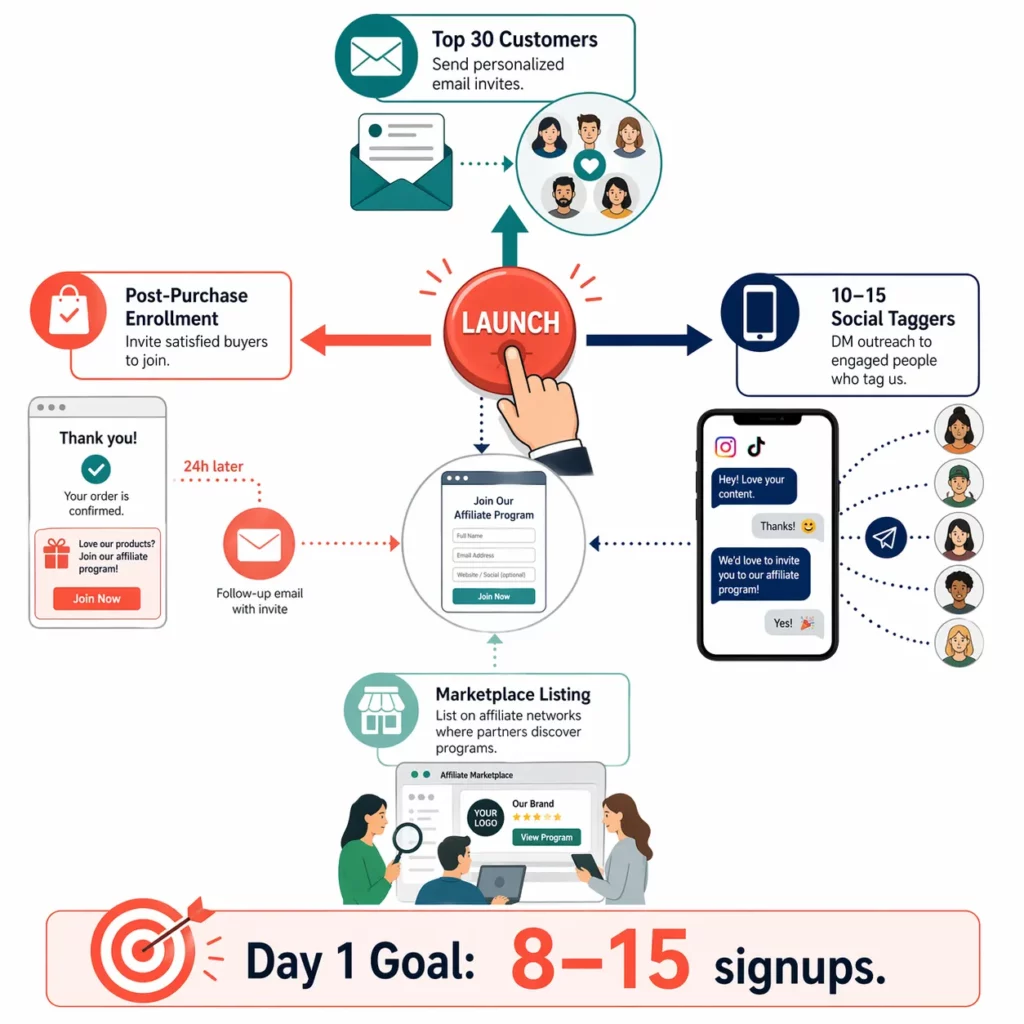
All tests pass. Launch day activates four recruitment channels at once — customer emails, social DMs, marketplace listing, and post-purchase enrollment. Running all four on the same day gives your program the widest possible start.
☐ 25. Add an “Affiliates” link to your website footer
Point it to your registration page from Shopify’s footer menu (Online Store → Navigation). Most affiliates discover programs through site navigation — this link recruits around the clock. ⏱️ 5 min
☐ 26. Email your top 30 customers
Repeat buyers make the strongest first affiliates. Personalize each message with the specific product they purchased and lead with the commission offer. ⏱️ 30–45 min
☐ 27. DM 10–15 social media taggers
Anyone who has tagged your product on Instagram or TikTok is already promoting you for free. A short message offering a commission link turns that into a tracked partnership. ⏱️ 20–30 min
☐ 28. List your program on an affiliate marketplace
If your app has a built-in directory like UpPromote Marketplace , listing your offer lets affiliates find you on their own. ⏱️ 15–20 min
☐ 29. Enable post-purchase affiliate recruitment
Customer excitement peaks right after purchase. Capture it with a thank-you page banner and a follow-up email (24 hours after delivery) inviting buyers to earn by sharing. ⏱️ 10–15 min
⚠️ Most common launch day mistake: Sending one batch of emails and waiting. Follow up with non-responders after 5–7 days — a single follow-up often makes the difference between a signup and silence.
Phase 5: How Should You Monitor Your First 30 Days? (7 Checkpoints)
[Est. time: 3–5 hours per week, ongoing]
Launching is not the finish line — it’s the starting point. The first 30 days show whether your program can scale or needs adjustment, and seven checkpoints keep you on track.
Weekly Monitoring
☐ Review your dashboard
Check signups, clicks, orders, and commissions every week. A healthy first month shows steady click growth and at least a few conversions, not big revenue yet. ⏱️ 15 min/week
☐ Respond to affiliate questions within 24 hours
Speed builds trust. Track common questions and add them to a FAQ doc — this saves you time as the program grows. ⏱️ As needed
☐ Send onboarding content to new affiliates
Day 0: welcome email with materials. Day 3: content ideas and promotion tips. Day 7: check-in asking if they need help. ⏱️ 15 min/week · → 7-Day Onboarding Framework
☐ Continue recruitment outreach
Send 20–30 messages per week to niche bloggers and new social taggers. The goal is 5–10 new signups each week to keep momentum building. ⏱️ 30–45 min/week
End-of-Month Review
After four weeks of monitoring, three final checks close out your launch month and set the direction for month two.
☐ Calculate affiliate revenue as a percentage of total sales
A realistic first-month target is 3–8%. Below 3% usually means the commission rate or recruitment volume needs a second look. ⏱️ 10 min
☐ Identify your top 3 affiliates and invest in them
Thank them, offer a higher commission or bonus, and ask one question: “ What would help you promote more? ” ⏱️15 min
☐ Audit for coupon leaks
Search Google for “[your brand] coupon code” and check whether any affiliate codes appear on deal aggregator sites. ⏱️10 min
The table below maps out a typical first month for a store earning $10K in monthly revenue with a 15% commission and a $65 average order value.
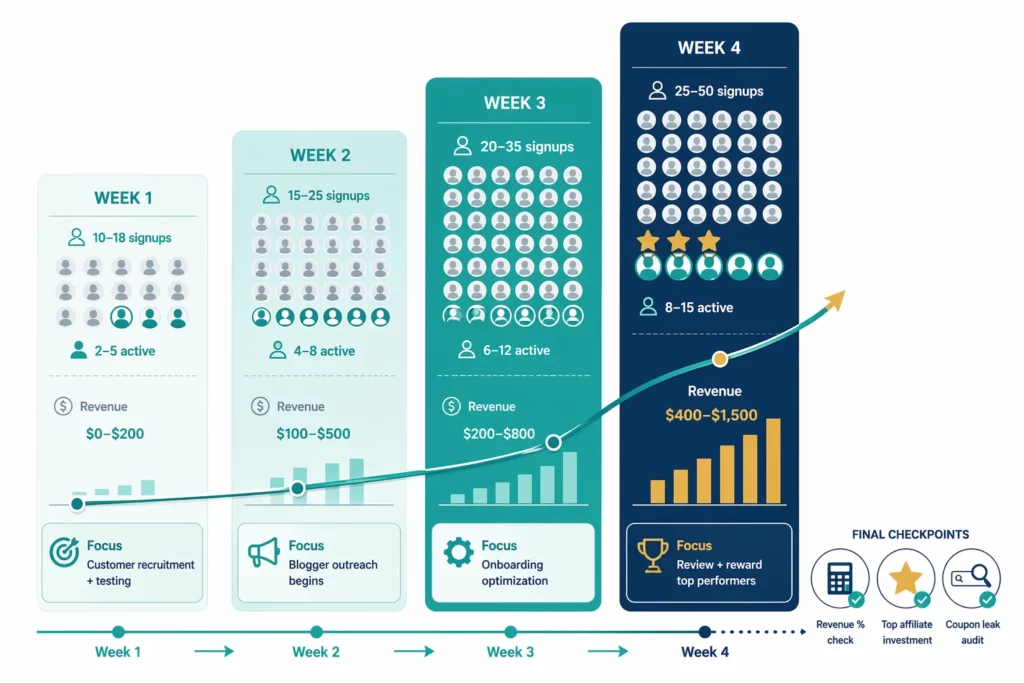
| Week | Total Signups | Active Affiliates | Est. Revenue | Focus |
| 1 | 10–18 | 2–5 | $0–$200 | Customer recruitment and system testing |
| 2 | 15–25 | 4–8 | $100–$500 | Blogger outreach begins |
| 3 | 20–35 | 6–12 | $200–$800 | Onboarding optimization |
| 4 | 25–50 | 8–15 | $400–$1,500 | Month review and top performer rewards |
Frequently Asked Questions
How long does this entire checklist take?
The five phases take 3–4 focused hours total. Phase 1 and 2 each run about 45–60 minutes, testing takes 15–20 minutes, and launch day takes 1–2 hours. You can spread the work across two or three days. Phase 5 monitoring adds 3–5 hours per week ongoing.
Which steps are the most critical not to skip?
Three steps cause the most problems when skipped. Step 1 (margin calculation) because wrong commissions lose money on every sale. Steps 19–24 (tracking tests) because bad data creates disputes. And Step 17 (fraud protection) because leaks start accumulating from day one.
Can I launch with only existing customers and no cold outreach?
Yes. A customer-only launch is the simplest starting point. Email 30–50 repeat buyers, expect 5–8 signups, and watch for 2–3 active promoters. That’s enough to validate the model. Add blogger and influencer outreach in month two once you confirm the program works.
Does this checklist apply to any Shopify affiliate app?
Yes. These steps work across any Shopify affiliate app. The workflow is the same everywhere — only the interface and setting locations differ. Check your specific app’s documentation for exact navigation paths to each setting.
Should I do a soft launch or a hard launch?
Soft launch works best for most stores. Invite 10–20 affiliates in week one — customers and close contacts — and test everything with that small group. Fix issues before expanding. A broader announcement works better in week three or four once the program is stable.
What if I have zero sales after 30 days?
Three issues cause most zero-sale months: commission too low to motivate, not enough signups (20+ needed to get 5–8 active), or a store conversion rate below 1%. Check each one in order.

Ellie Tran, a seasoned SEO content writer with three years of experience in the eCommerce world. Being a part of the UpPromote team, Ellie wants to assist Shopify merchants in achieving success through useful content & actionable insights.Ellie's commitment to learning never stops; she's always eager to gain more knowledge about SEO and content marketing to create valuable content for users. When she's not working on content, Ellie enjoys baking and exploring new places.

![How to Use Shopify Functions with Your Affiliate Program [2026 Guide]](https://static.uppromote.com/wp-content/uploads/2026/06/how-to-use-shopify-functions-with-affiliate-program-300x169.webp)

![How to Prevent Affiliate Fraud on Shopify: Self-Referral, Coupon Abuse & More [2026]](https://static.uppromote.com/wp-content/uploads/2026/06/how-to-prevent-affiliate-fraud-on-shopify-300x169.webp)